border_size=0
border_size=100
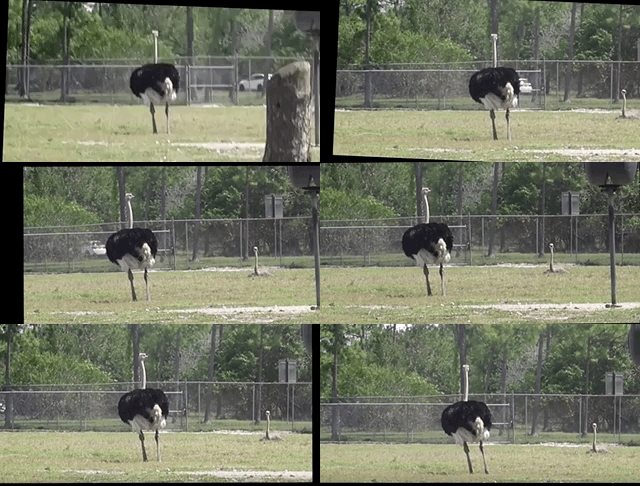
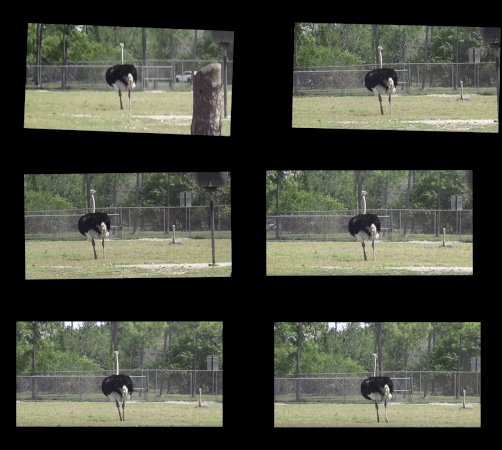
 \n\n[](https://travis-ci.org/AdamSpannbauer/python_video_stab)\n[](https://codecov.io/gh/AdamSpannbauer/python_video_stab)\n[](https://codeclimate.com/github/AdamSpannbauer/python_video_stab/maintainability)\n[](https://pypi.org/project/vidstab/)\n[](https://github.com/AdamSpannbauer/python_video_stab/commits/master)\n[](https://pepy.tech/project/vidstab)\n\n Python video stabilization using OpenCV. Full [searchable documentation here](https://adamspannbauer.github.io/python_video_stab).\n\n This module contains a single class (`VidStab`) used for video stabilization. This class is based on the work presented by Nghia Ho in [SIMPLE VIDEO STABILIZATION USING OPENCV](http://nghiaho.com/?p=2093). The foundation code was found in a comment on Nghia Ho's post by the commenter with username koala.\n\n Input | Output\n:-------------------------------:|:-------------------------:\n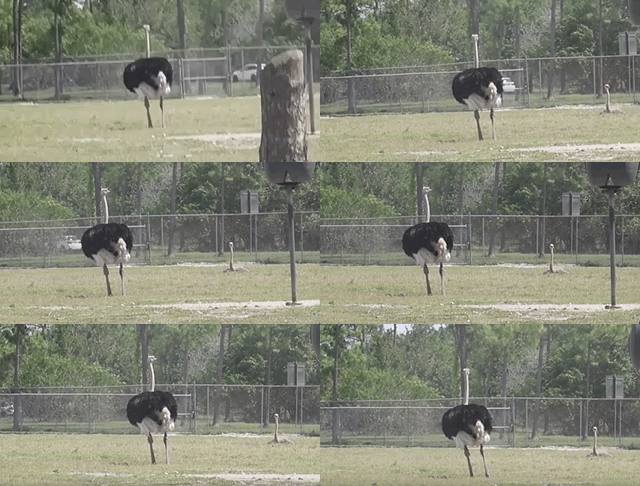 | \n\n*[Video](https://www.youtube.com/watch?v=9pypPqbV_GM) used with permission from [HappyLiving](https://www.facebook.com/happylivinginfl/)*\n\n## Contents:\n1. [Installation](#installation)\n * [Install `vidstab` without installing OpenCV](#install-vidstab-without-installing-opencv)\n * [Install vidstab & OpenCV](#install-vidstab-opencv) \n2. [Basic Usage](#basic-usage)\n * [Using from command line](#using-from-command-line)\n * [Using VidStab class](#using-vidstab-class)\n3. [Advanced Usage](#advanced-usage)\n * [Plotting frame to frame transformations](#plotting-frame-to-frame-transformations)\n * [Using borders](#using-borders)\n * [Using Frame Layering](#using-frame-layering)\n * [Stabilizing a frame at a time](#stabilizing-a-frame-at-a-time)\n * [Working with live video](#working-with-live-video)\n * [Transform File Writing & Reading](#transform-file-writing--reading)\n\n## Installation\n\n> ```diff\n> + Please report issues if you install/try to install and run into problems!\n> ```\n\n### Install `vidstab` without installing OpenCV\n\nIf you've already built OpenCV with python bindings on your machine it is recommended to install `vidstab` without installing the pypi versions of OpenCV. The `opencv-python` python module can cause issues if you've already built OpenCV from source in your environment.\n\nThe below commands will install `vidstab` without OpenCV included.\n\n#### From PyPi\n\n```bash\npip install vidstab\n```\n\n#### From GitHub\n\n```bash\npip install git+https://github.com/AdamSpannbauer/python_video_stab.git\n```\n\n### Install `vidstab` & OpenCV\n\nIf you don't have OpenCV installed already there are a couple options. \n\n1. You can build OpenCV using one of the great online tutorials from [PyImageSearch](https://www.pyimagesearch.com/), [LearnOpenCV](https://www.learnopencv.com/), or [OpenCV](https://docs.opencv.org/3.0-beta/doc/py_tutorials/py_setup/py_table_of_contents_setup/py_table_of_contents_setup.html#py-table-of-content-setup) themselves. When building from source you have more options (e.g. [platform optimization](https://www.pyimagesearch.com/2017/10/09/optimizing-opencv-on-the-raspberry-pi/)), but more responsibility. Once installed you can use the pip install command shown above.\n2. You can install a pre-built distribution of OpenCV from pypi as a dependency for `vidstab` (see command below)\n\nThe below commands will install `vidstab` with `opencv-contrib-python` as dependencies.\n\n#### From PyPi\n\n```bash\npip install vidstab[cv2]\n```\n\n#### From Github\n\n```bash\n pip install -e git+https://github.com/AdamSpannbauer/python_video_stab.git#egg=vidstab[cv2]\n```\n\n## Basic usage\n\nThe `VidStab` class can be used as a command line script or in your own custom python code.\n\n### Using from command line\n\n```bash\n# Using defaults\npython3 -m vidstab --input input_video.mov --output stable_video.avi\n```\n\n```bash\n# Using a specific keypoint detector\npython3 -m vidstab -i input_video.mov -o stable_video.avi -k GFTT\n```\n\n### Using `VidStab` class\n\n```python\nfrom vidstab import VidStab\n\n# Using defaults\nstabilizer = VidStab()\nstabilizer.stabilize(input_path='input_video.mov', output_path='stable_video.avi')\n\n# Using a specific keypoint detector\nstabilizer = VidStab(kp_method='ORB')\nstabilizer.stabilize(input_path='input_video.mp4', output_path='stable_video.avi')\n\n# Using a specific keypoint detector and customizing keypoint parameters\nstabilizer = VidStab(kp_method='FAST', threshold=42, nonmaxSuppression=False)\nstabilizer.stabilize(input_path='input_video.mov', output_path='stable_video.avi')\n```\n\n## Advanced usage\n\n### Plotting frame to frame transformations\n\n```python\nfrom vidstab import VidStab\nimport matplotlib.pyplot as plt\n\nstabilizer = VidStab()\nstabilizer.stabilize(input_path='input_video.mov', output_path='stable_video.avi')\n\nstabilizer.plot_trajectory()\nplt.show()\n\nstabilizer.plot_transforms()\nplt.show()\n```\n\nTrajectories | Transforms\n:-------------------------------:|:-------------------------:\n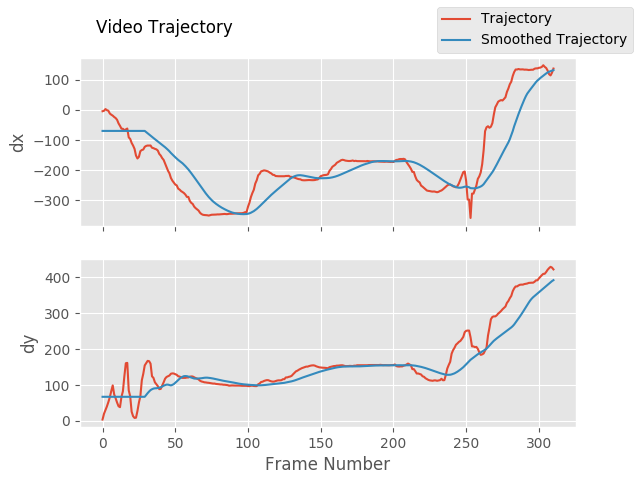 | 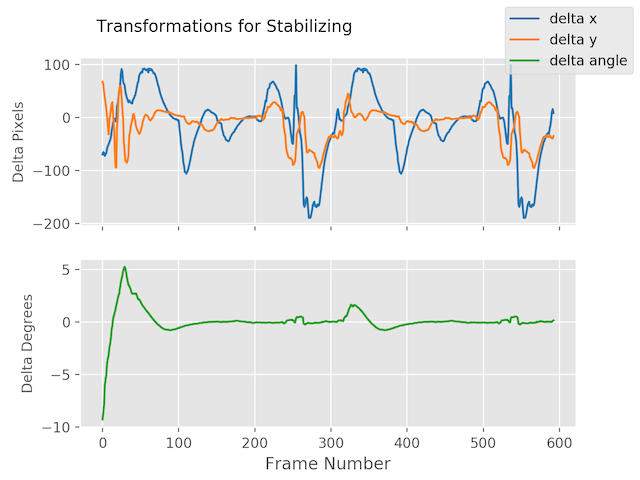\n\n### Using borders\n\n```python\nfrom vidstab import VidStab\n\nstabilizer = VidStab()\n\n# black borders\nstabilizer.stabilize(input_path='input_video.mov', \n output_path='stable_video.avi', \n border_type='black')\nstabilizer.stabilize(input_path='input_video.mov', \n output_path='wide_stable_video.avi', \n border_type='black', \n border_size=100)\n\n# filled in borders\nstabilizer.stabilize(input_path='input_video.mov', \n output_path='ref_stable_video.avi', \n border_type='reflect')\nstabilizer.stabilize(input_path='input_video.mov', \n output_path='rep_stable_video.avi', \n border_type='replicate')\n```\n\n
\n\n[](https://travis-ci.org/AdamSpannbauer/python_video_stab)\n[](https://codecov.io/gh/AdamSpannbauer/python_video_stab)\n[](https://codeclimate.com/github/AdamSpannbauer/python_video_stab/maintainability)\n[](https://pypi.org/project/vidstab/)\n[](https://github.com/AdamSpannbauer/python_video_stab/commits/master)\n[](https://pepy.tech/project/vidstab)\n\n Python video stabilization using OpenCV. Full [searchable documentation here](https://adamspannbauer.github.io/python_video_stab).\n\n This module contains a single class (`VidStab`) used for video stabilization. This class is based on the work presented by Nghia Ho in [SIMPLE VIDEO STABILIZATION USING OPENCV](http://nghiaho.com/?p=2093). The foundation code was found in a comment on Nghia Ho's post by the commenter with username koala.\n\n Input | Output\n:-------------------------------:|:-------------------------:\n | \n\n*[Video](https://www.youtube.com/watch?v=9pypPqbV_GM) used with permission from [HappyLiving](https://www.facebook.com/happylivinginfl/)*\n\n## Contents:\n1. [Installation](#installation)\n * [Install `vidstab` without installing OpenCV](#install-vidstab-without-installing-opencv)\n * [Install vidstab & OpenCV](#install-vidstab-opencv) \n2. [Basic Usage](#basic-usage)\n * [Using from command line](#using-from-command-line)\n * [Using VidStab class](#using-vidstab-class)\n3. [Advanced Usage](#advanced-usage)\n * [Plotting frame to frame transformations](#plotting-frame-to-frame-transformations)\n * [Using borders](#using-borders)\n * [Using Frame Layering](#using-frame-layering)\n * [Stabilizing a frame at a time](#stabilizing-a-frame-at-a-time)\n * [Working with live video](#working-with-live-video)\n * [Transform File Writing & Reading](#transform-file-writing--reading)\n\n## Installation\n\n> ```diff\n> + Please report issues if you install/try to install and run into problems!\n> ```\n\n### Install `vidstab` without installing OpenCV\n\nIf you've already built OpenCV with python bindings on your machine it is recommended to install `vidstab` without installing the pypi versions of OpenCV. The `opencv-python` python module can cause issues if you've already built OpenCV from source in your environment.\n\nThe below commands will install `vidstab` without OpenCV included.\n\n#### From PyPi\n\n```bash\npip install vidstab\n```\n\n#### From GitHub\n\n```bash\npip install git+https://github.com/AdamSpannbauer/python_video_stab.git\n```\n\n### Install `vidstab` & OpenCV\n\nIf you don't have OpenCV installed already there are a couple options. \n\n1. You can build OpenCV using one of the great online tutorials from [PyImageSearch](https://www.pyimagesearch.com/), [LearnOpenCV](https://www.learnopencv.com/), or [OpenCV](https://docs.opencv.org/3.0-beta/doc/py_tutorials/py_setup/py_table_of_contents_setup/py_table_of_contents_setup.html#py-table-of-content-setup) themselves. When building from source you have more options (e.g. [platform optimization](https://www.pyimagesearch.com/2017/10/09/optimizing-opencv-on-the-raspberry-pi/)), but more responsibility. Once installed you can use the pip install command shown above.\n2. You can install a pre-built distribution of OpenCV from pypi as a dependency for `vidstab` (see command below)\n\nThe below commands will install `vidstab` with `opencv-contrib-python` as dependencies.\n\n#### From PyPi\n\n```bash\npip install vidstab[cv2]\n```\n\n#### From Github\n\n```bash\n pip install -e git+https://github.com/AdamSpannbauer/python_video_stab.git#egg=vidstab[cv2]\n```\n\n## Basic usage\n\nThe `VidStab` class can be used as a command line script or in your own custom python code.\n\n### Using from command line\n\n```bash\n# Using defaults\npython3 -m vidstab --input input_video.mov --output stable_video.avi\n```\n\n```bash\n# Using a specific keypoint detector\npython3 -m vidstab -i input_video.mov -o stable_video.avi -k GFTT\n```\n\n### Using `VidStab` class\n\n```python\nfrom vidstab import VidStab\n\n# Using defaults\nstabilizer = VidStab()\nstabilizer.stabilize(input_path='input_video.mov', output_path='stable_video.avi')\n\n# Using a specific keypoint detector\nstabilizer = VidStab(kp_method='ORB')\nstabilizer.stabilize(input_path='input_video.mp4', output_path='stable_video.avi')\n\n# Using a specific keypoint detector and customizing keypoint parameters\nstabilizer = VidStab(kp_method='FAST', threshold=42, nonmaxSuppression=False)\nstabilizer.stabilize(input_path='input_video.mov', output_path='stable_video.avi')\n```\n\n## Advanced usage\n\n### Plotting frame to frame transformations\n\n```python\nfrom vidstab import VidStab\nimport matplotlib.pyplot as plt\n\nstabilizer = VidStab()\nstabilizer.stabilize(input_path='input_video.mov', output_path='stable_video.avi')\n\nstabilizer.plot_trajectory()\nplt.show()\n\nstabilizer.plot_transforms()\nplt.show()\n```\n\nTrajectories | Transforms\n:-------------------------------:|:-------------------------:\n | \n\n### Using borders\n\n```python\nfrom vidstab import VidStab\n\nstabilizer = VidStab()\n\n# black borders\nstabilizer.stabilize(input_path='input_video.mov', \n output_path='stable_video.avi', \n border_type='black')\nstabilizer.stabilize(input_path='input_video.mov', \n output_path='wide_stable_video.avi', \n border_type='black', \n border_size=100)\n\n# filled in borders\nstabilizer.stabilize(input_path='input_video.mov', \n output_path='ref_stable_video.avi', \n border_type='reflect')\nstabilizer.stabilize(input_path='input_video.mov', \n output_path='rep_stable_video.avi', \n border_type='replicate')\n```\n\n
| \n
| \n
| \n
| \n
\n  \n
\n
\n  \n
\n
\n  \n
\n