{
"info": {
"author": "Tal Yarkoni",
"author_email": "tyarkoni@gmail.com",
"bugtrack_url": null,
"classifiers": [
"License :: OSI Approved :: MIT License",
"Programming Language :: Python :: 2",
"Programming Language :: Python :: 2.7",
"Programming Language :: Python :: 3",
"Programming Language :: Python :: 3.3",
"Programming Language :: Python :: 3.4",
"Programming Language :: Python :: 3.5",
"Programming Language :: Python :: 3.6",
"Programming Language :: Python :: 3.7"
],
"description": "## Quickstart\n\nThey say [a good example is worth](https://www.google.com/webhp?ie=UTF-8#q=%22a+good+example+is+worth%22&start=20) 100 pages of API documentation, a million directives, or a thousand words.\n\nWell, \"they\" probably lie... but here's an example anyway:\n\n```python\nfrom transitions import Machine\nimport random\n\nclass NarcolepticSuperhero(object):\n\n # Define some states. Most of the time, narcoleptic superheroes are just like\n # everyone else. Except for...\n states = ['asleep', 'hanging out', 'hungry', 'sweaty', 'saving the world']\n\n def __init__(self, name):\n\n # No anonymous superheroes on my watch! Every narcoleptic superhero gets\n # a name. Any name at all. SleepyMan. SlumberGirl. You get the idea.\n self.name = name\n\n # What have we accomplished today?\n self.kittens_rescued = 0\n\n # Initialize the state machine\n self.machine = Machine(model=self, states=NarcolepticSuperhero.states, initial='asleep')\n\n # Add some transitions. We could also define these using a static list of\n # dictionaries, as we did with states above, and then pass the list to\n # the Machine initializer as the transitions= argument.\n\n # At some point, every superhero must rise and shine.\n self.machine.add_transition(trigger='wake_up', source='asleep', dest='hanging out')\n\n # Superheroes need to keep in shape.\n self.machine.add_transition('work_out', 'hanging out', 'hungry')\n\n # Those calories won't replenish themselves!\n self.machine.add_transition('eat', 'hungry', 'hanging out')\n\n # Superheroes are always on call. ALWAYS. But they're not always\n # dressed in work-appropriate clothing.\n self.machine.add_transition('distress_call', '*', 'saving the world',\n before='change_into_super_secret_costume')\n\n # When they get off work, they're all sweaty and disgusting. But before\n # they do anything else, they have to meticulously log their latest\n # escapades. Because the legal department says so.\n self.machine.add_transition('complete_mission', 'saving the world', 'sweaty',\n after='update_journal')\n\n # Sweat is a disorder that can be remedied with water.\n # Unless you've had a particularly long day, in which case... bed time!\n self.machine.add_transition('clean_up', 'sweaty', 'asleep', conditions=['is_exhausted'])\n self.machine.add_transition('clean_up', 'sweaty', 'hanging out')\n\n # Our NarcolepticSuperhero can fall asleep at pretty much any time.\n self.machine.add_transition('nap', '*', 'asleep')\n\n def update_journal(self):\n \"\"\" Dear Diary, today I saved Mr. Whiskers. Again. \"\"\"\n self.kittens_rescued += 1\n\n def is_exhausted(self):\n \"\"\" Basically a coin toss. \"\"\"\n return random.random() < 0.5\n\n def change_into_super_secret_costume(self):\n print(\"Beauty, eh?\")\n```\n\nThere, now you've baked a state machine into `NarcolepticSuperhero`. Let's take him/her/it out for a spin...\n\n```python\n>>> batman = NarcolepticSuperhero(\"Batman\")\n>>> batman.state\n'asleep'\n\n>>> batman.wake_up()\n>>> batman.state\n'hanging out'\n\n>>> batman.nap()\n>>> batman.state\n'asleep'\n\n>>> batman.clean_up()\nMachineError: \"Can't trigger event clean_up from state asleep!\"\n\n>>> batman.wake_up()\n>>> batman.work_out()\n>>> batman.state\n'hungry'\n\n# Batman still hasn't done anything useful...\n>>> batman.kittens_rescued\n0\n\n# We now take you live to the scene of a horrific kitten entreement...\n>>> batman.distress_call()\n'Beauty, eh?'\n>>> batman.state\n'saving the world'\n\n# Back to the crib.\n>>> batman.complete_mission()\n>>> batman.state\n'sweaty'\n\n>>> batman.clean_up()\n>>> batman.state\n'asleep' # Too tired to shower!\n\n# Another productive day, Alfred.\n>>> batman.kittens_rescued\n1\n```\n\n## The non-quickstart\n\n### Basic initialization\n\nGetting a state machine up and running is pretty simple. Let's say you have the object `lump` (an instance of class `Matter`), and you want to manage its states:\n\n```python\nclass Matter(object):\n pass\n\nlump = Matter()\n```\n\nYou can initialize a (_minimal_) working state machine bound to `lump` like this:\n\n```python\nfrom transitions import Machine\nmachine = Machine(model=lump, states=['solid', 'liquid', 'gas', 'plasma'], initial='solid')\n\n# Lump now has state!\nlump.state\n>>> 'solid'\n```\n\nI say \u201cminimal\u201d, because while this state machine is technically operational, it doesn't actually _do_ anything. It starts in the `'solid'` state, but won't ever move into another state, because no transitions are defined... yet!\n\nLet's try again.\n\n```python\n# The states\nstates=['solid', 'liquid', 'gas', 'plasma']\n\n# And some transitions between states. We're lazy, so we'll leave out\n# the inverse phase transitions (freezing, condensation, etc.).\ntransitions = [\n { 'trigger': 'melt', 'source': 'solid', 'dest': 'liquid' },\n { 'trigger': 'evaporate', 'source': 'liquid', 'dest': 'gas' },\n { 'trigger': 'sublimate', 'source': 'solid', 'dest': 'gas' },\n { 'trigger': 'ionize', 'source': 'gas', 'dest': 'plasma' }\n]\n\n# Initialize\nmachine = Machine(lump, states=states, transitions=transitions, initial='liquid')\n\n# Now lump maintains state...\nlump.state\n>>> 'liquid'\n\n# And that state can change...\nlump.evaporate()\nlump.state\n>>> 'gas'\nlump.trigger('ionize')\nlump.state\n>>> 'plasma'\n```\n\nNotice the shiny new methods attached to the `Matter` instance (`evaporate()`, `ionize()`, etc.). Each method triggers the corresponding transition. You don't have to explicitly define these methods anywhere; the name of each transition is bound to the model passed to the `Machine` initializer (in this case, `lump`).\nAdditionally, there is a method called `trigger` now attached to your model.\nThis method lets you execute transitions by name in case dynamic triggering is required.\n\n### States\n\nThe soul of any good state machine (and of many bad ones, no doubt) is a set of states. Above, we defined the valid model states by passing a list of strings to the `Machine` initializer. But internally, states are actually represented as `State` objects.\n\nYou can initialize and modify States in a number of ways. Specifically, you can:\n\n- pass a string to the `Machine` initializer giving the name(s) of the state(s), or\n- directly initialize each new `State` object, or\n- pass a dictionary with initialization arguments\n\nThe following snippets illustrate several ways to achieve the same goal:\n\n```python\n# Create a list of 3 states to pass to the Machine\n# initializer. We can mix types; in this case, we\n# pass one State, one string, and one dict.\nstates = [\n State(name='solid'),\n 'liquid',\n { 'name': 'gas'}\n ]\nmachine = Machine(lump, states)\n\n# This alternative example illustrates more explicit\n# addition of states and state callbacks, but the net\n# result is identical to the above.\nmachine = Machine(lump)\nsolid = State('solid')\nliquid = State('liquid')\ngas = State('gas')\nmachine.add_states([solid, liquid, gas])\n\n```\n\nStates are initialized *once* when added to the machine and will persist until they are removed from it. In other words: if you alter the attributes of a state object, this change will NOT be reset the next time you enter that state. Have a look at how to [extend state features](#state-features) in case you require some other behaviour.\n\n#### Callbacks\nA `State` can also be associated with a list of `enter` and `exit` callbacks, which are called whenever the state machine enters or leaves that state. You can specify callbacks during initialization, or add them later.\n\nFor convenience, whenever a new `State` is added to a `Machine`, the methods `on_enter_\u00abstate name\u00bb` and `on_exit_\u00abstate name\u00bb` are dynamically created on the Machine (not on the model!), which allow you to dynamically add new enter and exit callbacks later if you need them.\n\n```python\n# Our old Matter class, now with a couple of new methods we\n# can trigger when entering or exit states.\nclass Matter(object):\n def say_hello(self): print(\"hello, new state!\")\n def say_goodbye(self): print(\"goodbye, old state!\")\n\nlump = Matter()\n\n# Same states as above, but now we give StateA an exit callback\nstates = [\n State(name='solid', on_exit=['say_goodbye']),\n 'liquid',\n { 'name': 'gas' }\n ]\n\nmachine = Machine(lump, states=states)\nmachine.add_transition('sublimate', 'solid', 'gas')\n\n# Callbacks can also be added after initialization using\n# the dynamically added on_enter_ and on_exit_ methods.\n# Note that the initial call to add the callback is made\n# on the Machine and not on the model.\nmachine.on_enter_gas('say_hello')\n\n# Test out the callbacks...\nmachine.set_state('solid')\nlump.sublimate()\n>>> 'goodbye, old state!'\n>>> 'hello, new state!'\n```\n\nNote that `on_enter_\u00abstate name\u00bb` callback will *not* fire when a Machine is first initialized. For example if you have an `on_enter_A()` callback defined, and initialize the `Machine` with `initial='A'`, `on_enter_A()` will not be fired until the next time you enter state `A`. (If you need to make sure `on_enter_A()` fires at initialization, you can simply create a dummy initial state and then explicitly call `to_A()` inside the `__init__` method.)\n\nIn addition to passing in callbacks when initializing a `State`, or adding them dynamically, it's also possible to define callbacks in the model class itself, which may increase code clarity. For example:\n\n```python\nclass Matter(object):\n def say_hello(self): print(\"hello, new state!\")\n def say_goodbye(self): print(\"goodbye, old state!\")\n def on_enter_A(self): print(\"We've just entered state A!\")\n\nlump = Matter()\nmachine = Machine(lump, states=['A', 'B', 'C'])\n```\n\nNow, any time `lump` transitions to state `A`, the `on_enter_A()` method defined in the `Matter` class will fire.\n\nYou can always check the current state of the model by either:\n\n- inspecting the `.state` attribute, or\n- calling `is_\u00abstate name\u00bb()`\n\nAnd if you want to retrieve the actual `State` object for the current state, you can do that through the `Machine` instance's `get_state()` method.\n\n```python\nlump.state\n>>> 'solid'\nlump.is_gas()\n>>> False\nlump.is_solid()\n>>> True\nmachine.get_state(lump.state).name\n>>> 'solid'\n```\n\n#### Enumerations\n\nSo far we have seen how we can give state names and use these names to work with our state machine. If you favour stricter typing and more IDE code completion (or you just can't type 'sesquipedalophobia' any longer because the word scares you) using [Enumerations](https://docs.python.org/3/library/enum.html) might be what you are looking for:\n\n```python\nimport enum # Python 2.7 users need to have 'enum34' installed\nfrom transitions import Machine\n\nclass States(enum.Enum):\n ERROR = 0\n RED = 1\n YELLOW = 2\n GREEN = 3\n\ntransitions = [['proceed', States.RED, States.YELLOW],\n ['proceed', States.YELLOW, States.GREEN],\n ['error', '*', States.ERROR]]\n\nm = Machine(states=States, transitions=transitions, initial=States.RED)\nassert m.is_RED()\nassert m.state is States.RED\nstate = m.get_state(States.RED) # get transitions.State object\nprint(state.name) # >>> RED\nm.proceed()\nm.proceed()\nassert m.is_GREEN()\nm.error()\nassert m.state is States.ERROR\n```\n\nYou can mix enums and strings if you like (e.g. `[States.RED, 'ORANGE', States.YELLOW, States.GREEN]`) but note that internally, `transitions` will still handle states by name (`enum.Enum.name`). Thus, it is not possible to have the states `'GREEN'` and `States.GREEN` at the same time.\n\n### Transitions\nSome of the above examples already illustrate the use of transitions in passing, but here we'll explore them in more detail.\n\nAs with states, each transition is represented internally as its own object \u2013 an instance of class `Transition`. The quickest way to initialize a set of transitions is to pass a dictionary, or list of dictionaries, to the `Machine` initializer. We already saw this above:\n\n```python\ntransitions = [\n { 'trigger': 'melt', 'source': 'solid', 'dest': 'liquid' },\n { 'trigger': 'evaporate', 'source': 'liquid', 'dest': 'gas' },\n { 'trigger': 'sublimate', 'source': 'solid', 'dest': 'gas' },\n { 'trigger': 'ionize', 'source': 'gas', 'dest': 'plasma' }\n]\nmachine = Machine(model=Matter(), states=states, transitions=transitions)\n```\n\nDefining transitions in dictionaries has the benefit of clarity, but can be cumbersome. If you're after brevity, you might choose to define transitions using lists. Just make sure that the elements in each list are in the same order as the positional arguments in the `Transition` initialization (i.e., `trigger`, `source`, `destination`, etc.).\n\nThe following list-of-lists is functionally equivalent to the list-of-dictionaries above:\n\n```python\ntransitions = [\n ['melt', 'solid', 'liquid'],\n ['evaporate', 'liquid', 'gas'],\n ['sublimate', 'solid', 'gas'],\n ['ionize', 'gas', 'plasma']\n]\n```\n\nAlternatively, you can add transitions to a `Machine` after initialization:\n\n```python\nmachine = Machine(model=lump, states=states, initial='solid')\nmachine.add_transition('melt', source='solid', dest='liquid')\n```\n\nThe `trigger` argument defines the name of the new triggering method that gets attached to the base model. When this method is called, it will try to execute the transition:\n\n```python\n>>> lump.melt()\n>>> lump.state\n'liquid'\n```\n\nBy default, calling an invalid trigger will raise an exception:\n\n```python\n>>> lump.to_gas()\n>>> # This won't work because only objects in a solid state can melt\n>>> lump.melt()\ntransitions.core.MachineError: \"Can't trigger event melt from state gas!\"\n```\n\nThis behavior is generally desirable, since it helps alert you to problems in your code. But in some cases, you might want to silently ignore invalid triggers. You can do this by setting `ignore_invalid_triggers=True` (either on a state-by-state basis, or globally for all states):\n\n```python\n>>> # Globally suppress invalid trigger exceptions\n>>> m = Machine(lump, states, initial='solid', ignore_invalid_triggers=True)\n>>> # ...or suppress for only one group of states\n>>> states = ['new_state1', 'new_state2']\n>>> m.add_states(states, ignore_invalid_triggers=True)\n>>> # ...or even just for a single state. Here, exceptions will only be suppressed when the current state is A.\n>>> states = [State('A', ignore_invalid_triggers=True), 'B', 'C']\n>>> m = Machine(lump, states)\n>>> # ...this can be inverted as well if just one state should raise an exception\n>>> # since the machine's global value is not applied to a previously initialized state.\n>>> states = ['A', 'B', State('C')] # the default value for 'ignore_invalid_triggers' is False\n>>> m = Machine(lump, states, ignore_invalid_triggers=True)\n```\n\nIf you need to know which transitions are valid from a certain state, you can use `get_triggers`:\n\n```\nm.get_triggers('solid')\n>>> ['melt', 'sublimate']\nm.get_triggers('liquid')\n>>> ['evaporate']\nm.get_triggers('plasma')\n>>> []\n# you can also query several states at once\nm.get_triggers('solid', 'liquid', 'gas', 'plasma')\n>>> ['melt', 'evaporate', 'sublimate', 'ionize']\n```\n\n#### Automatic transitions for all states\nIn addition to any transitions added explicitly, a `to_\u00abstate\u00bb()` method is created automatically whenever a state is added to a `Machine` instance. This method transitions to the target state no matter which state the machine is currently in:\n\n```python\nlump.to_liquid()\nlump.state\n>>> 'liquid'\nlump.to_solid()\nlump.state\n>>> 'solid'\n```\n\nIf you desire, you can disable this behavior by setting `auto_transitions=False` in the `Machine` initializer.\n\n#### Transitioning from multiple states\nA given trigger can be attached to multiple transitions, some of which can potentially begin or end in the same state. For example:\n\n```python\nmachine.add_transition('transmogrify', ['solid', 'liquid', 'gas'], 'plasma')\nmachine.add_transition('transmogrify', 'plasma', 'solid')\n# This next transition will never execute\nmachine.add_transition('transmogrify', 'plasma', 'gas')\n```\n\nIn this case, calling `transmogrify()` will set the model's state to `'solid'` if it's currently `'plasma'`, and set it to `'plasma'` otherwise. (Note that only the _first_ matching transition will execute; thus, the transition defined in the last line above won't do anything.)\n\nYou can also make a trigger cause a transition from _all_ states to a particular destination by using the `'*'` wildcard:\n\n```python\nmachine.add_transition('to_liquid', '*', 'liquid')\n```\n\nNote that wildcard transitions will only apply to states that exist at the time of the add_transition() call. Calling a wildcard-based transition when the model is in a state added after the transition was defined will elicit an invalid transition message, and will not transition to the target state.\n\n#### Reflexive transitions from multiple states\nA reflexive trigger (trigger that has the same state as source and destination) can easily be added specifying `=` as destination.\nThis is handy if the same reflexive trigger should be added to multiple states.\nFor example:\n\n```python\nmachine.add_transition('touch', ['liquid', 'gas', 'plasma'], '=', after='change_shape')\n```\n\nThis will add reflexive transitions for all three states with `touch()` as trigger and with `change_shape` executed after each trigger.\n\n#### Internal transitions\nIn contrast to reflexive transitions, internal transitions will never actually leave the state.\nThis means that transition-related callbacks such as `before` or `after` will be processed while state-related callbacks `exit` or `enter` will not.\nTo define a transition to be internal, set the destination to `None`.\n\n```python\nmachine.add_transition('internal', ['liquid', 'gas'], None, after='change_shape')\n```\n\n#### Ordered transitions\nA common desire is for state transitions to follow a strict linear sequence. For instance, given states `['A', 'B', 'C']`, you might want valid transitions for `A` \u2192 `B`, `B` \u2192 `C`, and `C` \u2192 `A` (but no other pairs).\n\nTo facilitate this behavior, Transitions provides an `add_ordered_transitions()` method in the `Machine` class:\n\n```python\nstates = ['A', 'B', 'C']\n # See the \"alternative initialization\" section for an explanation of the 1st argument to init\nmachine = Machine(states=states, initial='A')\nmachine.add_ordered_transitions()\nmachine.next_state()\nprint(machine.state)\n>>> 'B'\n# We can also define a different order of transitions\nmachine = Machine(states=states, initial='A')\nmachine.add_ordered_transitions(['A', 'C', 'B'])\nmachine.next_state()\nprint(machine.state)\n>>> 'C'\n# Conditions can be passed to 'add_ordered_transitions' as well\n# If one condition is passed, it will be used for all transitions\nmachine = Machine(states=states, initial='A')\nmachine.add_ordered_transitions(conditions='check')\n# If a list is passed, it must contain exactly as many elements as the\n# machine contains states (A->B, ..., X->A)\nmachine = Machine(states=states, initial='A')\nmachine.add_ordered_transitions(conditions=['check_A2B', ..., 'check_X2A'])\n```\n\n#### Queued transitions\n\nThe default behaviour in Transitions is to process events instantly. This means events within an `on_enter` method will be processed _before_ callbacks bound to `after` are called.\n\n```python\ndef go_to_C():\n global machine\n machine.to_C()\n\ndef after_advance():\n print(\"I am in state B now!\")\n\ndef entering_C():\n print(\"I am in state C now!\")\n\nstates = ['A', 'B', 'C']\nmachine = Machine(states=states, initial='A')\n\n# we want a message when state transition to B has been completed\nmachine.add_transition('advance', 'A', 'B', after=after_advance)\n\n# call transition from state B to state C\nmachine.on_enter_B(go_to_C)\n\n# we also want a message when entering state C\nmachine.on_enter_C(entering_C)\nmachine.advance()\n>>> 'I am in state C now!'\n>>> 'I am in state B now!' # what?\n```\n\nThe execution order of this example is\n```\nprepare -> before -> on_enter_B -> on_enter_C -> after.\n```\nIf queued processing is enabled, a transition will be finished before the next transition is triggered:\n\n```python\nmachine = Machine(states=states, queued=True, initial='A')\n...\nmachine.advance()\n>>> 'I am in state B now!'\n>>> 'I am in state C now!' # That's better!\n```\n\nThis results in\n```\nprepare -> before -> on_enter_B -> queue(to_C) -> after -> on_enter_C.\n```\n**Important note:** when processing events in a queue, the trigger call will _always_ return `True`, since there is no way to determine at queuing time whether a transition involving queued calls will ultimately complete successfully. This is true even when only a single event is processed.\n\n```python\nmachine.add_transition('jump', 'A', 'C', conditions='will_fail')\n...\n# queued=False\nmachine.jump()\n>>> False\n# queued=True\nmachine.jump()\n>>> True\n```\n\n#### Conditional transitions\nSometimes you only want a particular transition to execute if a specific condition occurs. You can do this by passing a method, or list of methods, in the `conditions` argument:\n\n```python\n# Our Matter class, now with a bunch of methods that return booleans.\nclass Matter(object):\n def is_flammable(self): return False\n def is_really_hot(self): return True\n\nmachine.add_transition('heat', 'solid', 'gas', conditions='is_flammable')\nmachine.add_transition('heat', 'solid', 'liquid', conditions=['is_really_hot'])\n```\n\nIn the above example, calling `heat()` when the model is in state `'solid'` will transition to state `'gas'` if `is_flammable` returns `True`. Otherwise, it will transition to state `'liquid'` if `is_really_hot` returns `True`.\n\nFor convenience, there's also an `'unless'` argument that behaves exactly like conditions, but inverted:\n\n```python\nmachine.add_transition('heat', 'solid', 'gas', unless=['is_flammable', 'is_really_hot'])\n```\n\nIn this case, the model would transition from solid to gas whenever `heat()` fires, provided that both `is_flammable()` and `is_really_hot()` return `False`.\n\nNote that condition-checking methods will passively receive optional arguments and/or data objects passed to triggering methods. For instance, the following call:\n\n```python\nlump.heat(temp=74)\n# equivalent to lump.trigger('heat', temp=74)\n```\n\n... would pass the `temp=74` optional kwarg to the `is_flammable()` check (possibly wrapped in an `EventData` instance). For more on this, see the [Passing data](#passing-data) section below.\n\n#### Callbacks\nYou can attach callbacks to transitions as well as states. Every transition has `'before'` and `'after'` attributes that contain a list of methods to call before and after the transition executes:\n\n```python\nclass Matter(object):\n def make_hissing_noises(self): print(\"HISSSSSSSSSSSSSSSS\")\n def disappear(self): print(\"where'd all the liquid go?\")\n\ntransitions = [\n { 'trigger': 'melt', 'source': 'solid', 'dest': 'liquid', 'before': 'make_hissing_noises'},\n { 'trigger': 'evaporate', 'source': 'liquid', 'dest': 'gas', 'after': 'disappear' }\n]\n\nlump = Matter()\nmachine = Machine(lump, states, transitions=transitions, initial='solid')\nlump.melt()\n>>> \"HISSSSSSSSSSSSSSSS\"\nlump.evaporate()\n>>> \"where'd all the liquid go?\"\n```\n\nThere is also a `'prepare'` callback that is executed as soon as a transition starts, before any `'conditions'` are checked or other callbacks are executed.\n\n```python\nclass Matter(object):\n heat = False\n attempts = 0\n def count_attempts(self): self.attempts += 1\n def is_really_hot(self): return self.heat\n def heat_up(self): self.heat = random.random() < 0.25\n def stats(self): print('It took you %i attempts to melt the lump!' %self.attempts)\n\nstates=['solid', 'liquid', 'gas', 'plasma']\n\ntransitions = [\n { 'trigger': 'melt', 'source': 'solid', 'dest': 'liquid', 'prepare': ['heat_up', 'count_attempts'], 'conditions': 'is_really_hot', 'after': 'stats'},\n]\n\nlump = Matter()\nmachine = Machine(lump, states, transitions=transitions, initial='solid')\nlump.melt()\nlump.melt()\nlump.melt()\nlump.melt()\n>>> \"It took you 4 attempts to melt the lump!\"\n```\n\nNote that `prepare` will not be called unless the current state is a valid source for the named transition.\n\nDefault actions meant to be executed before or after *every* transition can be passed to `Machine` during initialization with\n`before_state_change` and `after_state_change` respectively:\n\n```python\nclass Matter(object):\n def make_hissing_noises(self): print(\"HISSSSSSSSSSSSSSSS\")\n def disappear(self): print(\"where'd all the liquid go?\")\n\nstates=['solid', 'liquid', 'gas', 'plasma']\n\nlump = Matter()\nm = Machine(lump, states, before_state_change='make_hissing_noises', after_state_change='disappear')\nlump.to_gas()\n>>> \"HISSSSSSSSSSSSSSSS\"\n>>> \"where'd all the liquid go?\"\n```\n\nThere are also two keywords for callbacks which should be executed *independently* a) of how many transitions are possible,\nb) if any transition succeeds and c) even if an error is raised during the execution of some other callback.\nCallbacks passed to `Machine` with `prepare_event` will be executed *once* before processing possible transitions\n(and their individual `prepare` callbacks) takes place.\nCallbacks of `finalize_event` will be executed regardless of the success of the processed transitions.\nNote that if an error occurred it will be attached to `event_data` as `error` and can be retrieved with `send_event=True`.\n\n```python\nfrom transitions import Machine\n\nclass Matter(object):\n def raise_error(self, event): raise ValueError(\"Oh no\")\n def prepare(self, event): print(\"I am ready!\")\n def finalize(self, event): print(\"Result: \", type(event.error), event.error)\n\nstates=['solid', 'liquid', 'gas', 'plasma']\n\nlump = Matter()\nm = Machine(lump, states, prepare_event='prepare', before_state_change='raise_error',\n finalize_event='finalize', send_event=True)\ntry:\n lump.to_gas()\nexcept ValueError:\n pass\nprint(lump.state)\n\n>>> I am ready!\n>>> Result: Oh no\n>>> initial\n```\n\n### Callback resolution and execution order\n\nAs you have probably already realized, the standard way of passing callbacks to states and transitions is by name. When processing callbacks, `transitions` will use the name to retrieve the related callback from the model. If the method cannot be retrieved and it contains dots, Transitions will treat the name as a path to a module function and try to import it. Alternatively, you can pass callables such as (bound) functions directly. As mentioned earlier, you can also pass lists/tuples of callbacks to the callback parameters. Callbacks will be executed in the order they were added.\n\n```python\nfrom transitions import Machine\nfrom mod import imported_func\n\n\nclass Model(object):\n\n def a_callback(self):\n imported_func()\n\n\nmodel = Model()\nmachine = Machine(model=model, states=['A'], initial='A')\nmachine.add_transition('by_name', 'A', 'A', after='a_callback')\nmachine.add_transition('by_reference', 'A', 'A', after=model.a_callback)\nmachine.add_transition('imported', 'A', 'A', after='mod.imported_func')\n\nmodel.by_name()\nmodel.by_reference()\nmodel.imported()\n```\nThe callback resolution is done in `Machine.resolve_callbacks`.\nThis method can be overridden in case more complex callback resolution strategies are required.\n\nIn summary, callbacks on transitions are executed in the following order:\n\n| Callback | Current State | Comments |\n|--------------------------------|:-------------:|-------------------------------------------------------------|\n| `'machine.prepare_event'` | `source` | executed *once* before individual transitions are processed |\n| `'transition.prepare'` | `source` | executed as soon as the transition starts |\n| `'transition.conditions'` | `source` | conditions *may* fail and halt the transition |\n| `'transition.unless'` | `source` | conditions *may* fail and halt the transition |\n| `'machine.before_state_change'`| `source` | default callbacks declared on model |\n| `'transition.before'` | `source` | |\n| `'state.on_exit'` | `source` | callbacks declared on the source state |\n| `` | | |\n| `'state.on_enter'` | `destination` | callbacks declared on the destination state |\n| `'transition.after'` | `destination` | |\n| `'machine.after_state_change'` | `destination` | default callbacks declared on model |\n| `'machine.finalize_event'` | `source/destination` | callbacks will be executed even if no transition took place or an exception has been raised |\n\nIf any callback raises an exception, the processing of callbacks is not continued. This means that when an error occurs before the transition (in `state.on_exit` or earlier), it is halted. In case there is a raise after the transition has been conducted (in `state.on_enter` or later), the state change persists and no rollback is happening. Callbacks specified in `machine.finalize_event` will always be executed unless the exception is raised by a finalizing callback itself.\n\n### Passing data\nSometimes you need to pass the callback functions registered at machine initialization some data that reflects the model's current state. Transitions allows you to do this in two different ways.\n\nFirst (the default), you can pass any positional or keyword arguments directly to the trigger methods (created when you call `add_transition()`):\n\n```python\nclass Matter(object):\n def __init__(self): self.set_environment()\n def set_environment(self, temp=0, pressure=101.325):\n self.temp = temp\n self.pressure = pressure\n def print_temperature(self): print(\"Current temperature is %d degrees celsius.\" % self.temp)\n def print_pressure(self): print(\"Current pressure is %.2f kPa.\" % self.pressure)\n\nlump = Matter()\nmachine = Machine(lump, ['solid', 'liquid'], initial='solid')\nmachine.add_transition('melt', 'solid', 'liquid', before='set_environment')\n\nlump.melt(45) # positional arg;\n# equivalent to lump.trigger('melt', 45)\nlump.print_temperature()\n>>> 'Current temperature is 45 degrees celsius.'\n\nmachine.set_state('solid') # reset state so we can melt again\nlump.melt(pressure=300.23) # keyword args also work\nlump.print_pressure()\n>>> 'Current pressure is 300.23 kPa.'\n\n```\n\nYou can pass any number of arguments you like to the trigger.\n\nThere is one important limitation to this approach: every callback function triggered by the state transition must be able to handle _all_ of the arguments. This may cause problems if the callbacks each expect somewhat different data.\n\nTo get around this, Transitions supports an alternate method for sending data. If you set `send_event=True` at `Machine` initialization, all arguments to the triggers will be wrapped in an `EventData` instance and passed on to every callback. (The `EventData` object also maintains internal references to the source state, model, transition, machine, and trigger associated with the event, in case you need to access these for anything.)\n\n```python\nclass Matter(object):\n\n def __init__(self):\n self.temp = 0\n self.pressure = 101.325\n\n # Note that the sole argument is now the EventData instance.\n # This object stores positional arguments passed to the trigger method in the\n # .args property, and stores keywords arguments in the .kwargs dictionary.\n def set_environment(self, event):\n self.temp = event.kwargs.get('temp', 0)\n self.pressure = event.kwargs.get('pressure', 101.325)\n\n def print_pressure(self): print(\"Current pressure is %.2f kPa.\" % self.pressure)\n\nlump = Matter()\nmachine = Machine(lump, ['solid', 'liquid'], send_event=True, initial='solid')\nmachine.add_transition('melt', 'solid', 'liquid', before='set_environment')\n\nlump.melt(temp=45, pressure=1853.68) # keyword args\nlump.print_pressure()\n>>> 'Current pressure is 1853.68 kPa.'\n\n```\n\n### Alternative initialization patterns\n\nIn all of the examples so far, we've attached a new `Machine` instance to a separate model (`lump`, an instance of class `Matter`). While this separation keeps things tidy (because you don't have to monkey patch a whole bunch of new methods into the `Matter` class), it can also get annoying, since it requires you to keep track of which methods are called on the state machine, and which ones are called on the model that the state machine is bound to (e.g., `lump.on_enter_StateA()` vs. `machine.add_transition()`).\n\nFortunately, Transitions is flexible, and supports two other initialization patterns.\n\nFirst, you can create a standalone state machine that doesn't require another model at all. Simply omit the model argument during initialization:\n\n```python\nmachine = Machine(states=states, transitions=transitions, initial='solid')\nmachine.melt()\nmachine.state\n>>> 'liquid'\n```\n\nIf you initialize the machine this way, you can then attach all triggering events (like `evaporate()`, `sublimate()`, etc.) and all callback functions directly to the `Machine` instance.\n\nThis approach has the benefit of consolidating all of the state machine functionality in one place, but can feel a little bit unnatural if you think state logic should be contained within the model itself rather than in a separate controller.\n\nAn alternative (potentially better) approach is to have the model inherit from the `Machine` class. Transitions is designed to support inheritance seamlessly. (just be sure to override class `Machine`'s `__init__` method!):\n\n```python\nclass Matter(Machine):\n def say_hello(self): print(\"hello, new state!\")\n def say_goodbye(self): print(\"goodbye, old state!\")\n\n def __init__(self):\n states = ['solid', 'liquid', 'gas']\n Machine.__init__(self, states=states, initial='solid')\n self.add_transition('melt', 'solid', 'liquid')\n\nlump = Matter()\nlump.state\n>>> 'solid'\nlump.melt()\nlump.state\n>>> 'liquid'\n```\n\nHere you get to consolidate all state machine functionality into your existing model, which often feels more natural way than sticking all of the functionality we want in a separate standalone `Machine` instance.\n\nA machine can handle multiple models which can be passed as a list like `Machine(model=[model1, model2, ...])`.\nIn cases where you want to add models *as well as* the machine instance itself, you can pass the string placeholder `'self'` during initialization like `Machine(model=['self', model1, ...])`.\nYou can also create a standalone machine, and register models dynamically via `machine.add_model`.\nRemember to call `machine.remove_model` if machine is long-lasting and your models are temporary and should be garbage collected:\n\n```python\nclass Matter():\n pass\n\nlump1 = Matter()\nlump2 = Matter()\n\nmachine = Machine(states=states, transitions=transitions, initial='solid', add_self=False)\n\nmachine.add_model(lump1)\nmachine.add_model(lump2, initial='liquid')\n\nlump1.state\n>>> 'solid'\nlump2.state\n>>> 'liquid'\n\nmachine.remove_model([lump1, lump2])\ndel lump1 # lump1 is garbage collected\ndel lump2 # lump2 is garbage collected\n```\n\nIf you don't provide an initial state in the state machine constructor, you must provide one every time you add a model:\n\n```python\nmachine = Machine(states=states, transitions=transitions, add_self=False)\n\nmachine.add_model(Matter())\n>>> \"MachineError: No initial state configured for machine, must specify when adding model.\"\nmachine.add_model(Matter(), initial='liquid')\n```\n\n### Logging\n\nTransitions includes very rudimentary logging capabilities. A number of events \u2013 namely, state changes, transition triggers, and conditional checks \u2013 are logged as INFO-level events using the standard Python `logging` module. This means you can easily configure logging to standard output in a script:\n\n```python\n# Set up logging; The basic log level will be DEBUG\nimport logging\nlogging.basicConfig(level=logging.DEBUG)\n# Set transitions' log level to INFO; DEBUG messages will be omitted\nlogging.getLogger('transitions').setLevel(logging.INFO)\n\n# Business as usual\nmachine = Machine(states=states, transitions=transitions, initial='solid')\n...\n```\n\n### (Re-)Storing machine instances\n\nMachines are picklable and can be stored and loaded with `pickle`. For Python 3.3 and earlier `dill` is required.\n\n```python\nimport dill as pickle # only required for Python 3.3 and earlier\n\nm = Machine(states=['A', 'B', 'C'], initial='A')\nm.to_B()\nm.state \n>>> B\n\n# store the machine\ndump = pickle.dumps(m)\n\n# load the Machine instance again\nm2 = pickle.loads(dump)\n\nm2.state\n>>> B\n\nm2.states.keys()\n>>> ['A', 'B', 'C']\n```\n\n### Extensions\n\nEven though the core of transitions is kept lightweight, there are a variety of MixIns to extend its functionality. Currently supported are:\n\n- **Diagrams** to visualize the current state of a machine\n- **Hierarchical State Machines** for nesting and reuse\n- **Threadsafe Locks** for parallel execution\n- **Custom States** for extended state-related behaviour\n\nThere are two mechanisms to retrieve a state machine instance with the desired features enabled. The first approach makes use of the convenience `factory` with the three parameters `graph`, `nested` and `locked` set to `True` if the certain feature is required:\n\n```python\nfrom transitions.extensions import MachineFactory\n\n# create a machine with mixins\ndiagram_cls = MachineFactory.get_predefined(graph=True)\nnested_locked_cls = MachineFactory.get_predefined(nested=True, locked=True)\n\n# create instances from these classes\n# instances can be used like simple machines\nmachine1 = diagram_cls(model, state, transitions...)\nmachine2 = nested_locked_cls(model, state, transitions)\n```\n\nThis approach targets experimental use since in this case the underlying classes do not have to be known. However, classes can also be directly imported from `transitions.extensions`. The naming scheme is as follows:\n\n| | Diagrams | Nested | Locked |\n| -----------------------------: | :------: | :----: | :----: |\n| Machine | \u2718 | \u2718 | \u2718 |\n| GraphMachine | \u2713 | \u2718 | \u2718 |\n| HierarchicalMachine | \u2718 | \u2713 | \u2718 |\n| LockedMachine | \u2718 | \u2718 | \u2713 |\n| HierarchicalGraphMachine | \u2713 | \u2713 | \u2718 |\n| LockedGraphMachine | \u2713 | \u2718 | \u2713 |\n| LockedHierarchicalMachine | \u2718 | \u2713 | \u2713 |\n| LockedHierarchicalGraphMachine | \u2713 | \u2713 | \u2713 |\n\nTo use a full featured state machine, one could write:\n\n```python\nfrom transitions.extensions import LockedHierarchicalGraphMachine as Machine\n\n#enable ALL the features!\nmachine = Machine(model, states, transitions)\n```\n\n#### Diagrams\n\nAdditional Keywords:\n* `title` (optional): Sets the title of the generated image.\n* `show_conditions` (default False): Shows conditions at transition edges\n* `show_auto_transitions` (default False): Shows auto transitions in graph\n* `show_state_attributes` (default False): Show callbacks (enter, exit), tags and timeouts in graph\n\nTransitions can generate basic state diagrams displaying all valid transitions between states. To use the graphing functionality, you'll need to have `graphviz` and/or `pygraphviz` installed: \nTo generate graphs with the package `graphviz`, you need to install [Graphviz](https://graphviz.org/) manually or via a package manager.\n\n sudo apt-get install graphviz # Ubuntu and Debian\n brew install graphviz # MacOS\n conda install graphviz python-graphviz # (Ana)conda\n\nNow you can install the actual Python packages\n\n pip install graphviz pygraphviz # install graphviz and/or pygraphviz manually...\n pip install transitions[diagrams] # ... or install transitions with 'diagrams' extras which currently depends on pygraphviz\n\nCurrently, `GraphMachine` will use `pygraphviz` when available and fall back to `graphviz` when `pygraphviz` cannot be \nfound. This can be overridden by passing `use_pygraphviz=False` to the constructor. Note that this default might change \nin the future and `pygraphviz` support may be dropped.\nWith `Model.get_graph()` you can get the current graph or the region of interest (roi) and draw it like this:\n\n```python\n# import transitions\n\nfrom transitions.extensions import GraphMachine as Machine\nm = Model()\n# without further arguments pygraphviz will be used\nmachine = Machine(model=m, ...)\n# when you want to use graphviz explicitely\nmachine = Machine(model=m, use_pygraphviz=False, ...)\n# in cases where auto transitions should be visible\nmachine = Machine(model=m, show_auto_transitions=True, ...)\n\n# draw the whole graph ...\nm.get_graph().draw('my_state_diagram.png', prog='dot')\n# ... or just the region of interest\n# (previous state, active state and all reachable states)\nroi = m.get_graph(show_roi=True).draw('my_state_diagram.png', prog='dot')\n```\n\nThis produces something like this:\n\n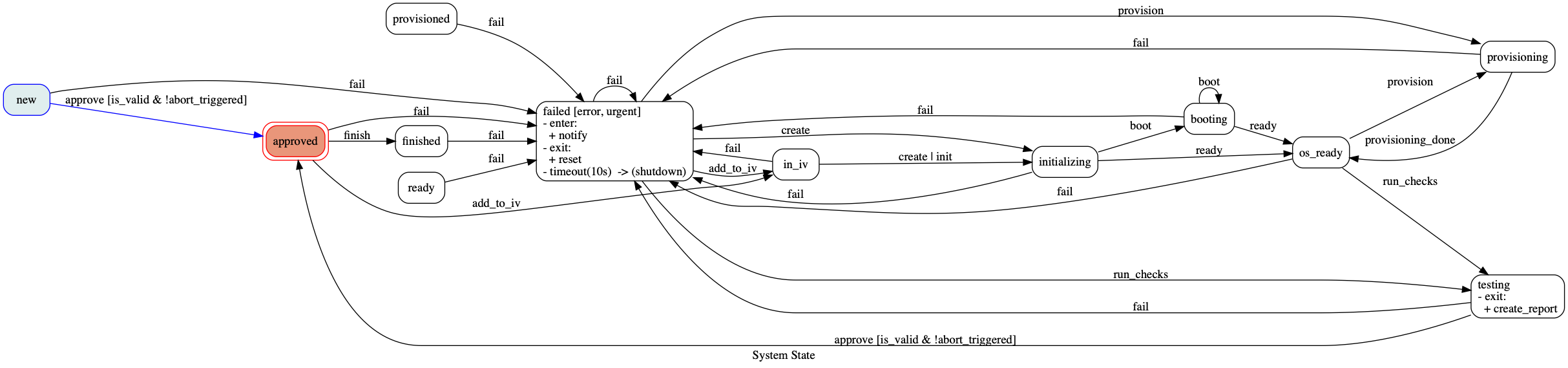\n\nAlso, have a look at our [example](./examples) IPython/Jupyter notebooks for a more detailed example.\n\n### Hierarchical State Machine (HSM)\n\nTransitions includes an extension module which allows to nest states. This allows to create contexts and to model cases where states are related to certain subtasks in the state machine. To create a nested state, either import `NestedState` from transitions or use a dictionary with the initialization arguments `name` and `children`. Optionally, `initial` can be used to define a sub state to transit to, when the nested state\n is entered.\n\n```python\nfrom transitions.extensions import HierarchicalMachine as Machine\n\nstates = ['standing', 'walking', {'name': 'caffeinated', 'children':['dithering', 'running']}]\ntransitions = [\n ['walk', 'standing', 'walking'],\n ['stop', 'walking', 'standing'],\n ['drink', '*', 'caffeinated'],\n ['walk', ['caffeinated', 'caffeinated_dithering'], 'caffeinated_running'],\n ['relax', 'caffeinated', 'standing']\n]\n\nmachine = Machine(states=states, transitions=transitions, initial='standing', ignore_invalid_triggers=True)\n\nmachine.walk() # Walking now\nmachine.stop() # let's stop for a moment\nmachine.drink() # coffee time\nmachine.state\n>>> 'caffeinated'\nmachine.walk() # we have to go faster\nmachine.state\n>>> 'caffeinated_running'\nmachine.stop() # can't stop moving!\nmachine.state\n>>> 'caffeinated_running'\nmachine.relax() # leave nested state\nmachine.state # phew, what a ride\n>>> 'standing'\n# machine.on_enter_caffeinated_running('callback_method')\n```\n\nA configuration making use of `initial` could look like this:\n\n```python\n# ...\nstates = ['standing', 'walking', {'name': 'caffeinated', 'initial': 'dithering', 'children': ['dithering', 'running']}]\ntransitions = [\n ['walk', 'standing', 'walking'],\n ['stop', 'walking', 'standing'],\n # this transition will end in 'caffeinated_dithering'...\n ['drink', '*', 'caffeinated'],\n # ... that is why we do not need do specify 'caffeinated' here anymore\n ['walk', 'caffeinated_dithering', 'caffeinated_running'],\n ['relax', 'caffeinated', 'standing']\n]\n# ...\n```\n\nSome things that have to be considered when working with nested states: State *names are concatenated* with `NestedState.separator`. Currently the separator is set to underscore ('_') and therefore behaves similar to the basic machine. This means a substate `bar` from state `foo` will be known by `foo_bar`. A substate `baz` of `bar` will be referred to as `foo_bar_baz` and so on. When entering a substate, `enter` will be called for all parent states. The same is true for exiting substates. Third, nested states can overwrite transition behaviour of their parents. If a transition is not known to the current state it will be delegated to its parent.\n\nIn some cases underscore as a separator is not sufficient. For instance if state names consists of more than one word and a concatenated naming such as `state_A_name_state_C` would be confusing. Setting the separator to something else than underscore changes some of the behaviour (auto_transition and setting callbacks). You can even use unicode characters if you use python 3:\n\n```python\nfrom transitions.extensions.nesting import NestedState\nNestedState.separator = '\u21a6'\nstates = ['A', 'B',\n {'name': 'C', 'children':['1', '2',\n {'name': '3', 'children': ['a', 'b', 'c']}\n ]}\n]\n\ntransitions = [\n ['reset', 'C', 'A'],\n ['reset', 'C\u21a62', 'C'] # overwriting parent reset\n]\n\n# we rely on auto transitions\nmachine = Machine(states=states, transitions=transitions, initial='A')\nmachine.to_B() # exit state A, enter state B\nmachine.to_C() # exit B, enter C\nmachine.to_C.s3.a() # enter C\u21a6a; enter C\u21a63\u21a6a;\nmachine.state,\n>>> 'C\u21a63\u21a6a'\nmachine.to('C\u21a62') # not interactive; exit C\u21a63\u21a6a, exit C\u21a63, enter C\u21a62\nmachine.reset() # exit C\u21a62; reset C has been overwritten by C\u21a63\nmachine.state\n>>> 'C'\nmachine.reset() # exit C, enter A\nmachine.state\n>>> 'A'\n# s.on_enter('C\u21a63\u21a6a', 'callback_method')\n```\n\nInstead of `to_C_3_a()` auto transition is called as `to_C.s3.a()`. If your substate starts with a digit, transitions adds a prefix 's' ('3' becomes 's3') to the auto transition `FunctionWrapper` to comply with the attribute naming scheme of python.\nIf interactive completion is not required, `to('C\u21a63\u21a6a')` can be called directly. Additionally, `on_enter/exit_<>` is replaced with `on_enter/exit(state_name, callback)`.\n\nTo check whether the current state is a substate of a specific state `is_state` supports the keyword `allow_substates`:\n\n```python\nmachine.state\n>>> 'C.2.a'\nmachine.is_C() # checks for specific states\n>>> False\nmachine.is_C(allow_substates=True)\n>>> True\n```\n\nYou can use enumerations in HSMs as well but `enum` support is currently limited to the root level as model state enums lack hierarchical information. An attempt of nesting an `Enum` will raise an `AttributeError` in `NestedState`.\n\n```python\n# will work\nstates = [States.RED, States.YELLOW, {'name': States.GREEN, 'children': ['tick', 'tock']}]\n# will raise an AttributeError\nstates = ['A', {'name': 'B', 'children': States}]\n```\n\n#### Reuse of previously created HSMs\n\nBesides semantic order, nested states are very handy if you want to specify state machines for specific tasks and plan to reuse them. Be aware that this will *embed* the passed machine's states. This means if your states had been altered *before*, this change will be persistent. \n\n```python\ncount_states = ['1', '2', '3', 'done']\ncount_trans = [\n ['increase', '1', '2'],\n ['increase', '2', '3'],\n ['decrease', '3', '2'],\n ['decrease', '2', '1'],\n ['done', '3', 'done'],\n ['reset', '*', '1']\n]\n\ncounter = Machine(states=count_states, transitions=count_trans, initial='1')\n\ncounter.increase() # love my counter\nstates = ['waiting', 'collecting', {'name': 'counting', 'children': counter}]\n\ntransitions = [\n ['collect', '*', 'collecting'],\n ['wait', '*', 'waiting'],\n ['count', 'collecting', 'counting']\n]\n\ncollector = Machine(states=states, transitions=transitions, initial='waiting')\ncollector.collect() # collecting\ncollector.count() # let's see what we got; counting_1\ncollector.increase() # counting_2\ncollector.increase() # counting_3\ncollector.done() # collector.state == counting_done\ncollector.wait() # collector.state == waiting\n```\n\nIf a `HierarchicalStateMachine` is passed with the `children` keyword, the initial state of this machine will be assigned to the new parent state. In the above example we see that entering `counting` will also enter `counting_1`. If this is undesired behaviour and the machine should rather halt in the parent state, the user can pass `initial` as `False` like `{'name': 'counting', 'children': counter, 'initial': False}`.\n\nSometimes you want such an embedded state collection to 'return' which means after it is done it should exit and transit to one of your states. To achieve this behaviour you can remap state transitions. In the example above we would like the counter to return if the state `done` was reached. This is done as follows:\n\n```python\nstates = ['waiting', 'collecting', {'name': 'counting', 'children': counter, 'remap': {'done': 'waiting'}}]\n\n... # same as above\n\ncollector.increase() # counting_3\ncollector.done()\ncollector.state\n>>> 'waiting' # be aware that 'counting_done' will be removed from the state machine\n```\n\nIf a reused state machine does not have a final state, you can of course add the transitions manually. If 'counter' had no 'done' state, we could just add `['done', 'counter_3', 'waiting']` to achieve the same behaviour.\n\nNote that the `HierarchicalMachine` will not integrate the machine instance itself but the states and transitions by creating copies of them. This way you are able to continue using your previously created instance without interfering with the embedded version.\n\n#### Threadsafe(-ish) State Machine\n\nIn cases where event dispatching is done in threads, one can use either `LockedMachine` or `LockedHierarchicalMachine` where **function access** (!sic) is secured with reentrant locks. This does not save you from corrupting your machine by tinkering with member variables of your model or state machine.\n\n```python\nfrom transitions.extensions import LockedMachine as Machine\nfrom threading import Thread\nimport time\n\nstates = ['A', 'B', 'C']\nmachine = Machine(states=states, initial='A')\n\n# let us assume that entering B will take some time\nthread = Thread(target=machine.to_B)\nthread.start()\ntime.sleep(0.01) # thread requires some time to start\nmachine.to_C() # synchronized access; won't execute before thread is done\n# accessing attributes directly\nthread = Thread(target=machine.to_B)\nthread.start()\nmachine.new_attrib = 42 # not synchronized! will mess with execution order\n```\n\nAny python context manager can be passed in via the `machine_context` keyword argument:\n\n```python\nfrom transitions.extensions import LockedMachine as Machine\nfrom threading import RLock\n\nstates = ['A', 'B', 'C']\n\nlock1 = RLock()\nlock2 = RLock()\n\nmachine = Machine(states=states, initial='A', machine_context=[lock1, lock2])\n```\n\nAny contexts via `machine_model` will be shared between all models registered with the `Machine`.\nPer-model contexts can be added as well:\n\n```\nlock3 = RLock()\n\nmachine.add_model(model, model_context=lock3)\n```\n\nIt's important that all user-provided context managers are re-entrant since the state machine will call them multiple\ntimes, even in the context of a single trigger invocation.\n\n#### Adding features to states\n\nIf your superheroes need some custom behaviour, you can throw in some extra functionality by decorating machine states:\n\n```python\nfrom time import sleep\nfrom transitions import Machine\nfrom transitions.extensions.states import add_state_features, Tags, Timeout\n\n\n@add_state_features(Tags, Timeout)\nclass CustomStateMachine(Machine):\n pass\n\n\nclass SocialSuperhero(object):\n def __init__(self):\n self.entourage = 0\n\n def on_enter_waiting(self):\n self.entourage += 1\n\n\nstates = [{'name': 'preparing', 'tags': ['home', 'busy']},\n {'name': 'waiting', 'timeout': 1, 'on_timeout': 'go'},\n {'name': 'away'}] # The city needs us!\n\ntransitions = [['done', 'preparing', 'waiting'],\n ['join', 'waiting', 'waiting'], # Entering Waiting again will increase our entourage\n ['go', 'waiting', 'away']] # Okay, let' move\n\nhero = SocialSuperhero()\nmachine = CustomStateMachine(model=hero, states=states, transitions=transitions, initial='preparing')\nassert hero.state == 'preparing' # Preparing for the night shift\nassert machine.get_state(hero.state).is_busy # We are at home and busy\nhero.done()\nassert hero.state == 'waiting' # Waiting for fellow superheroes to join us\nassert hero.entourage == 1 # It's just us so far\nsleep(0.7) # Waiting...\nhero.join() # Weeh, we got company\nsleep(0.5) # Waiting...\nhero.join() # Even more company \\o/\nsleep(2) # Waiting...\nassert hero.state == 'away' # Impatient superhero already left the building\nassert machine.get_state(hero.state).is_home is False # Yupp, not at home anymore\nassert hero.entourage == 3 # At least he is not alone\n```\n\nCurrently, transitions comes equipped with the following state features:\n\n* **Timeout** -- triggers an event after some time has passed\n - keyword: `timeout` (int, optional) -- if passed, an entered state will timeout after `timeout` seconds\n - keyword: `on_timeout` (string/callable, optional) -- will be called when timeout time has been reached\n - will raise an `AttributeError` when `timeout` is set but `on_timeout` is not\n - Note: A timeout is triggered in a thread. This implies several limitations (e.g. catching Exceptions raised in timeouts). Consider an event queue for more sophisticated applications.\n\n* **Tags** -- adds tags to states\n - keyword: `tags` (list, optional) -- assigns tags to a state\n - `State.is_` will return `True` when the state has been tagged with `tag_name`, else `False`\n\n* **Error** -- raises a `MachineError` when a state cannot be left \n - inherits from `Tags` (if you use `Error` do not use `Tags`)\n - keyword: `accepted` (bool, optional) -- marks a state as accepted\n - alternatively the keyword `tags` can be passed, containing 'accepted'\n - Note: Errors will only be raised if `auto_transitions` has been set to `False`. Otherwise every state can be exited with `to_` methods.\n\n* **Volatile** -- initialises an object every time a state is entered\n - keyword: `volatile` (class, optional) -- every time the state is entered an object of type class will be assigned to the model. The attribute name is defined by `hook`. If omitted, an empty VolatileObject will be created instead\n - keyword: `hook` (string, default='scope') -- The model's attribute name fore the temporal object.\n\nYou can write your own `State` extensions and add them the same way. Just note that `add_state_features` expects *Mixins*. This means your extension should always call the overridden methods `__init__`, `enter` and `exit`. Your extension may inherit from *State* but will also work without it.\nIn case you prefer to write your own custom states from scratch be aware that some state extensions *require* certain state features. `HierarchicalStateMachine` requires your custom state to be an instance of `NestedState` (`State` is not sufficient). To inject your states you can either assign them to your `Machine`'s class attribute `state_cls` or override `Machine.create_state` in case you need some specific procedures done whenever a state is created:\n\n```python\nfrom transitions import Machine, State\n\nclass MyState(State):\n pass\n\nclass CustomMachine(Machine):\n # Use MyState as state class\n state_cls = MyState\n\n\nclass VerboseMachine(Machine):\n\n # `Machine._create_state` is a class method but we can \n # override it to be an instance method\n def _create_state(self, *args, **kwargs):\n print(\"Creating a new state with machine '{0}'\".format(self.name))\n return MyState(*args, **kwargs)\n\n```\n\n#### Using transitions together with Django\n\nChristian Ledermann developed `django-transitions`, a module dedicated to streamline the work with `transitions` and Django. The source code is also hosted on [Github](https://github.com/PrimarySite/django-transitions). Have a look at [the documentation](https://django-transitions.readthedocs.io/en/latest/) for usage examples.\n\n\n### I have a [bug report/issue/question]...\nFor bug reports and other issues, please open an issue on GitHub.\n\nFor usage questions, post on Stack Overflow, making sure to tag your question with the `transitions` and `python` tags. Do not forget to have a look at the [extended examples](./examples)!\n\n\nFor any other questions, solicitations, or large unrestricted monetary gifts, email [Tal Yarkoni](mailto:tyarkoni@gmail.com).\n\n\n",
"description_content_type": "text/markdown",
"docs_url": null,
"download_url": "https://github.com/pytransitions/transitions/archive/0.7.1.tar.gz",
"downloads": {
"last_day": -1,
"last_month": -1,
"last_week": -1
},
"home_page": "http://github.com/pytransitions/transitions",
"keywords": "",
"license": "MIT",
"maintainer": "Alexander Neumann",
"maintainer_email": "aleneum@gmail.com",
"name": "transitions",
"package_url": "https://pypi.org/project/transitions/",
"platform": "",
"project_url": "https://pypi.org/project/transitions/",
"project_urls": {
"Download": "https://github.com/pytransitions/transitions/archive/0.7.1.tar.gz",
"Homepage": "http://github.com/pytransitions/transitions"
},
"release_url": "https://pypi.org/project/transitions/0.7.1/",
"requires_dist": [
"six",
"pygraphviz ; extra == 'diagrams'",
"pytest ; extra == 'test'"
],
"requires_python": "",
"summary": "A lightweight, object-oriented Python state machine implementation.",
"version": "0.7.1"
},
"last_serial": 5824290,
"releases": {
"0.1": [
{
"comment_text": "",
"digests": {
"md5": "a24703fec0038e103c2883f33cca5709",
"sha256": "cbb3d3dbafdc7f0967dd538569c6dbe2fad585f2d87f6c67730884eb2467ecb1"
},
"downloads": -1,
"filename": "transitions-0.1.tar.gz",
"has_sig": false,
"md5_digest": "a24703fec0038e103c2883f33cca5709",
"packagetype": "sdist",
"python_version": "source",
"requires_python": null,
"size": 2429,
"upload_time": "2014-10-15T03:40:06",
"url": "https://files.pythonhosted.org/packages/2e/eb/424936b09b918a85ba6f41e434f5bdb7c609a96a320d32dd064f2110199f/transitions-0.1.tar.gz"
}
],
"0.2": [
{
"comment_text": "",
"digests": {
"md5": "c7880dd385325af17150cfbbd269827d",
"sha256": "3c6ad78f2e44f93c48b4ea047569bd76548f4a1dbed9f1f94b2febd883f5c50e"
},
"downloads": -1,
"filename": "transitions-0.2.tar.gz",
"has_sig": false,
"md5_digest": "c7880dd385325af17150cfbbd269827d",
"packagetype": "sdist",
"python_version": "source",
"requires_python": null,
"size": 3894,
"upload_time": "2014-10-27T04:12:46",
"url": "https://files.pythonhosted.org/packages/5c/99/8b306cd0e30563a957e9c545c700683e4671cba60eadacc31b58be2892aa/transitions-0.2.tar.gz"
}
],
"0.2.1": [
{
"comment_text": "",
"digests": {
"md5": "9140f673aa164943436bc475fa53a31c",
"sha256": "346dffa68235464b41f54e6e50aff771730d56875c8aa1bc7a2f158d05429094"
},
"downloads": -1,
"filename": "transitions-0.2.1.tar.gz",
"has_sig": false,
"md5_digest": "9140f673aa164943436bc475fa53a31c",
"packagetype": "sdist",
"python_version": "source",
"requires_python": null,
"size": 3973,
"upload_time": "2014-11-11T06:04:53",
"url": "https://files.pythonhosted.org/packages/6a/76/e9a0a6a2a1904f1326a4652f52e877b5449a996a58968094391760313eef/transitions-0.2.1.tar.gz"
}
],
"0.2.2": [
{
"comment_text": "",
"digests": {
"md5": "5b403a3847c3dc159cb418cf22e0065d",
"sha256": "d2dbf07f1581efddc38423ff06bdd4e22dcdec9e7616724fcf9dda5a977dc4cb"
},
"downloads": -1,
"filename": "transitions-0.2.2.tar.gz",
"has_sig": false,
"md5_digest": "5b403a3847c3dc159cb418cf22e0065d",
"packagetype": "sdist",
"python_version": "source",
"requires_python": null,
"size": 4973,
"upload_time": "2014-12-28T18:15:32",
"url": "https://files.pythonhosted.org/packages/75/f3/04a42334cf5c76e5f420b5ac0d278f6171d02b654ac980a0ad69be85f993/transitions-0.2.2.tar.gz"
}
],
"0.2.3": [
{
"comment_text": "",
"digests": {
"md5": "ee1fde5ffe0118a5aa3742e6608cc395",
"sha256": "1c9a9cbdcd9e93ecc87f906d858de40168b8189724d31e729eec6a614180f788"
},
"downloads": -1,
"filename": "transitions-0.2.3.tar.gz",
"has_sig": false,
"md5_digest": "ee1fde5ffe0118a5aa3742e6608cc395",
"packagetype": "sdist",
"python_version": "source",
"requires_python": null,
"size": 5333,
"upload_time": "2015-01-15T03:27:42",
"url": "https://files.pythonhosted.org/packages/1c/04/051c6147e1f0caea6a22e0a91a10f2d4d38549b0dc5f9cad990b97c2ea4f/transitions-0.2.3.tar.gz"
}
],
"0.2.4": [
{
"comment_text": "",
"digests": {
"md5": "86f299982d277c8fbec8c5e3e14caf02",
"sha256": "de64e3b1920a6c98b3451fce88792fe6026d2d7e907189167e34e8f0053c25ee"
},
"downloads": -1,
"filename": "transitions-0.2.4.tar.gz",
"has_sig": false,
"md5_digest": "86f299982d277c8fbec8c5e3e14caf02",
"packagetype": "sdist",
"python_version": "source",
"requires_python": null,
"size": 5397,
"upload_time": "2015-03-11T05:45:05",
"url": "https://files.pythonhosted.org/packages/aa/07/485f35a06e03665aa8de802f2dd2e3a151657c77dc55a83e80bd4cbe2ad0/transitions-0.2.4.tar.gz"
}
],
"0.2.5": [
{
"comment_text": "",
"digests": {
"md5": "67d4d57780f98d719c7e540b8dbc0c7d",
"sha256": "c9f882c352f7db772796aedcb182dd84f3487c1fad81677829f04239b1c76bc1"
},
"downloads": -1,
"filename": "transitions-0.2.5.tar.gz",
"has_sig": false,
"md5_digest": "67d4d57780f98d719c7e540b8dbc0c7d",
"packagetype": "sdist",
"python_version": "source",
"requires_python": null,
"size": 5753,
"upload_time": "2015-05-04T16:06:05",
"url": "https://files.pythonhosted.org/packages/f0/bc/2ad6d672f905ead21833ec23ddfa5b7174936304c06b931f6e3e1bacd44b/transitions-0.2.5.tar.gz"
}
],
"0.2.6": [
{
"comment_text": "",
"digests": {
"md5": "c53bdddd361634a91c8b229c936e7e90",
"sha256": "90deb0fa49526ad9ef0f0b003c4d4d5c6e4313654c4b7123abb53bf1a2956d37"
},
"downloads": -1,
"filename": "transitions-0.2.6.tar.gz",
"has_sig": false,
"md5_digest": "c53bdddd361634a91c8b229c936e7e90",
"packagetype": "sdist",
"python_version": "source",
"requires_python": null,
"size": 6134,
"upload_time": "2015-07-26T11:35:07",
"url": "https://files.pythonhosted.org/packages/53/1c/4dd1e4f1ab9f3a4c284b6543a063f0fa134a0920cc49635eae2aa1270cc1/transitions-0.2.6.tar.gz"
}
],
"0.2.7": [
{
"comment_text": "",
"digests": {
"md5": "04d535025de21a35b9bf8131549e4a25",
"sha256": "88819acf7e9c1472830fe9317d1a19cc656e7981a237f356e48b9f7170ca7f0a"
},
"downloads": -1,
"filename": "transitions-0.2.7.tar.gz",
"has_sig": false,
"md5_digest": "04d535025de21a35b9bf8131549e4a25",
"packagetype": "sdist",
"python_version": "source",
"requires_python": null,
"size": 6157,
"upload_time": "2015-07-27T12:41:19",
"url": "https://files.pythonhosted.org/packages/21/5c/3e51e3dac893c81adf1ead752610c5ce9e292d9e65e2cc08b088ed2be92d/transitions-0.2.7.tar.gz"
}
],
"0.2.8": [
{
"comment_text": "",
"digests": {
"md5": "dd41ae02944b280d27bc837871c5f8b4",
"sha256": "1ab5c4569ac719db2042d592a4fde1fb4fbfb13a5eaea13b7c521be261e934d1"
},
"downloads": -1,
"filename": "transitions-0.2.8.tar.gz",
"has_sig": false,
"md5_digest": "dd41ae02944b280d27bc837871c5f8b4",
"packagetype": "sdist",
"python_version": "source",
"requires_python": null,
"size": 6224,
"upload_time": "2015-08-06T10:49:15",
"url": "https://files.pythonhosted.org/packages/8b/e9/32cd27d6fab5ec79bbbbe7651aba15b978e5d54ae05441e04821c6d9c352/transitions-0.2.8.tar.gz"
}
],
"0.2.9": [
{
"comment_text": "",
"digests": {
"md5": "3184f918150d67d4b477bcb77278f536",
"sha256": "514dbc3497dce5c825408d01a066680c21257cfbc0fdcbbe1e7eae214c356f0d"
},
"downloads": -1,
"filename": "transitions-0.2.9.tar.gz",
"has_sig": false,
"md5_digest": "3184f918150d67d4b477bcb77278f536",
"packagetype": "sdist",
"python_version": "source",
"requires_python": null,
"size": 6400,
"upload_time": "2015-11-10T17:08:43",
"url": "https://files.pythonhosted.org/packages/59/8a/b1930213f237bf379d008026b22acb4b4bd9ecc8231c21ba9aff96e36d0a/transitions-0.2.9.tar.gz"
}
],
"0.3.0": [
{
"comment_text": "",
"digests": {
"md5": "d3e99cc0629c8aba19953d7909bf1ee3",
"sha256": "974c30c19f1dab585d495b1e711cb6417cd1ed199538c46b710833d47cf334e0"
},
"downloads": -1,
"filename": "transitions-0.3.0.tar.gz",
"has_sig": false,
"md5_digest": "d3e99cc0629c8aba19953d7909bf1ee3",
"packagetype": "sdist",
"python_version": "source",
"requires_python": null,
"size": 10462,
"upload_time": "2016-01-02T21:46:01",
"url": "https://files.pythonhosted.org/packages/17/95/dfb279199c1cf9be9b8892658f52e99a8eaa975ce1a8b9b0e49a99446dbd/transitions-0.3.0.tar.gz"
}
],
"0.3.1": [
{
"comment_text": "",
"digests": {
"md5": "0b2507356912680d243868b24aa162e1",
"sha256": "30bfd1ccf3a1019ca07f67fb6440a8616e8f02d2c17f686bd149de0851f91d71"
},
"downloads": -1,
"filename": "transitions-0.3.1.tar.gz",
"has_sig": false,
"md5_digest": "0b2507356912680d243868b24aa162e1",
"packagetype": "sdist",
"python_version": "source",
"requires_python": null,
"size": 10504,
"upload_time": "2016-01-03T21:36:03",
"url": "https://files.pythonhosted.org/packages/26/ee/0d1580c976be3a60d744da80361645fd63769bab66de18931b29b3557347/transitions-0.3.1.tar.gz"
}
],
"0.4.0": [
{
"comment_text": "",
"digests": {
"md5": "5c0d51e258842e6334ff29de068aed49",
"sha256": "52868c6e336ad00de24cffcd9efe2401ea9a76e1dad10226719090c0f7ec0615"
},
"downloads": -1,
"filename": "transitions-0.4.0.tar.gz",
"has_sig": false,
"md5_digest": "5c0d51e258842e6334ff29de068aed49",
"packagetype": "sdist",
"python_version": "source",
"requires_python": null,
"size": 12763,
"upload_time": "2016-04-25T17:12:45",
"url": "https://files.pythonhosted.org/packages/ce/69/3f908bbb79fc6af0be57badec98c4a0e976e0287ef8b4e6d1d7d8defbcf9/transitions-0.4.0.tar.gz"
}
],
"0.4.1": [
{
"comment_text": "",
"digests": {
"md5": "2e82f9c2a2a5fe3ac5929c4016105916",
"sha256": "25d6fd8a150679da02d4850df49de69b7804bf0e9dcbd630ad4c523e2b681049"
},
"downloads": -1,
"filename": "transitions-0.4.1.tar.gz",
"has_sig": false,
"md5_digest": "2e82f9c2a2a5fe3ac5929c4016105916",
"packagetype": "sdist",
"python_version": "source",
"requires_python": null,
"size": 13494,
"upload_time": "2016-07-26T12:39:22",
"url": "https://files.pythonhosted.org/packages/61/1f/206c836bf138ee70378b6c5d870ec20028ecc63b43f3a2e95ac6b3748657/transitions-0.4.1.tar.gz"
}
],
"0.4.2": [
{
"comment_text": "",
"digests": {
"md5": "47c77f7ee61a997e297251a55e4e3019",
"sha256": "94752bed6d33351bf8bd07a944b27b446a1ecda48bdba16a57505a8beb3fac61"
},
"downloads": -1,
"filename": "transitions-0.4.2.tar.gz",
"has_sig": false,
"md5_digest": "47c77f7ee61a997e297251a55e4e3019",
"packagetype": "sdist",
"python_version": "source",
"requires_python": null,
"size": 14634,
"upload_time": "2016-10-07T13:22:39",
"url": "https://files.pythonhosted.org/packages/fd/26/be378a8a6819fa2d1e37e213527eb3b8ab7c3de00c082720fece4757bb08/transitions-0.4.2.tar.gz"
}
],
"0.4.3": [
{
"comment_text": "",
"digests": {
"md5": "2215cfe0ba8e6147a2d360bbf8d486f8",
"sha256": "1e704f9724a76ebc28c741d2f85235a93be9b53abd97b14ca08e2d9d9e569161"
},
"downloads": -1,
"filename": "transitions-0.4.3.tar.gz",
"has_sig": false,
"md5_digest": "2215cfe0ba8e6147a2d360bbf8d486f8",
"packagetype": "sdist",
"python_version": "source",
"requires_python": null,
"size": 15270,
"upload_time": "2016-12-10T08:47:45",
"url": "https://files.pythonhosted.org/packages/1c/da/00d6caf311c9011d05f7dbae794377972844baca820c2c35b8f3e1b9891e/transitions-0.4.3.tar.gz"
}
],
"0.5.0": [
{
"comment_text": "",
"digests": {
"md5": "127c29880b27f6573ea0bcdc29779d0e",
"sha256": "341d83e978a9fd102ea8fc89dbf894114ea7732e05e465c9111133e9d3d8e890"
},
"downloads": -1,
"filename": "transitions-0.5.0.tar.gz",
"has_sig": false,
"md5_digest": "127c29880b27f6573ea0bcdc29779d0e",
"packagetype": "sdist",
"python_version": "source",
"requires_python": null,
"size": 18206,
"upload_time": "2017-03-14T14:02:38",
"url": "https://files.pythonhosted.org/packages/96/69/d90b3c637cd87b9555477965fc4b55d45c081397bfc27bc3f43e56245d67/transitions-0.5.0.tar.gz"
}
],
"0.5.1": [
{
"comment_text": "",
"digests": {
"md5": "5473b15f83bd1e2dfd0a9f803922f6bd",
"sha256": "e08774118c275558729f9c5b1b3869b7251c7d06260820176d2ee975fa0db2a6"
},
"downloads": -1,
"filename": "transitions-0.5.1.tar.gz",
"has_sig": false,
"md5_digest": "5473b15f83bd1e2dfd0a9f803922f6bd",
"packagetype": "sdist",
"python_version": "source",
"requires_python": null,
"size": 19280,
"upload_time": "2017-04-24T15:27:48",
"url": "https://files.pythonhosted.org/packages/4f/54/f159396388d79753c346c905da3aa304476293fd2cb3dc8fb9cdb119cbc6/transitions-0.5.1.tar.gz"
}
],
"0.5.2": [
{
"comment_text": "",
"digests": {
"md5": "403a838fb11f966933bb6aa02c06c56e",
"sha256": "88d09aaca7ab369897f4a87077f9ef88c97f99bf77c1fc8039c8c61678c32693"
},
"downloads": -1,
"filename": "transitions-0.5.2.tar.gz",
"has_sig": false,
"md5_digest": "403a838fb11f966933bb6aa02c06c56e",
"packagetype": "sdist",
"python_version": "source",
"requires_python": null,
"size": 19313,
"upload_time": "2017-04-24T16:14:58",
"url": "https://files.pythonhosted.org/packages/89/82/7aa84a375fa1f9825691614ae438348c2f98ffd4168ff5035f6b411ce1d2/transitions-0.5.2.tar.gz"
}
],
"0.5.3": [
{
"comment_text": "",
"digests": {
"md5": "74f5a81a86ff3d442a034df2d32d1415",
"sha256": "1cac6a60db1c0301c2613ddfdcea7de231bfae8b79b0bd5577e39dc4b7aeecca"
},
"downloads": -1,
"filename": "transitions-0.5.3.tar.gz",
"has_sig": false,
"md5_digest": "74f5a81a86ff3d442a034df2d32d1415",
"packagetype": "sdist",
"python_version": "source",
"requires_python": null,
"size": 19640,
"upload_time": "2017-05-29T07:29:21",
"url": "https://files.pythonhosted.org/packages/02/c3/604664c7ee96457a8f981ca9fa165ac959192708587062edadf4a7dbd049/transitions-0.5.3.tar.gz"
}
],
"0.6.0": [
{
"comment_text": "",
"digests": {
"md5": "391d8de62365051a048d06ac1b4a7080",
"sha256": "cca65befe5cd3810d2ddecca36d9bdd2cd51e280f2c030ff92f50337d1f5c47c"
},
"downloads": -1,
"filename": "transitions-0.6.0-py2.py3-none-any.whl",
"has_sig": false,
"md5_digest": "391d8de62365051a048d06ac1b4a7080",
"packagetype": "bdist_wheel",
"python_version": "3.3",
"requires_python": null,
"size": 23772,
"upload_time": "2017-08-20T22:07:46",
"url": "https://files.pythonhosted.org/packages/0a/8f/1d7ad5a4616cae9b208f95027eaf9f6964580887944162b628db9bb40030/transitions-0.6.0-py2.py3-none-any.whl"
},
{
"comment_text": "",
"digests": {
"md5": "12bc10080e36467492e82de2f915430b",
"sha256": "d0e5d6f694d03fcb9fd6862a8e27f4264e6f7f8a91da270f850b1685547dda00"
},
"downloads": -1,
"filename": "transitions-0.6.0.tar.gz",
"has_sig": false,
"md5_digest": "12bc10080e36467492e82de2f915430b",
"packagetype": "sdist",
"python_version": "source",
"requires_python": null,
"size": 1328987,
"upload_time": "2017-08-20T22:07:40",
"url": "https://files.pythonhosted.org/packages/18/15/460f5da7f8c1db8bf10d90b26719a31fb4742baa655238ebc6bcadbd6700/transitions-0.6.0.tar.gz"
}
],
"0.6.1": [
{
"comment_text": "",
"digests": {
"md5": "776e3ed05757ae215b6359c6e0c57e78",
"sha256": "c268d049142cb70323131c469087c7c14faddd399621a9846cff0842ebcba033"
},
"downloads": -1,
"filename": "transitions-0.6.1-py2.py3-none-any.whl",
"has_sig": false,
"md5_digest": "776e3ed05757ae215b6359c6e0c57e78",
"packagetype": "bdist_wheel",
"python_version": "3.3",
"requires_python": null,
"size": 24222,
"upload_time": "2017-09-04T10:16:31",
"url": "https://files.pythonhosted.org/packages/fa/79/62ddbe856ff20d434c7183259ea6eb7d80b99c3dba8f612019a22215251b/transitions-0.6.1-py2.py3-none-any.whl"
},
{
"comment_text": "",
"digests": {
"md5": "0db905df6cbcefb6b942c2c15ef6a4d6",
"sha256": "896cb64d3abc9bb505248c1bd0823122e2709060a4bb5664ca3513d85646d5cf"
},
"downloads": -1,
"filename": "transitions-0.6.1.tar.gz",
"has_sig": false,
"md5_digest": "0db905df6cbcefb6b942c2c15ef6a4d6",
"packagetype": "sdist",
"python_version": "source",
"requires_python": null,
"size": 1336900,
"upload_time": "2017-09-04T10:16:27",
"url": "https://files.pythonhosted.org/packages/1a/34/410b21b64cba480be8c619530470e7b693bf507fc5f1411ca924c940287e/transitions-0.6.1.tar.gz"
}
],
"0.6.2": [
{
"comment_text": "",
"digests": {
"md5": "d13b6235ec8d4dc093cccd31611bd9ee",
"sha256": "145ef824b04a7d367301857b944aab4c81a284afd1c71c6e8db10f760cc79ae3"
},
"downloads": -1,
"filename": "transitions-0.6.2-py2.py3-none-any.whl",
"has_sig": false,
"md5_digest": "d13b6235ec8d4dc093cccd31611bd9ee",
"packagetype": "bdist_wheel",
"python_version": "2.7",
"requires_python": null,
"size": 30927,
"upload_time": "2017-11-03T08:32:28",
"url": "https://files.pythonhosted.org/packages/13/fa/066006426a93e25029bdfac254ff0bbea0192db6c8337633c497c6e47847/transitions-0.6.2-py2.py3-none-any.whl"
},
{
"comment_text": "",
"digests": {
"md5": "c584ee55d96010bab2e1ff34fe43e044",
"sha256": "a78aa671dbe70bf5e2db92eb74d4b0f1a338db35827501e55aa1b4c23676cf37"
},
"downloads": -1,
"filename": "transitions-0.6.2.tar.gz",
"has_sig": false,
"md5_digest": "c584ee55d96010bab2e1ff34fe43e044",
"packagetype": "sdist",
"python_version": "source",
"requires_python": null,
"size": 1343117,
"upload_time": "2017-11-03T08:32:25",
"url": "https://files.pythonhosted.org/packages/73/64/96365a9c0ae19196ed9bc7d02586f117e11880aa4a9bc42966e60bd2c4d9/transitions-0.6.2.tar.gz"
}
],
"0.6.3": [
{
"comment_text": "",
"digests": {
"md5": "a615cd8baa8fe3fa01a220278183f582",
"sha256": "b6c7de3ee22614f8ad1b1572636b616752c6aac581528acf6567734ef839006d"
},
"downloads": -1,
"filename": "transitions-0.6.3-py2.py3-none-any.whl",
"has_sig": false,
"md5_digest": "a615cd8baa8fe3fa01a220278183f582",
"packagetype": "bdist_wheel",
"python_version": "2.7",
"requires_python": null,
"size": 31368,
"upload_time": "2017-11-30T08:28:00",
"url": "https://files.pythonhosted.org/packages/83/b7/2a1795bc59cadde9dcc644e641c015ef6b77780ce59c97e5ebfe8e51eae1/transitions-0.6.3-py2.py3-none-any.whl"
},
{
"comment_text": "",
"digests": {
"md5": "34f11ecd9d5e76cc6f8d2a2a1e9a71b2",
"sha256": "d1b5c01e82707a5883aa21ff38c793a94e7e315f8134b41b88f182d1cdf7b1cb"
},
"downloads": -1,
"filename": "transitions-0.6.3.tar.gz",
"has_sig": false,
"md5_digest": "34f11ecd9d5e76cc6f8d2a2a1e9a71b2",
"packagetype": "sdist",
"python_version": "source",
"requires_python": null,
"size": 1344596,
"upload_time": "2017-11-30T08:27:56",
"url": "https://files.pythonhosted.org/packages/e1/66/7888beed2ba19ccee4205813fab4f68f445273d9b2c157921a02a8451b59/transitions-0.6.3.tar.gz"
}
],
"0.6.4": [
{
"comment_text": "",
"digests": {
"md5": "f786f876750e7009628ff98cbe86f9c2",
"sha256": "e3f9869eb396acc71ea608c0ae8db48f8bfff51d87d45723ae558e9e03c4eaae"
},
"downloads": -1,
"filename": "transitions-0.6.4-py2.py3-none-any.whl",
"has_sig": false,
"md5_digest": "f786f876750e7009628ff98cbe86f9c2",
"packagetype": "bdist_wheel",
"python_version": "2.7",
"requires_python": null,
"size": 31697,
"upload_time": "2018-01-03T11:36:12",
"url": "https://files.pythonhosted.org/packages/d4/1c/e0d0dc2cf90dfb7a73acbb5364f352c257ecaf449a420833585532dc63f3/transitions-0.6.4-py2.py3-none-any.whl"
},
{
"comment_text": "",
"digests": {
"md5": "127f0b780fb5ca74a8b0741780d8092f",
"sha256": "56c41ae6d7d966b493864da7f3cc332f86c5beb43546c823f480c67d9ed47dc6"
},
"downloads": -1,
"filename": "transitions-0.6.4.tar.gz",
"has_sig": false,
"md5_digest": "127f0b780fb5ca74a8b0741780d8092f",
"packagetype": "sdist",
"python_version": "source",
"requires_python": null,
"size": 1350326,
"upload_time": "2018-01-03T11:36:08",
"url": "https://files.pythonhosted.org/packages/46/a1/a632804457de26227228a906bea1dc786eb316089f2cc2050c5656a2314d/transitions-0.6.4.tar.gz"
}
],
"0.6.5": [
{
"comment_text": "",
"digests": {
"md5": "8dc79330e115f210faf69f0e66e1dcd6",
"sha256": "582e0698a9e5a6448de4516fe9e61b439d10242a0387ca9885fbfad0560dc2c6"
},
"downloads": -1,
"filename": "transitions-0.6.5-py2.py3-none-any.whl",
"has_sig": false,
"md5_digest": "8dc79330e115f210faf69f0e66e1dcd6",
"packagetype": "bdist_wheel",
"python_version": "2.7",
"requires_python": null,
"size": 64536,
"upload_time": "2018-04-16T16:35:22",
"url": "https://files.pythonhosted.org/packages/70/7b/09f80f13a1e52bd1630e0cea117ab1617b8027c7930ac10744c6e0bc50ec/transitions-0.6.5-py2.py3-none-any.whl"
},
{
"comment_text": "",
"digests": {
"md5": "f3a64419ac566de15708765b272a6022",
"sha256": "f72b6c5fcac3d1345bbf829e1a48a810255bcb4fc2c11a634af68107c378c1be"
},
"downloads": -1,
"filename": "transitions-0.6.5.tar.gz",
"has_sig": false,
"md5_digest": "f3a64419ac566de15708765b272a6022",
"packagetype": "sdist",
"python_version": "source",
"requires_python": null,
"size": 1383866,
"upload_time": "2018-04-16T16:35:19",
"url": "https://files.pythonhosted.org/packages/b7/51/3528aeec7fe9ac1750299dabebab89987cb7db3a617bd82fd9cc44fed810/transitions-0.6.5.tar.gz"
}
],
"0.6.6": [
{
"comment_text": "",
"digests": {
"md5": "8594749e1e7508850a27b45bbb62b0fc",
"sha256": "7871edd430bc214aa11165d3e2450096069a228071ea9a246aebeb32f0f664da"
},
"downloads": -1,
"filename": "transitions-0.6.6-py2.py3-none-any.whl",
"has_sig": false,
"md5_digest": "8594749e1e7508850a27b45bbb62b0fc",
"packagetype": "bdist_wheel",
"python_version": "py2.py3",
"requires_python": null,
"size": 65081,
"upload_time": "2018-05-18T11:48:04",
"url": "https://files.pythonhosted.org/packages/c3/fd/80f8e4a7488e7e8acac40288fed28ff1feb26fc925fb6350341683d46721/transitions-0.6.6-py2.py3-none-any.whl"
},
{
"comment_text": "",
"digests": {
"md5": "27fadff9ee65bfef9153c050ee770cb7",
"sha256": "590ed7aa410703be712d8a4e149d745b29511b9bc9c0251dcf945c43deeaca8b"
},
"downloads": -1,
"filename": "transitions-0.6.6.tar.gz",
"has_sig": false,
"md5_digest": "27fadff9ee65bfef9153c050ee770cb7",
"packagetype": "sdist",
"python_version": "source",
"requires_python": null,
"size": 1386722,
"upload_time": "2018-05-18T11:48:07",
"url": "https://files.pythonhosted.org/packages/7e/30/b17fadcaa85f35b01839a73cb98851456ffce84653e34ba952b8097903c7/transitions-0.6.6.tar.gz"
}
],
"0.6.7": [
{
"comment_text": "",
"digests": {
"md5": "5d4625e3b6851674f0178adb76617df0",
"sha256": "4ee23229563363c427dcb2c375fb920ec2601794dc9a77282466e2cf698f83e1"
},
"downloads": -1,
"filename": "transitions-0.6.7-py2.py3-none-any.whl",
"has_sig": false,
"md5_digest": "5d4625e3b6851674f0178adb76617df0",
"packagetype": "bdist_wheel",
"python_version": "py2.py3",
"requires_python": null,
"size": 47785,
"upload_time": "2018-05-18T12:33:28",
"url": "https://files.pythonhosted.org/packages/23/57/2ff444aa2542600b5778ea2776525d1b6439ad4af60d6e9992e90a20a68a/transitions-0.6.7-py2.py3-none-any.whl"
},
{
"comment_text": "",
"digests": {
"md5": "dfa1279e9680be71db82782484f9ae2e",
"sha256": "0a1d8293a719c49539115f3eb7a048cfbc8a980e87735915d4d20583d8bd167a"
},
"downloads": -1,
"filename": "transitions-0.6.7.tar.gz",
"has_sig": false,
"md5_digest": "dfa1279e9680be71db82782484f9ae2e",
"packagetype": "sdist",
"python_version": "source",
"requires_python": null,
"size": 1385814,
"upload_time": "2018-05-18T12:33:31",
"url": "https://files.pythonhosted.org/packages/b8/25/ccc5aea256948b8d81d0057552a0709f7d479d36ba284d2cb216b95a1aca/transitions-0.6.7.tar.gz"
}
],
"0.6.8": [
{
"comment_text": "",
"digests": {
"md5": "94fd8ce6f67642e093c90b621c96f466",
"sha256": "adbfce523187e4f1b8745250e4562d43fe4562e7d2152ab11d1c8ae9da51eaad"
},
"downloads": -1,
"filename": "transitions-0.6.8-py2.py3-none-any.whl",
"has_sig": false,
"md5_digest": "94fd8ce6f67642e093c90b621c96f466",
"packagetype": "bdist_wheel",
"python_version": "py2.py3",
"requires_python": null,
"size": 47784,
"upload_time": "2018-05-25T14:39:07",
"url": "https://files.pythonhosted.org/packages/2c/49/489c2d2bd3ffb49f143b3d46a7d5f0d72f030a36383abc5c6d7819b8cc15/transitions-0.6.8-py2.py3-none-any.whl"
},
{
"comment_text": "",
"digests": {
"md5": "41c96798fe8b449ee38f2428b0a20424",
"sha256": "155de243bd935959ae66cdab5c4c1a92f2bbf48555c6f994365935a0a9fffc1b"
},
"downloads": -1,
"filename": "transitions-0.6.8.tar.gz",
"has_sig": false,
"md5_digest": "41c96798fe8b449ee38f2428b0a20424",
"packagetype": "sdist",
"python_version": "source",
"requires_python": null,
"size": 1385793,
"upload_time": "2018-05-25T14:39:10",
"url": "https://files.pythonhosted.org/packages/ca/29/e394e452ce6e8a7d8c0ff1ab9ca36f939859f04017506754bc3c7f74d380/transitions-0.6.8.tar.gz"
}
],
"0.6.9": [
{
"comment_text": "",
"digests": {
"md5": "88c8c37014c1f5e81d592b4fba66c401",
"sha256": "00bfa91b0cfe3f649731b2f28478c4314bb9e830c600b422973f1b3a704ac710"
},
"downloads": -1,
"filename": "transitions-0.6.9-py2.py3-none-any.whl",
"has_sig": false,
"md5_digest": "88c8c37014c1f5e81d592b4fba66c401",
"packagetype": "bdist_wheel",
"python_version": "py2.py3",
"requires_python": null,
"size": 48998,
"upload_time": "2018-10-26T17:11:37",
"url": "https://files.pythonhosted.org/packages/14/4d/26043920085674539495eb3d80162a1ad3c749d2285b1151ab50a3259dc6/transitions-0.6.9-py2.py3-none-any.whl"
},
{
"comment_text": "",
"digests": {
"md5": "9a28e1e2b9e0a5fc2856a9a0803aa731",
"sha256": "afe0f498cf1f3f3b0fc13562011b8895a172df8f891dbb5118923d46e78a96d7"
},
"downloads": -1,
"filename": "transitions-0.6.9.tar.gz",
"has_sig": false,
"md5_digest": "9a28e1e2b9e0a5fc2856a9a0803aa731",
"packagetype": "sdist",
"python_version": "source",
"requires_python": null,
"size": 1386466,
"upload_time": "2018-10-26T17:11:39",
"url": "https://files.pythonhosted.org/packages/b1/29/9a7796266beb1b2d89d8af148874f1cd66c1144a8406b05eda9bcddf4c1b/transitions-0.6.9.tar.gz"
}
],
"0.7.0": [
{
"comment_text": "",
"digests": {
"md5": "bb0fd65c0a28fd58e4c8d16a86de4b9b",
"sha256": "50595659de7113a446e9d330805e7fbab50bb362944d93ef2323ffde21681651"
},
"downloads": -1,
"filename": "transitions-0.7.0-py2.py3-none-any.whl",
"has_sig": false,
"md5_digest": "bb0fd65c0a28fd58e4c8d16a86de4b9b",
"packagetype": "bdist_wheel",
"python_version": "py2.py3",
"requires_python": null,
"size": 54039,
"upload_time": "2019-08-19T19:31:36",
"url": "https://files.pythonhosted.org/packages/de/30/39b18afb69af38437f3b6974251be922788e36c8412c7aafee8c4770b437/transitions-0.7.0-py2.py3-none-any.whl"
},
{
"comment_text": "",
"digests": {
"md5": "4a02be26659204e609f9d72554bd3d51",
"sha256": "b5712bc1ef3854ff3104cd22502e2ce66c1da5b9ace90427b97bd9b7efd921fa"
},
"downloads": -1,
"filename": "transitions-0.7.0.tar.gz",
"has_sig": false,
"md5_digest": "4a02be26659204e609f9d72554bd3d51",
"packagetype": "sdist",
"python_version": "source",
"requires_python": null,
"size": 1261223,
"upload_time": "2019-08-19T19:33:07",
"url": "https://files.pythonhosted.org/packages/d2/2c/3f523885a1702a2998a2e56e77a5ce13f30c061bdf87702c5d8ef3361753/transitions-0.7.0.tar.gz"
}
],
"0.7.1": [
{
"comment_text": "",
"digests": {
"md5": "e5fa51237f58c89ec71019c7efc3a5ce",
"sha256": "2822e51bd4108bb9730cd883da0949d9948c2d8638b3fb78f19c80f6865dfa4c"
},
"downloads": -1,
"filename": "transitions-0.7.1-py2.py3-none-any.whl",
"has_sig": false,
"md5_digest": "e5fa51237f58c89ec71019c7efc3a5ce",
"packagetype": "bdist_wheel",
"python_version": "py2.py3",
"requires_python": null,
"size": 55346,
"upload_time": "2019-09-13T07:49:49",
"url": "https://files.pythonhosted.org/packages/ca/83/e579cc08917978421acd3418ab8f7d4ff68ade09ba51f41fb0499f075de3/transitions-0.7.1-py2.py3-none-any.whl"
},
{
"comment_text": "",
"digests": {
"md5": "61d84b188f241d0e74e8d283f086709c",
"sha256": "b73015080833b753cbb4a10f51f8234924ddfbdbaf33539fee4e4f3abfff454d"
},
"downloads": -1,
"filename": "transitions-0.7.1.tar.gz",
"has_sig": false,
"md5_digest": "61d84b188f241d0e74e8d283f086709c",
"packagetype": "sdist",
"python_version": "source",
"requires_python": null,
"size": 1318322,
"upload_time": "2019-09-13T07:49:53",
"url": "https://files.pythonhosted.org/packages/67/3f/3cd05fb4bd0bb63a44284e4cf760ba9be3597b11f34028455a6becf66f6a/transitions-0.7.1.tar.gz"
}
]
},
"urls": [
{
"comment_text": "",
"digests": {
"md5": "e5fa51237f58c89ec71019c7efc3a5ce",
"sha256": "2822e51bd4108bb9730cd883da0949d9948c2d8638b3fb78f19c80f6865dfa4c"
},
"downloads": -1,
"filename": "transitions-0.7.1-py2.py3-none-any.whl",
"has_sig": false,
"md5_digest": "e5fa51237f58c89ec71019c7efc3a5ce",
"packagetype": "bdist_wheel",
"python_version": "py2.py3",
"requires_python": null,
"size": 55346,
"upload_time": "2019-09-13T07:49:49",
"url": "https://files.pythonhosted.org/packages/ca/83/e579cc08917978421acd3418ab8f7d4ff68ade09ba51f41fb0499f075de3/transitions-0.7.1-py2.py3-none-any.whl"
},
{
"comment_text": "",
"digests": {
"md5": "61d84b188f241d0e74e8d283f086709c",
"sha256": "b73015080833b753cbb4a10f51f8234924ddfbdbaf33539fee4e4f3abfff454d"
},
"downloads": -1,
"filename": "transitions-0.7.1.tar.gz",
"has_sig": false,
"md5_digest": "61d84b188f241d0e74e8d283f086709c",
"packagetype": "sdist",
"python_version": "source",
"requires_python": null,
"size": 1318322,
"upload_time": "2019-09-13T07:49:53",
"url": "https://files.pythonhosted.org/packages/67/3f/3cd05fb4bd0bb63a44284e4cf760ba9be3597b11f34028455a6becf66f6a/transitions-0.7.1.tar.gz"
}
]
}