{
"info": {
"author": "Rikin K",
"author_email": "rikin@hasura.io",
"bugtrack_url": null,
"classifiers": [
"License :: OSI Approved :: MIT License",
"Operating System :: OS Independent",
"Programming Language :: Python :: 2.7"
],
"description": "# Sphinx GraphiQL\n\nThis is a GraphiQL plugin for Sphinx that lets you make GraphQL queries from your docs.\n\nWe built this for documenting [Hasura GraphQL engine](https://hasura.io/)'s API. Check it out in action [here](https://docs.hasura.io/1.0/graphql/manual/queries/simple-object-queries.html). *(Note: In our docs we have added custom css overrides to make GraphiQL look as per our needs)*\n\n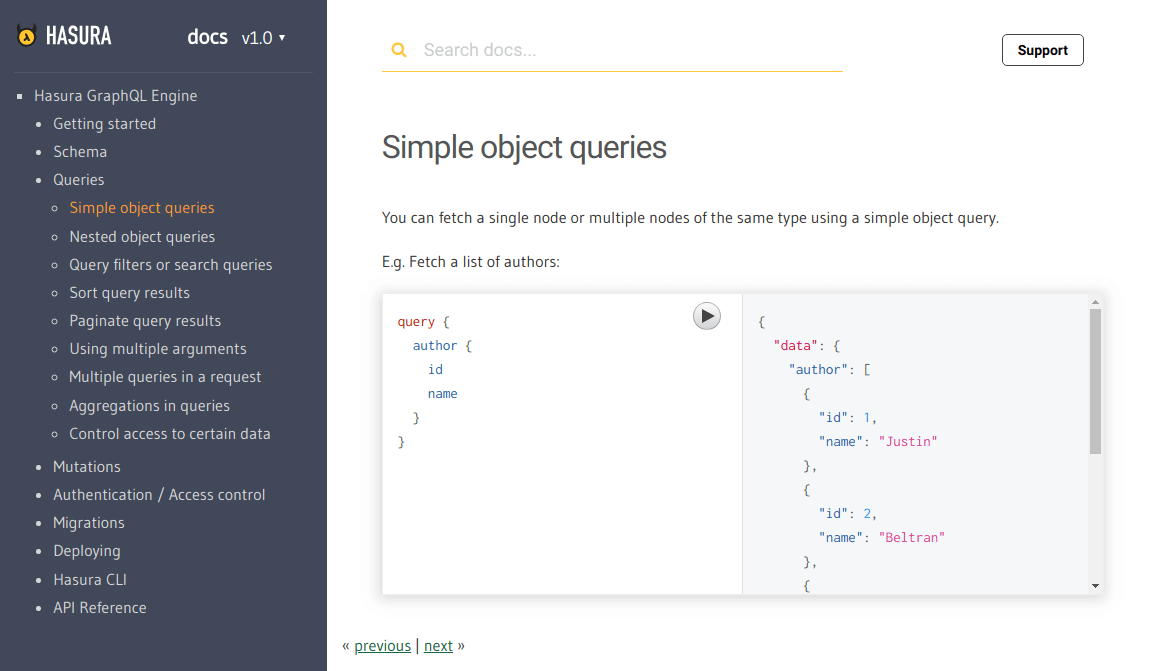\n\n\n## Usage\n\nTo insert a GraphiQL component inside your `.rst` doc, use the declarative:\n\n```\n.. graphiql::\n :query:\n query {\n author {\n id\n name\n }\n }\n```\n\n### View only\n\nIf you want to make GraphiQL view-only (ie: disable execution), you just have to add another option `:view_only:`. For example:\n\n```\n.. graphiql::\n :view_only:\n :query:\n query {\n author {\n id\n name\n }\n }\n```\n\n### Show a dummy response\n\nSometimes you will want to show the response along with the query without executing it. You can do that by adding a `:response:` option.\n\n```\n.. graphiql::\n :view_only:\n :query:\n query {\n author {\n id\n name\n }\n }\n :response:\n {\n \"data\": {\n \"author\": [\n {\n \"id\": 1\n \"name\": \"Justin\",\n },\n {\n \"id\": 2\n \"name\": \"Beltran\",\n },\n {\n \"id\": 3\n \"name\": \"Sidney\",\n }\n ]\n }\n }\n```\n\n### Custom endpoint\n\nBy default, the GraphQL endpoint is picked up from an environment variable as described [here](#default-graphql-endpoint). \nIn case you want to explicitly set an endpoint for a query, you can do so by adding an `:endpoint:` option.\n\n```\n.. graphiql::\n :endpoint: http://localhost:8080/v1/graphql\n :query:\n query {\n author {\n id\n name\n }\n }\n```\n\n## Installation\n\n### Step 1: Install the plugin\n\n```bash\n$ pip install sphinx_graphiql\n```\n\n### Step 2: Mention the plugin as an extension in `conf.py`\n\nYou might be using other extensions in your docs. Append `sphinx_graphiql` to the list of extensions.\n\n```\nextensions.append('sphinx_graphiql')\n```\n\n### Step 3: Add the required scripts to your template HTML\n\nAdd the following tags inside the `` of your template html file (typically `layout.html`).\n\n```html\n\n\n\n\n\n\n\n\n```\n\n> You can find these tags at `static/static.html` of the root directory.\n\n## Configuration\n\n### Default GraphQL Endpoint\n\nYou have to set the GraphQL endpoint as an environment variable in your sphinx configuration file (typically `conf.py` at the root your your project).\n\nFor example:\n\n```python\nGRAPHIQL_DEFAULT_ENDPOINT = \"https://graphql.my-graphql-app.io/v1/graphql\"\n```\n\n### Auto-completion\n\nGraphiQL uses the GraphQL schema to auto complete as you type in queries and mutations.\n\nIf your GraphQL endpoint supports introspection, just pass `undefined` as the schema variable and \nauto-completion will work out of the box.\n\n```js\n\nconst graphiQLElement = React.createElement(GraphiQL, {\n fetcher: graphQLFetcher(endpoint),\n schema: undefined, // the schema will be fetched using introspection\n query: query,\n response: response\n});\n```\n\n\n",
"description_content_type": "text/markdown",
"docs_url": null,
"download_url": "",
"downloads": {
"last_day": -1,
"last_month": -1,
"last_week": -1
},
"home_page": "https://github.com/hasura/sphinx_graphiql",
"keywords": "",
"license": "",
"maintainer": "",
"maintainer_email": "",
"name": "sphinx-graphiql",
"package_url": "https://pypi.org/project/sphinx-graphiql/",
"platform": "",
"project_url": "https://pypi.org/project/sphinx-graphiql/",
"project_urls": {
"Homepage": "https://github.com/hasura/sphinx_graphiql"
},
"release_url": "https://pypi.org/project/sphinx-graphiql/0.0.3/",
"requires_dist": null,
"requires_python": "",
"summary": "Sphinx extension for GraphiQL",
"version": "0.0.3"
},
"last_serial": 4108224,
"releases": {
"0.0.1": [
{
"comment_text": "",
"digests": {
"md5": "3cd1a591c8ec7e78e5107720ac4221d1",
"sha256": "89c8c070bfa03da3bd84b3076579a5d4e48810c9a4e15f324ae2e86fb74ff433"
},
"downloads": -1,
"filename": "sphinx_graphiql-0.0.1-py2-none-any.whl",
"has_sig": false,
"md5_digest": "3cd1a591c8ec7e78e5107720ac4221d1",
"packagetype": "bdist_wheel",
"python_version": "py2",
"requires_python": null,
"size": 6778,
"upload_time": "2018-06-22T12:53:08",
"url": "https://files.pythonhosted.org/packages/2d/5d/4c355aa6d3096e4a11e729f11f0599b9dc4f6070b81d56562b642b085456/sphinx_graphiql-0.0.1-py2-none-any.whl"
},
{
"comment_text": "",
"digests": {
"md5": "f6012cc6e480b61d36d2a6a5bc44aa83",
"sha256": "f87df011faed8174c9c8d91023bb1981edf2e53110f85f0d46918c9e54048b2e"
},
"downloads": -1,
"filename": "sphinx_graphiql-0.0.1.tar.gz",
"has_sig": false,
"md5_digest": "f6012cc6e480b61d36d2a6a5bc44aa83",
"packagetype": "sdist",
"python_version": "source",
"requires_python": null,
"size": 4036,
"upload_time": "2018-06-22T12:53:10",
"url": "https://files.pythonhosted.org/packages/4a/8f/4c1c0c9ff2bb66b73c474f9267086319271f35519800aaa556ca9c2a7ea6/sphinx_graphiql-0.0.1.tar.gz"
}
],
"0.0.3": [
{
"comment_text": "",
"digests": {
"md5": "d2da465a9fefe1bd2a128cdfa497b7ee",
"sha256": "3ced313097a3299799d02a4864d8e1d8750ae4640aca5f58c459c467b67599dc"
},
"downloads": -1,
"filename": "sphinx_graphiql-0.0.3-py3-none-any.whl",
"has_sig": false,
"md5_digest": "d2da465a9fefe1bd2a128cdfa497b7ee",
"packagetype": "bdist_wheel",
"python_version": "py3",
"requires_python": null,
"size": 4244,
"upload_time": "2018-07-27T11:03:59",
"url": "https://files.pythonhosted.org/packages/9d/80/afc15d179d13fbb961b095769dfa7cec8c6a8fee9b4005529893edbdf782/sphinx_graphiql-0.0.3-py3-none-any.whl"
},
{
"comment_text": "",
"digests": {
"md5": "7b6af377f04c4fd66eb3d9d4e0cf87fe",
"sha256": "a0671013d4710863b6451a427d1deeb8dff4ef9ca52f977da2db9cf2afa20503"
},
"downloads": -1,
"filename": "sphinx_graphiql-0.0.3.tar.gz",
"has_sig": false,
"md5_digest": "7b6af377f04c4fd66eb3d9d4e0cf87fe",
"packagetype": "sdist",
"python_version": "source",
"requires_python": null,
"size": 4150,
"upload_time": "2018-07-27T11:04:01",
"url": "https://files.pythonhosted.org/packages/c1/ce/1445162b9f0724af3345dda830eba8445d1a587d4d4c97c848efbc657f22/sphinx_graphiql-0.0.3.tar.gz"
}
]
},
"urls": [
{
"comment_text": "",
"digests": {
"md5": "d2da465a9fefe1bd2a128cdfa497b7ee",
"sha256": "3ced313097a3299799d02a4864d8e1d8750ae4640aca5f58c459c467b67599dc"
},
"downloads": -1,
"filename": "sphinx_graphiql-0.0.3-py3-none-any.whl",
"has_sig": false,
"md5_digest": "d2da465a9fefe1bd2a128cdfa497b7ee",
"packagetype": "bdist_wheel",
"python_version": "py3",
"requires_python": null,
"size": 4244,
"upload_time": "2018-07-27T11:03:59",
"url": "https://files.pythonhosted.org/packages/9d/80/afc15d179d13fbb961b095769dfa7cec8c6a8fee9b4005529893edbdf782/sphinx_graphiql-0.0.3-py3-none-any.whl"
},
{
"comment_text": "",
"digests": {
"md5": "7b6af377f04c4fd66eb3d9d4e0cf87fe",
"sha256": "a0671013d4710863b6451a427d1deeb8dff4ef9ca52f977da2db9cf2afa20503"
},
"downloads": -1,
"filename": "sphinx_graphiql-0.0.3.tar.gz",
"has_sig": false,
"md5_digest": "7b6af377f04c4fd66eb3d9d4e0cf87fe",
"packagetype": "sdist",
"python_version": "source",
"requires_python": null,
"size": 4150,
"upload_time": "2018-07-27T11:04:01",
"url": "https://files.pythonhosted.org/packages/c1/ce/1445162b9f0724af3345dda830eba8445d1a587d4d4c97c848efbc657f22/sphinx_graphiql-0.0.3.tar.gz"
}
]
}