{
"info": {
"author": "Vikram Sahu - DX Team, Pepipost & APIMatic",
"author_email": "dx@pepipost.com",
"bugtrack_url": null,
"classifiers": [
"License :: OSI Approved :: MIT License",
"Operating System :: OS Independent",
"Programming Language :: Python"
],
"description": "\r\n\r\n[](./LICENSE.txt)\r\n[](https://twitter.com/pepi_post)\r\n\r\n# Official Python library :snake: for [Pepipost](https://pepipost.com)\r\n\r\n This SDK contain methods for easily interacting with the Pepipost Email Sending API to send emails within few seconds.\r\n\r\nWe are trying to make our libraries a Community Driven. To help us building right things in proper order we would request you to help us by sharing comments, creating new issues or pull request.\r\n\r\n We welcome any sort of contribution to this library.\r\n\r\n The latest 2.5.0 version of this library provides is fully compatible with the latest Pepipost v2.0 API.\r\n\r\n For any update of this library check [Releases]\r\n\r\n## Table of Content\r\n* [Installation](#installation)\r\n* [Quick Start](#quickstart)\r\n* [Sample Example](#sample)\r\n* [Announcements](#announcements)\r\n* [Roadmap](#roadmap)\r\n* [About](#about)\r\n* [License](#license)\r\n\r\n\r\n\r\n## Installation \r\n\r\n There are two ways of installing the library for Pepipost either you can use \r\n\r\n ```pip install pepipost``` \r\n\r\n **OR**\r\n\r\n ```git clone https://github.com/hellovikram/pepipost-python.git pepipost_python``` \r\n\r\n Below are the steps inorder to install the library\r\n\r\n### Prerequisites\r\n * Python (2 >=2.7.9 or 3 >= 3.4)\r\n * Python IDE (we are using [Pycharm](https://www.jetbrains.com/pycharm/download/) )\r\n * Python packages \r\n * nose\r\n * jsonpickle\r\n * requests\r\n * cachecontrol\r\n * python-dateutil\r\n\r\n Installation of PIP can be done from [here](https://pip.pypa.io/en/stable/installing/).\r\n\r\n We recommend using PIP Dependency manager in order to install all the dependencies which we had mentioned in ```requirements.txt``` files that comes in SDK.\r\n\r\n\r\n### Defining Enviroment variable. \r\n\r\n * Python and PIP Should be defined in your PATH.\r\n * Check using \r\n\r\n ```pip --version``` --> Will display the version of PIP dependency manager installed.\r\n\r\n ```python --version``` --> Will display the version of Python installed \r\n\r\n which should be >=2.7.1 if you are using python 2 else it can be >=3.4 if you are using python 3.\r\n\r\n ![image]()\r\n\r\n * Use Command line to navigate to directory \r\n\r\n ```cd pepipost_python```\r\n\r\n\r\n\r\n### Quickstart\r\n\r\n 1. Using SDK from Github repository, Run the below command to download the requirements\r\n\r\n ```pip install -r requirement.txt```\r\n\r\n 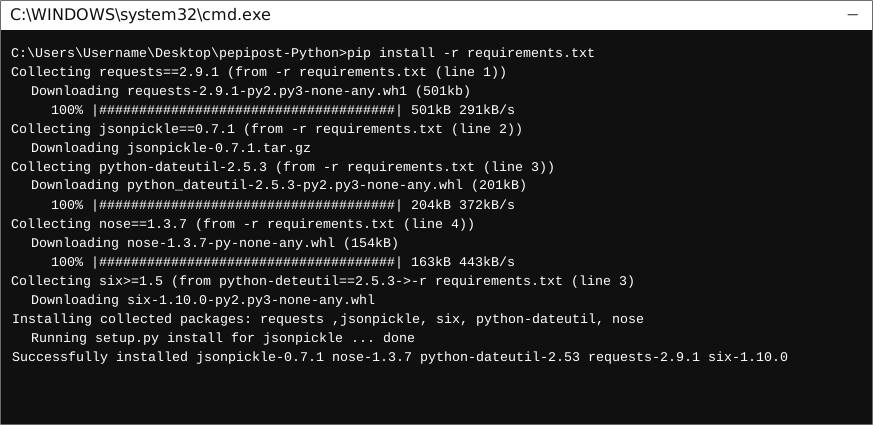\r\n\r\n **OR**\r\n\r\n Using PIP dependency manager download our official library directly from PIP \r\n\r\n Run below Command inorder to download Pepipost library.\r\n\r\n ```pip install pepipost```\r\n\r\n 2. Open Project in an IDE\r\n\r\n Open up a Python IDE like PyCharm. \r\n The basic workflow presented here is also applicable if you prefer using a different editor or IDE.\r\n\r\n 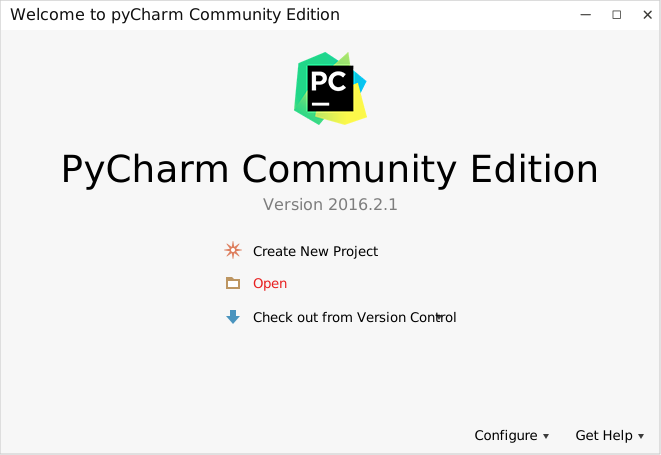\r\n\r\n Click on ```Open``` in PyCharm to browse to your generated SDK directory and then\r\n\r\n click ```OK```\r\n\r\n 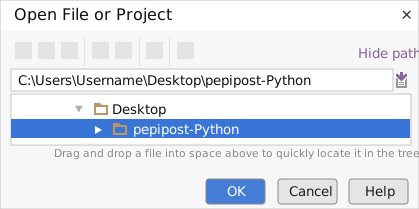 \r\n\r\n The project files will be displayed in the side bar as follows:\r\n\r\n 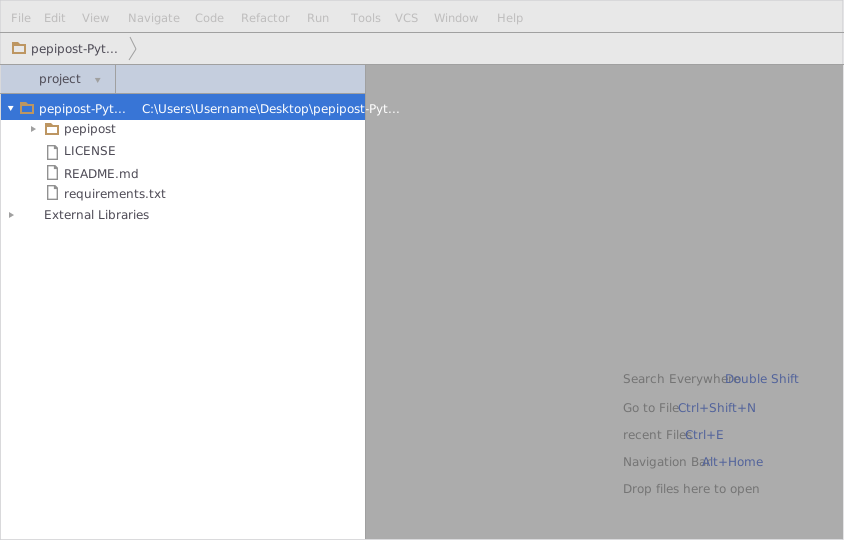 \r\n\r\n 3. Add a new Test Project\r\n\r\n Create a new directory by right clicking on the solution name as shown below:\r\n\r\n 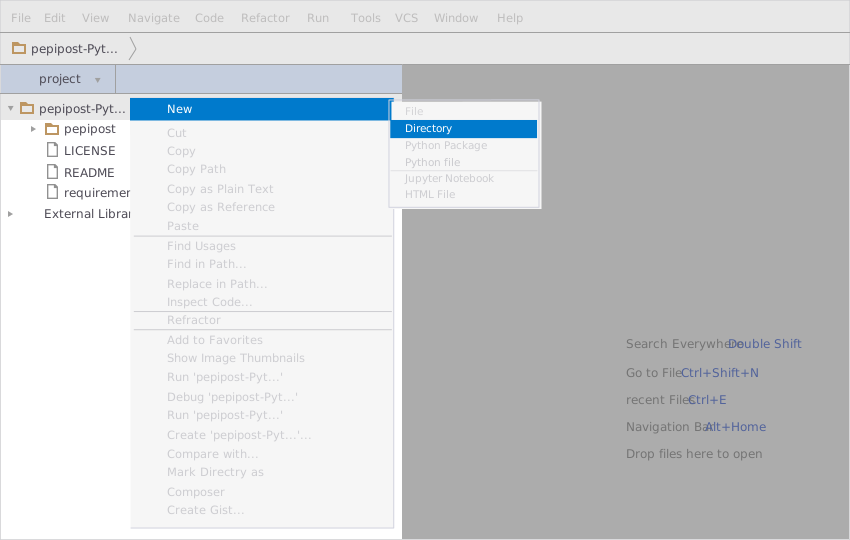\r\n\r\n Name the directory as \"test\"\r\n\r\n 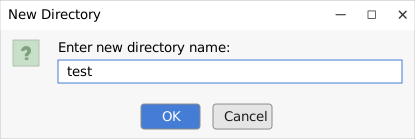\r\n\r\n Add a python file to this project with the name \"testsdk\"\r\n\r\n 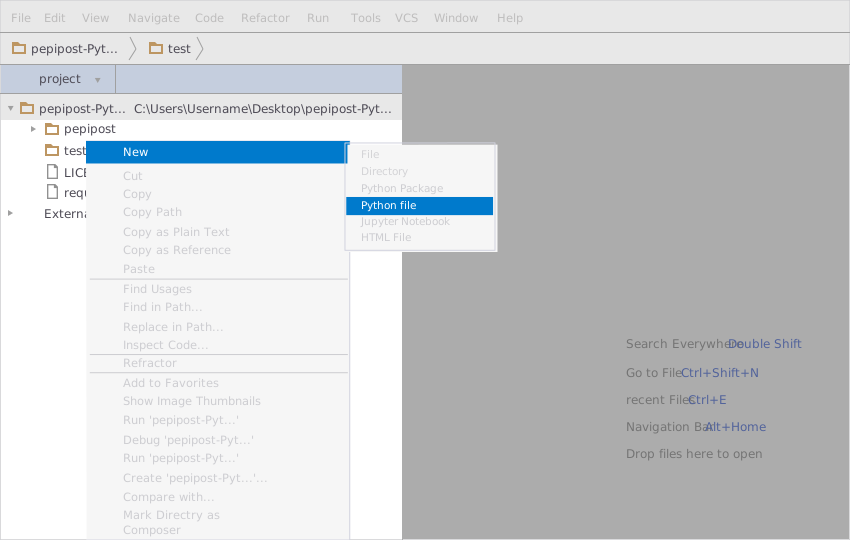\r\n\r\n Name it \"testsdk\"\r\n\r\n 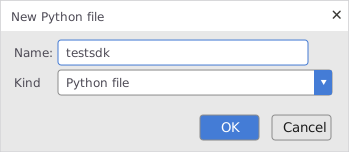\r\n\r\n 4. Importing files from python library\r\n\r\n Inorder to import file you need to just copy the [sample file from here](#sample). \r\n\r\n 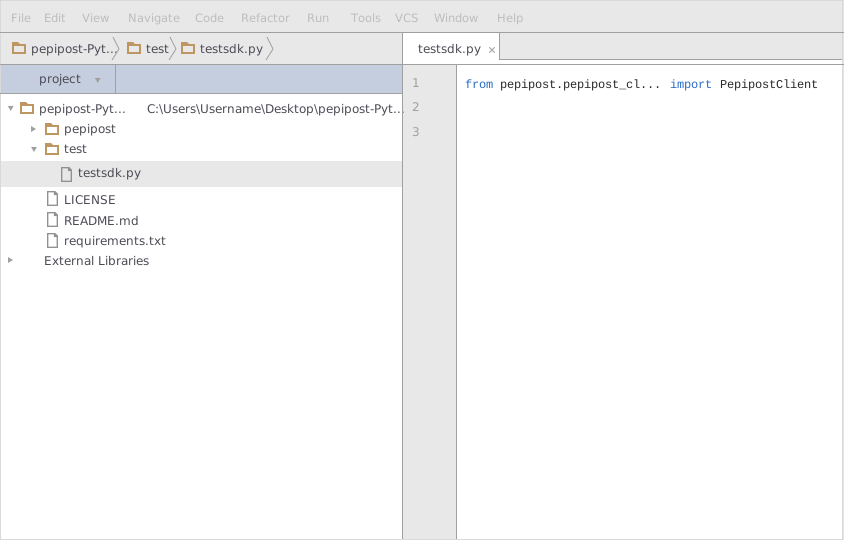\r\n\r\n 5. Update API key and Sending Domain\r\n\r\n * apikey: This will be available under: Login to your Pepipost account -> Settings -> Integration.\r\n\r\n * FromEmail: If your fromemail address is e.g. info@mydomain.com, then the Sending Domain mydomain need to be verified and active under your Pepipost account. You can manage the Sending Domain under: Login to Pepipost -> Settings -> Sending Domains.\r\n\r\n 6. Run the Test Project\r\n\r\n To run the file \r\n\r\n ```ctrl+F5```\r\n\r\n **OR** \r\n\r\n Right click on your Python file inside your Test project and click on ```Run```\r\n\r\n 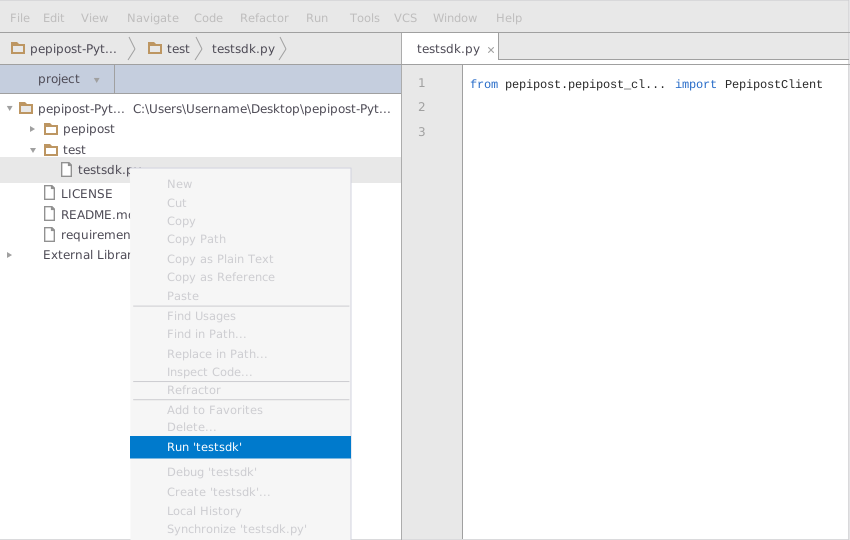\r\n\r\n\r\n### Sample Example\r\n\r\n```python\r\nfrom pepipost.pepipost_client import PepipostClient\r\nfrom pepipost.models.email_body import EmailBody\r\nfrom pepipost.models.personalizations import Personalizations\r\nfrom pepipost.models.attachments import Attachments\r\nfrom pepipost.models.mfrom import From\r\nfrom pepipost.models.email_body_attachments import EmailBodyAttachments\r\nfrom pepipost.models.settings import Settings\r\nfrom pepipost.exceptions.api_exception import APIException\r\nimport jsonpickle\r\n\r\nclient = PepipostClient()\r\nemail_controller = client.email\r\nbody = EmailBody()\r\nbody.personalizations = []\r\n\r\napi_key = 'api_key here '\r\nbody.personalizations.append(Personalizations())\r\nbody.personalizations[0].recipient = 'recipient@your-mail.com'\r\n\r\nbody.tags = 'tagsPython'\r\nbody.mfrom = From()\r\n\r\nbody.mfrom.from_email = 'example@your-verified-domain'\r\nbody.mfrom.from_name = 'Example Pepi'\r\nbody.subject = 'Emailing with Pepipost is easy'\r\nbody.content = 'Hey,
Do you know integration is even simpler in Pepipost,
with Python
Happy Mailing !
Pepipost '\r\nbody.settings = Settings()\r\n\r\nbody.settings.footer = 1\r\nbody.settings.clicktrack = 1\r\nbody.settings.opentrack = 1\r\nbody.settings.unsubscribe = 1\r\n\r\ntry:\r\n result = email_controller.create_send_email(api_key, body)\r\n if not (result.error_info.error_message is None):\r\n print(\"Reason :: \" + str(result.error_info.error_message) + \"\\n\" + \"Message :: \" + str(result.message))\r\n else:\r\n print(\"Message :: \" + result.message)\r\nexcept APIException as e:\r\n print(e)\r\n\r\n```\r\n\r\n\r\n# Announcements\r\n\r\nv2.5.0 has been released! Please see the [release notes](https://github.com/pepipost/pepipost-sdk-csharp/releases/tag/v2.5.0) for details.\r\n\r\nAll updates to this library are documented in our [releases](https://github.com/pepipost/pepipost-sdk-csharp/releases). For any queries, feel free to reach out us at dx@pepipost.com\r\n\r\n\r\n## Roadmap\r\n\r\nIf you are interested in the future direction of this project, please take a look at our open [issues](https://github.com/pepipost/pepipost-sdk-csharp/issues) and [pull requests](https://github.com/pepipost/pepipost-sdk-csharp/pulls). We would love to hear your feedback.\r\n\r\n\r\n## About\r\npepipost-php-sdk library is guided and supported by the [Pepipost Developer Experience Team](https://github.com/orgs/pepipost/teams/pepis/members) .\r\nThis pepipost-php-sdk library is maintained and funded by Pepipost Ltd. The names and logos for pepipost-php-sdk are trademarks of Pepipost Ltd.\r\n\r\n\r\n## License\r\nThis code library was semi-automatically generated by APIMATIC v2.0 and licensed under The MIT License (MIT). \r\n\r\n\r\n\r\n\r\n\r\n\r\n\r\n",
"description_content_type": "text/markdown",
"docs_url": null,
"download_url": "",
"downloads": {
"last_day": -1,
"last_month": -1,
"last_week": -1
},
"home_page": "https://pepipost.com/",
"keywords": "",
"license": "",
"maintainer": "vikramsahu",
"maintainer_email": "",
"name": "pepipost",
"package_url": "https://pypi.org/project/pepipost/",
"platform": "",
"project_url": "https://pypi.org/project/pepipost/",
"project_urls": {
"Homepage": "https://pepipost.com/"
},
"release_url": "https://pypi.org/project/pepipost/2.5.0/",
"requires_dist": [
"requests (<3.0,>=2.9.1)",
"jsonpickle (<1.0,>=0.7.1)",
"cachecontrol (<1.0,>=0.11.7)",
"python-dateutil (<3.0,>=2.5.3)"
],
"requires_python": "",
"summary": "Official Python Library by Pepipost for sending email using Web API v2",
"version": "2.5.0"
},
"last_serial": 4296039,
"releases": {
"2.5.0": [
{
"comment_text": "",
"digests": {
"md5": "45338992786b13aea37e5efc2c0d04da",
"sha256": "17939c4ce1fe69da56b8d55eaa7d63411476157d9bfe5980062cb9fa8762c7af"
},
"downloads": -1,
"filename": "pepipost-2.5.0-py2-none-any.whl",
"has_sig": false,
"md5_digest": "45338992786b13aea37e5efc2c0d04da",
"packagetype": "bdist_wheel",
"python_version": "py2",
"requires_python": null,
"size": 27563,
"upload_time": "2018-09-19T10:03:27",
"url": "https://files.pythonhosted.org/packages/6e/0d/d9aa345ff34540bd7f7f6ec141fd913e1ec2466638d482b95ac245d2bac1/pepipost-2.5.0-py2-none-any.whl"
},
{
"comment_text": "",
"digests": {
"md5": "c453ab8b87f0d6d7d155e16410caa239",
"sha256": "5b3001bd63a23793109181edd55b373f059b889a2e9e67f4f6542a2181863220"
},
"downloads": -1,
"filename": "pepipost-2.5.0.tar.gz",
"has_sig": false,
"md5_digest": "c453ab8b87f0d6d7d155e16410caa239",
"packagetype": "sdist",
"python_version": "source",
"requires_python": null,
"size": 15611,
"upload_time": "2018-09-19T10:03:29",
"url": "https://files.pythonhosted.org/packages/c7/69/9e2b7e3aacbd47ba63cdb04396a7280e75a16e07fb95edfb6e0e1012e5a1/pepipost-2.5.0.tar.gz"
}
]
},
"urls": [
{
"comment_text": "",
"digests": {
"md5": "45338992786b13aea37e5efc2c0d04da",
"sha256": "17939c4ce1fe69da56b8d55eaa7d63411476157d9bfe5980062cb9fa8762c7af"
},
"downloads": -1,
"filename": "pepipost-2.5.0-py2-none-any.whl",
"has_sig": false,
"md5_digest": "45338992786b13aea37e5efc2c0d04da",
"packagetype": "bdist_wheel",
"python_version": "py2",
"requires_python": null,
"size": 27563,
"upload_time": "2018-09-19T10:03:27",
"url": "https://files.pythonhosted.org/packages/6e/0d/d9aa345ff34540bd7f7f6ec141fd913e1ec2466638d482b95ac245d2bac1/pepipost-2.5.0-py2-none-any.whl"
},
{
"comment_text": "",
"digests": {
"md5": "c453ab8b87f0d6d7d155e16410caa239",
"sha256": "5b3001bd63a23793109181edd55b373f059b889a2e9e67f4f6542a2181863220"
},
"downloads": -1,
"filename": "pepipost-2.5.0.tar.gz",
"has_sig": false,
"md5_digest": "c453ab8b87f0d6d7d155e16410caa239",
"packagetype": "sdist",
"python_version": "source",
"requires_python": null,
"size": 15611,
"upload_time": "2018-09-19T10:03:29",
"url": "https://files.pythonhosted.org/packages/c7/69/9e2b7e3aacbd47ba63cdb04396a7280e75a16e07fb95edfb6e0e1012e5a1/pepipost-2.5.0.tar.gz"
}
]
}