{
"info": {
"author": "ComFreek",
"author_email": "comfreek@outlook.com",
"bugtrack_url": null,
"classifiers": [
"Development Status :: 4 - Beta",
"Intended Audience :: End Users/Desktop",
"Intended Audience :: Science/Research",
"License :: OSI Approved :: ISC License (ISCL)",
"Operating System :: OS Independent",
"Programming Language :: Python",
"Programming Language :: Python :: 3.6",
"Programming Language :: Python :: 3.7",
"Topic :: Documentation",
"Topic :: Multimedia :: Graphics :: Presentation"
],
"description": " [](https://travis-ci.org/ComFreek/mmtpygments)\n[](https://app.codacy.com/app/ComFreek/mmtpygments?utm_source=github.com&utm_medium=referral&utm_content=ComFreek/mmtpygments&utm_campaign=Badge_Grade_Dashboard)\n\n[](http://makeapullrequest.com)\n | [GitHub Repo](https://github.com/ComFreek/mmtpygments) | [Collection of rendered codes](https://comfreek.github.io/mmtpygments/mmtpygments/test/index.html)\n\n# mmtpygments: Pygments plugin for MMT surface syntax\n\nTo support syntax highlighting of the [MMT Surface Syntax](https://uniformal.github.io/doc/language/) from the [MMT project](https://uniformal.github.io/) this package is a Pygments plugin including\n\n- a Pygments lexer (`mmt`)\n- a recommended Pygments style for it (`mmtdefault`)\n- and experimentally a Pygments lexer for MMT relational data (`mmtrel`).\n\n**Collection of rendered codes:** [click here](https://comfreek.github.io/mmtpygments/mmtpygments/test/index.html)
\n**Screenshot:**
\n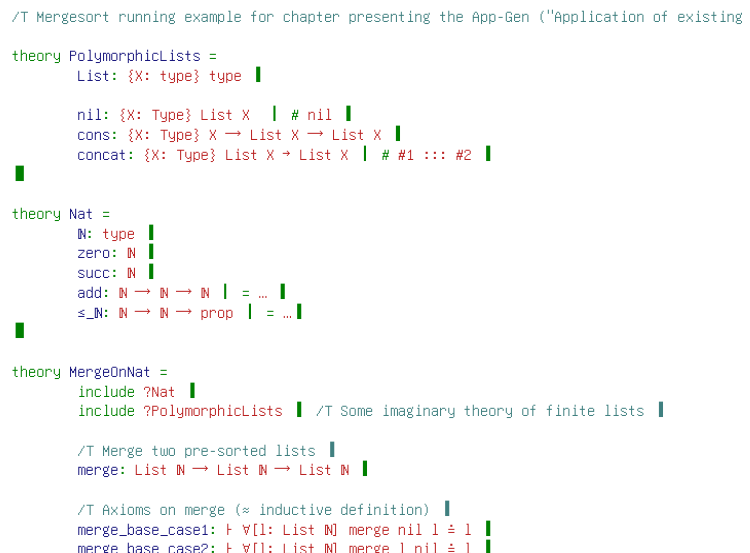\n\n## Installation\n\n### Via Pip (recommended)\n\n1. `pip install Pygments mmtpygments`\n2. Use as you wish with Pygments, e.g. run on CLI:\n\n `pygmentize -f html -l mmt -O full,style=mmtdefault -o test.html test.mmt`\n\n This tells Pygments to use the HTML formatter (`-f`), the MMT lexer (`-l`) and to output a full HTML file using the `mmtdefault` style (`-O`) rendered of `test.mmt` into `test.html` (`-o`).\n\n## Usage in LaTeX with minted\n\n[minted](https://ctan.org/pkg/minted) is a LaTeX package rendering codes with Pygments as the backend.\n\n```tex\n% You MUST USE XeLaTeX (or any other LaTeX-derivative which supports Unicode)\n\\usepackage{fontspec}\n\n% Download GNU Unifont from http://unifoundry.com/unifont/index.html\n% And save it, say, as \"fonts/unifont-12.1.02.ttf\"\n\\newfontfamily\\unifont{unifont-12.1.02.ttf}[Path=./fonts/,NFSSFamily=unifont]\n\n% Disable caching for debugging purposes (increases compilation times!)\n\\usepackage[cache=false]{minted}\n\\setminted{\n\tfontfamily=unifont\n}\n\n\\newminted[mmtcode]{mmt}{}\n\\newmintinline[mmtinline]{mmt}{}\n\\newmintedfile[mmtfile]{mmt}{}\n\n\\begin{document}\n\t% Variant 1: Code given in LaTeX, rendered in display mode\n\t\\begin{mmtcode}\n\t\ttheory MyTheory = c : type \u2758 # abc \u2759\u275a\n\t\\end{mmtcode}\n\n\t% Variant 2: Code given in LaTeX, rendered inline\n\t% You can use any delimiter you like, here we use /\n\t\\mmtinline/theory MyTheory = c : type \u2758 # abc \u2759\u275a/\n\n\t% Variant 3: Code given externally in file, rendered in display mode\n\t\\mmtfile{your-mmt-file.mmt}\n\\end{document}\n```\n\n**LaTeX Beamer**: Use the `fragile` option for frames embedding codes: `\\begin{frame}[fragile] ... \\end{frame}`\n\nSee the [minted manual](https://ctan.org/pkg/minted) for more information on how to customize it.\n\n#### Common Error: Rendered PDF shows tab characters of source\n\nIf you tab characters in the MMT source being highlighted and they are shown in the PDF rendered by XeLaTeX, you face a known bug of XeLaTeX ([\\[1\\]](https://tex.stackexchange.com/a/36872/38074), [\\[2\\]](https://tex.stackexchange.com/a/14776/38074)). It can be solved by passing `-8bit` to XeLaTeX.\n\n\n\n## Development\n\n1. Install [pipenv](https://github.com/pypa/pipenv), which provides a consistent Python, pip and package environment locked in the committed `Pipfile` and `Pipfile.lock` files.\n2. `git submodule init`\n3. `git submodule update`\n\n### Testing\n\n1. `cd mmtpygments/test`\n2. `pipenv run python test.py ./` (returns non-zero exit code on failure)\n3. Open `index.html` in a browser to see failures visually (red rectangles).\n\nThis [`test.py`](mmtpygments/test/test.py) runs the lexer on large MMT archives containing a lot of MMT surface syntax. It recursively searches for MMT files in `mmtpygments/test/data`, on which it then runs the provided lexer and Pygment's HtmlFormatter. The rendered versions are written next to the original `*.mmt` files with an `.html` extension. Furthermore, `index.html` and `amalgamation.html` are generated to link and display the results, respectively.\n\nThe Travis build automatically runs [`test.py`](mmtpygments/test/test.py) and deploys the results on the `gh-pages` branch, see and especially .\n\n## Development\n\nFor tinkering and testing the lexer, it is recommended to employ the same testing infrastructure as described above. Even though the Travis build fails on lexing error, [`test.py`](mmtpygments/test/test.py) actually doesn't -- it just returns a non-zero exit code. In fact, it even generates the HTML renderings with red rectangles around lexing errors. Hence, while tinkering with the lexer, just regularly run [`test.py`](mmtpygments/test/test.py) and look at the `index.html` locally in your browser to see any errors.\n\n## Publishing\n\n```bash\n# Packaging\n$ pipenv run python setup.py sdist bdist_wheel\n\n# Checking if packages are okay (PyPi server will do the same)\n$ pipenv run twine check dist/*\n\n# Upload to Test PyPi repository\n$ pipenv run twine upload --repository-url https://test.pypi.org/legacy/ dist/*\n\n# Upload to real PyPi repository\n$ pipenv run twine upload dist/*\n```\n\n## For future maintainers: necessary changes in case of repository movement\n\nIn case you wish to host this repository or a fork thereof somewhere else, these are the places where you have to make changes:\n\n - `README.md`: Change all links to deployed `gh-pages` branch render results accordingly.\n - `.travis.yml`: Change the base path with which `python test.py` is run to your hosting URI.\n\n\n",
"description_content_type": "text/markdown",
"docs_url": null,
"download_url": "",
"downloads": {
"last_day": -1,
"last_month": -1,
"last_week": -1
},
"home_page": "https://github.com/ComFreek/mmtpygments",
"keywords": "pygments highlighting mmt minted",
"license": "",
"maintainer": "ComFreek",
"maintainer_email": "comfreek@outlook.com",
"name": "mmtpygments",
"package_url": "https://pypi.org/project/mmtpygments/",
"platform": "",
"project_url": "https://pypi.org/project/mmtpygments/",
"project_urls": {
"Homepage": "https://github.com/ComFreek/mmtpygments"
},
"release_url": "https://pypi.org/project/mmtpygments/0.2.0/",
"requires_dist": [
"pygments"
],
"requires_python": ">=3.6",
"summary": "Pygments plugin for MMT surface syntax (lexer & style)",
"version": "0.2.0"
},
"last_serial": 5802428,
"releases": {
"0.2.0": [
{
"comment_text": "",
"digests": {
"md5": "8e7312d98910e54f1ccf058d10f6670e",
"sha256": "2d7583b987f1a6ba38e29240454c5e027143e9828cfb7d957de9f6a133154078"
},
"downloads": -1,
"filename": "mmtpygments-0.2.0-py3-none-any.whl",
"has_sig": false,
"md5_digest": "8e7312d98910e54f1ccf058d10f6670e",
"packagetype": "bdist_wheel",
"python_version": "py3",
"requires_python": ">=3.6",
"size": 10678,
"upload_time": "2019-09-09T08:24:20",
"url": "https://files.pythonhosted.org/packages/d9/78/ec27b1d01071a2e550d5fb3422297150f61074ed941b04f2cba36dee0ec5/mmtpygments-0.2.0-py3-none-any.whl"
},
{
"comment_text": "",
"digests": {
"md5": "39410a5ee8111b26246ee78336f75678",
"sha256": "4e07b7ccb0ce69b928ba48c1e42da9f42b0dc57897ba167a8e95c7fc60cb42dd"
},
"downloads": -1,
"filename": "mmtpygments-0.2.0.tar.gz",
"has_sig": false,
"md5_digest": "39410a5ee8111b26246ee78336f75678",
"packagetype": "sdist",
"python_version": "source",
"requires_python": ">=3.6",
"size": 9358,
"upload_time": "2019-09-09T08:24:22",
"url": "https://files.pythonhosted.org/packages/50/ba/b5dc6a8093676dcf46fe34ce6139a104cb3f8deb337b7d4ba055242c441a/mmtpygments-0.2.0.tar.gz"
}
]
},
"urls": [
{
"comment_text": "",
"digests": {
"md5": "8e7312d98910e54f1ccf058d10f6670e",
"sha256": "2d7583b987f1a6ba38e29240454c5e027143e9828cfb7d957de9f6a133154078"
},
"downloads": -1,
"filename": "mmtpygments-0.2.0-py3-none-any.whl",
"has_sig": false,
"md5_digest": "8e7312d98910e54f1ccf058d10f6670e",
"packagetype": "bdist_wheel",
"python_version": "py3",
"requires_python": ">=3.6",
"size": 10678,
"upload_time": "2019-09-09T08:24:20",
"url": "https://files.pythonhosted.org/packages/d9/78/ec27b1d01071a2e550d5fb3422297150f61074ed941b04f2cba36dee0ec5/mmtpygments-0.2.0-py3-none-any.whl"
},
{
"comment_text": "",
"digests": {
"md5": "39410a5ee8111b26246ee78336f75678",
"sha256": "4e07b7ccb0ce69b928ba48c1e42da9f42b0dc57897ba167a8e95c7fc60cb42dd"
},
"downloads": -1,
"filename": "mmtpygments-0.2.0.tar.gz",
"has_sig": false,
"md5_digest": "39410a5ee8111b26246ee78336f75678",
"packagetype": "sdist",
"python_version": "source",
"requires_python": ">=3.6",
"size": 9358,
"upload_time": "2019-09-09T08:24:22",
"url": "https://files.pythonhosted.org/packages/50/ba/b5dc6a8093676dcf46fe34ce6139a104cb3f8deb337b7d4ba055242c441a/mmtpygments-0.2.0.tar.gz"
}
]
}