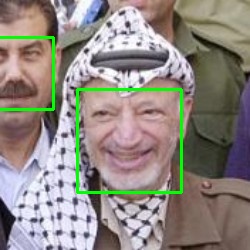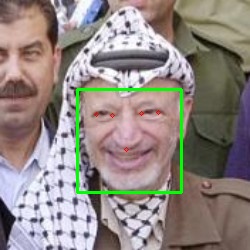
{ "info": { "author": "Luis Rojas Aguilera", "author_email": "rojas@icomp.ufam.edu.br", "bugtrack_url": null, "classifiers": [ "License :: OSI Approved :: MIT License", "Operating System :: OS Independent", "Programming Language :: Python :: 3" ], "description": "## Face Detector\n\nPython package and Command Line Tool for state-of-the-art face detection and face\nlandmark points localization. It gathers the techniques implemented in dlib and\nmtcnn, which can be easily switched between by setting a parameter in the\nFaceDetector class instantiation (dlib\\_5 is default if no technique is\nspecified, use dlib\\_5 for dlib with 5 landmarks and dlib\\_68 for dlib with 68\nlandmarks).\n\n## How to Install:\n\n First install C compiler:\n sudo apt-get install cmake, g++\n\n Then this package:\n pip install face-detector\n\n## How to Use python package:\n\n from face_detector import FaceDetector\n\n img_addr = \"path/to/image.[jpg/png/jpeg ...]\"\n\n # First parameter in FaceDetector constructor specifies face detection method (dlib: fl_5 or fl_68, mtcnn is default: mtcnn)\n face_detector = FaceDetector()\n faces = face_detector.get_faces(img_addr)\n\n # Or to get the most prominent face in photo\n main_face = face_detector.get_main_face(img_addr)\n\n # Show image with bounding boxes and landmarks\n import cv2\n img = cv2.imread(img_addr)\n\n for face in faces:\n bb = face.bounding_box\n landmarks = face.landmarks\n cv2.rectangle(img, (int(bb.x), int(bb.y)), (int(bb.x + bb.w), int(bb.y+bb.h)), (0, 255, 0), 1)\n for l in landmarks:\n cv2.circle(img, (l.x, l.y), 2, (0,0,255))\n\n cv2.imshow('img', img)\n cv2.waitKey(0)\n cv2.destroyAllWindows()\n\n## How to use Command Line Tool\n\n```console\n foo@bar:~$ facedetector /home/foo/images/Yasser_Arafat.jpg\n```\nThe previous command will display the image passed in arguments with a bounding box wrapping every face in the image. Fig. 1 shows the image displayed.\n\n
Fig. 1 Face detections as outputted by facedetector command line tool
\n
Fig. 2 Face detections and landmarks as outputted by facedetector with -l (--landmarks) and -j (--only-main-face) options
\n