{
"info": {
"author": "Jacob Rief",
"author_email": "jacob.rief@gmail.com",
"bugtrack_url": null,
"classifiers": [
"Development Status :: 4 - Beta",
"Environment :: Web Environment",
"Framework :: Django",
"Framework :: Django :: 1.10",
"Framework :: Django :: 1.11",
"Framework :: Django :: 2.0",
"Framework :: Django :: 2.1",
"Framework :: Django :: 2.2",
"Intended Audience :: Developers",
"License :: OSI Approved :: MIT License",
"Operating System :: OS Independent",
"Programming Language :: Python",
"Programming Language :: Python :: 2.7",
"Programming Language :: Python :: 3.4",
"Programming Language :: Python :: 3.5",
"Programming Language :: Python :: 3.6",
"Programming Language :: Python :: 3.7",
"Topic :: Internet :: WWW/HTTP :: Dynamic Content"
],
"description": "# djangocms-bootstrap\n\nSome templates and templatetags to be used with django-CMS and Bootstrap3/Bootstrap4.\n\nDjango-CMS is frontend agnostic, which is a good thing. However, in combination with Bootstrap3/4\nthe menu structure does not quite fit. This is because Bootstrap3/4 only allows one nested menu level.\n\n[]()\n[](https://https://pypi.python.org/pypi/djangocms-bootstrap)\n[]()\n[](https://twitter.com/jacobrief)\n\n\n## Rendering a django-CMS menu\n\n**djangocms-bootstrap** adds a few modified templatetags, which render the existing page tree into a\nmenu structure, suitable for the navbar in Bootstrap3/4.\n\nWith the concept of *mobile first*, there is no mouse-over event we could use to open a drop-down\nelement showing the sub-menu-items. Instead the user has to click onto the main menu item in order\nto open a drop-down element. Now however, there wouldn't be any more distinction between clicking\nonto a menu-item to either open the drop-down or to click onto the page referenced by that menu\nitem.\n\n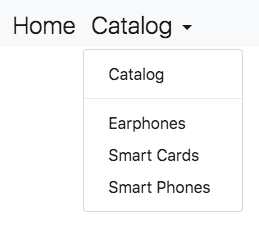\n\nIn this example **djangocms-bootstrap** uses a special templatetag to render the navbar. Here the\nCMS page *Catalog* has three children. Clicking onto *Catalog* in the navbar, opens a drop-down menu,\nwhich contains another entry for *Catalog*. This is the link which sends us onto the desired page.\nUsing this approach we can navigate through a django-CMS page-tree, without having to use the\nmouse-over effect to open drop-down menus.\n\n\n### Usage\n\nRendering the navbar to show a menu to navigate though the page-tree in **django-CMS**: \n\n```html\n{% load bootstrap_tags %}\n\n
\n \n
\n```\n\nThe templatetag `{% main_menu ... %}` takes an extra parameter, `template`, which can be used to\nfine-tune the rendering of the navigation items. Also note that only CMS pages, where the checkbox\nfor \"Menu\" is active, show up in the navbar.\n\nIn Bootstrap-3 and 4, the navigation bar normally is much more than the short snippet shown above.\nTherefore **djangocms-bootstrap** is shipped with two HTML snippets, which do the heavy lifting and\nwhich shall be included in the base template of your project. By using\n`{% include \"bootstrap4/includes/nav-navbar.html\" %}` in addition to the navbar, a branding icon\nand a navbar toggle button is rendered, all according to the Bootstrap's style guides.\n\nBy appending `with navbar_classes=\"navbar-light bg-light fixed-top\"` to the `include` statement,\none can style the navbar using the provided CSS classes.\n\n\n## Chosing the language in django-CMS\n\nIf **django-CMS** is configured to run in a multilingual environment, often it is desirable to add\nan option, allowing the user the select his native language. For this purpose **djangocms-bootstrap**\noffers a templatetag `language_chooser` rendering a drop-down menu with all languages available\nthrough the CMS. To render this select options, add this HTML snippet inside or above of the main\nnavbar:\n\n```html\n{% language_chooser \"bootstrap4/includes/language-chooser.html\" %}\n```\n\n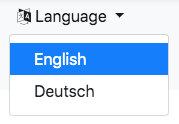\n\n\n## Render secondary menus\n\nWrite the docs.\n\n\n## Rendering a paginator\n\nThe Django list view class `django.views.generic.ListView`, by default adds a Paginator object to\nthe rendering context, if there is the member attribute `paginate_by = ...`. To render this\npaginator following Bootstrap's best practices, add this HTML snippet above or below the list of\nitems you are going to render:\n\n```html\n{% load bootstrap_tags %}\n\n\n```\n\n\n\nBy prepending `{% with paginator_classes=\"pagination justify-content-center\" %}` to the `paginator`\nstatement, one can style the paginator using the provided CSS classes. Don't forget to append\n`{% endwith %}` afterwards.",
"description_content_type": "text/markdown",
"docs_url": null,
"download_url": "",
"downloads": {
"last_day": -1,
"last_month": -1,
"last_week": -1
},
"home_page": "https://github.com/jrief/djangocms-bootstrap",
"keywords": "django-cms,bootstrap-3,bootstrap-4",
"license": "MIT",
"maintainer": "",
"maintainer_email": "",
"name": "djangocms-bootstrap",
"package_url": "https://pypi.org/project/djangocms-bootstrap/",
"platform": "OS Independent",
"project_url": "https://pypi.org/project/djangocms-bootstrap/",
"project_urls": {
"Homepage": "https://github.com/jrief/djangocms-bootstrap"
},
"release_url": "https://pypi.org/project/djangocms-bootstrap/1.1.2/",
"requires_dist": null,
"requires_python": "",
"summary": "Templates and templatetags to be used with django-CMS with Bootstrap3 or Bootstrap4.",
"version": "1.1.2"
},
"last_serial": 6004622,
"releases": {
"0.1.0": [
{
"comment_text": "",
"digests": {
"md5": "774136668fa4b080c7f5ad106f3dec8c",
"sha256": "c4a1389b03e1b687a9f9e69c5875c09845e3b26adcd3e0bc6ba96e82b1e7df92"
},
"downloads": -1,
"filename": "djangocms-bootstrap-0.1.0.tar.gz",
"has_sig": false,
"md5_digest": "774136668fa4b080c7f5ad106f3dec8c",
"packagetype": "sdist",
"python_version": "source",
"requires_python": null,
"size": 6680,
"upload_time": "2013-10-16T19:54:14",
"url": "https://files.pythonhosted.org/packages/16/9f/a019222ac8255d46c4e9b248b57662f663be0bc1b62851bffd3120725bfd/djangocms-bootstrap-0.1.0.tar.gz"
}
],
"0.1.1": [
{
"comment_text": "",
"digests": {
"md5": "7240540f7f9a335a47a7d2023838a013",
"sha256": "44c660b9a605f2c7a0fd6856477b5fd06eff1a47842e3a1b659e19913786023e"
},
"downloads": -1,
"filename": "djangocms-bootstrap-0.1.1.tar.gz",
"has_sig": false,
"md5_digest": "7240540f7f9a335a47a7d2023838a013",
"packagetype": "sdist",
"python_version": "source",
"requires_python": null,
"size": 6796,
"upload_time": "2013-10-18T15:17:36",
"url": "https://files.pythonhosted.org/packages/c8/69/8343be793f4a1ffe6e90372431361c8c95270c50d9c63f8744b1ef502fc0/djangocms-bootstrap-0.1.1.tar.gz"
}
],
"0.2.0": [
{
"comment_text": "",
"digests": {
"md5": "3074419a1e5df3c34f3ae8fdca7d8b7d",
"sha256": "91f21197e405de27f6ebb5850f269ce1229cd3e52f49621a42308f5688ba1311"
},
"downloads": -1,
"filename": "djangocms-bootstrap-0.2.0.tar.gz",
"has_sig": false,
"md5_digest": "3074419a1e5df3c34f3ae8fdca7d8b7d",
"packagetype": "sdist",
"python_version": "source",
"requires_python": null,
"size": 7735,
"upload_time": "2013-11-07T15:19:15",
"url": "https://files.pythonhosted.org/packages/df/de/181264420196439669ebe2d8a905cd48dcd8117ba043b9831f547b6fc4ea/djangocms-bootstrap-0.2.0.tar.gz"
}
],
"0.2.1": [
{
"comment_text": "",
"digests": {
"md5": "8c7b0940926c08b1e8be8f252e91374b",
"sha256": "7d3954a3dd63879dcba8538c64b4c7ab95ce0d35571d5db09e247f512ce013ca"
},
"downloads": -1,
"filename": "djangocms-bootstrap-0.2.1.tar.gz",
"has_sig": false,
"md5_digest": "8c7b0940926c08b1e8be8f252e91374b",
"packagetype": "sdist",
"python_version": "source",
"requires_python": null,
"size": 8460,
"upload_time": "2013-11-22T10:48:51",
"url": "https://files.pythonhosted.org/packages/29/96/b742c5646c4b7a497543d8f2a0441ab1dc3f90bc128153d94977859f252f/djangocms-bootstrap-0.2.1.tar.gz"
}
],
"1.0": [
{
"comment_text": "",
"digests": {
"md5": "f8998447f47e7afb72793941aaf43479",
"sha256": "3eb9366e2d99e7b190208aa1bae0e73645878f0a529fe7eded3cd60c646ad2f9"
},
"downloads": -1,
"filename": "djangocms-bootstrap-1.0.tar.gz",
"has_sig": false,
"md5_digest": "f8998447f47e7afb72793941aaf43479",
"packagetype": "sdist",
"python_version": "source",
"requires_python": null,
"size": 7730,
"upload_time": "2018-11-05T13:16:59",
"url": "https://files.pythonhosted.org/packages/08/54/edddf2872feb18dd1d6e32b1ce4a0103eb70f9c764d94f6c71868c9a23aa/djangocms-bootstrap-1.0.tar.gz"
}
],
"1.0.1": [
{
"comment_text": "",
"digests": {
"md5": "6b20e987649e0795b479c145e10d1e62",
"sha256": "973205cef0595c10d6f9415916f5ba4b05eda93cf2c72a841f8a3ec5475c0d0c"
},
"downloads": -1,
"filename": "djangocms-bootstrap-1.0.1.tar.gz",
"has_sig": false,
"md5_digest": "6b20e987649e0795b479c145e10d1e62",
"packagetype": "sdist",
"python_version": "source",
"requires_python": null,
"size": 8072,
"upload_time": "2019-01-09T17:40:05",
"url": "https://files.pythonhosted.org/packages/15/73/ec08c5a4fd08f57bdfbf59b85195e9cc9bcca92e8b80a1333147397f3ba1/djangocms-bootstrap-1.0.1.tar.gz"
}
],
"1.0.2": [
{
"comment_text": "",
"digests": {
"md5": "64419d472e801ff6b0faabc7e475bf2e",
"sha256": "dac78892eedfd38f43d57449cd454172f5a36d94c80244c570b403d687f4b0ab"
},
"downloads": -1,
"filename": "djangocms-bootstrap-1.0.2.tar.gz",
"has_sig": false,
"md5_digest": "64419d472e801ff6b0faabc7e475bf2e",
"packagetype": "sdist",
"python_version": "source",
"requires_python": null,
"size": 8461,
"upload_time": "2019-03-06T10:03:57",
"url": "https://files.pythonhosted.org/packages/db/e8/858120644ffdf936f8b3f1bd17ae7e426d804bc83630e4274cfee885a7a4/djangocms-bootstrap-1.0.2.tar.gz"
}
],
"1.1": [
{
"comment_text": "",
"digests": {
"md5": "9efd6f6ed9dd7d967ce0c03c5959eb5e",
"sha256": "9aabcc1a90d169087fa8d6a5998fa36d0266392b50cf8300b71def0f6e91c4d4"
},
"downloads": -1,
"filename": "djangocms-bootstrap-1.1.tar.gz",
"has_sig": false,
"md5_digest": "9efd6f6ed9dd7d967ce0c03c5959eb5e",
"packagetype": "sdist",
"python_version": "source",
"requires_python": null,
"size": 9985,
"upload_time": "2019-05-20T16:25:29",
"url": "https://files.pythonhosted.org/packages/b1/6a/884fabdd18de8305dac1662962800d0c9a6c6c0f9d023f596bf60f766b19/djangocms-bootstrap-1.1.tar.gz"
}
],
"1.1.1": [
{
"comment_text": "",
"digests": {
"md5": "6f2ee5ccd52349b7663c7fbcb998ddb9",
"sha256": "57084cfc7076afa67495b79b717af8ca26835cacc373dd528c3006bd5247aed6"
},
"downloads": -1,
"filename": "djangocms-bootstrap-1.1.1.tar.gz",
"has_sig": false,
"md5_digest": "6f2ee5ccd52349b7663c7fbcb998ddb9",
"packagetype": "sdist",
"python_version": "source",
"requires_python": null,
"size": 10012,
"upload_time": "2019-06-12T19:12:35",
"url": "https://files.pythonhosted.org/packages/ff/bc/a8f6acf8629ecad031303f51c3daf46d2b699cca4a3d545cb6f0c428cb0d/djangocms-bootstrap-1.1.1.tar.gz"
}
],
"1.1.2": [
{
"comment_text": "",
"digests": {
"md5": "d596908c362811b043cbfab311e47526",
"sha256": "60e0802111df17298933104fdc73fc7bb74924e435d5c025b3a12a29a10e6761"
},
"downloads": -1,
"filename": "djangocms-bootstrap-1.1.2.tar.gz",
"has_sig": false,
"md5_digest": "d596908c362811b043cbfab311e47526",
"packagetype": "sdist",
"python_version": "source",
"requires_python": null,
"size": 9984,
"upload_time": "2019-10-20T20:41:34",
"url": "https://files.pythonhosted.org/packages/ab/a8/185d9ef27cbdc2e83bbf88bc62c19981e58de071ff1d0973c6945a6031fa/djangocms-bootstrap-1.1.2.tar.gz"
}
]
},
"urls": [
{
"comment_text": "",
"digests": {
"md5": "d596908c362811b043cbfab311e47526",
"sha256": "60e0802111df17298933104fdc73fc7bb74924e435d5c025b3a12a29a10e6761"
},
"downloads": -1,
"filename": "djangocms-bootstrap-1.1.2.tar.gz",
"has_sig": false,
"md5_digest": "d596908c362811b043cbfab311e47526",
"packagetype": "sdist",
"python_version": "source",
"requires_python": null,
"size": 9984,
"upload_time": "2019-10-20T20:41:34",
"url": "https://files.pythonhosted.org/packages/ab/a8/185d9ef27cbdc2e83bbf88bc62c19981e58de071ff1d0973c6945a6031fa/djangocms-bootstrap-1.1.2.tar.gz"
}
]
}