{
"info": {
"author": "Daniel F. Moisset",
"author_email": "dmoisset@machinalis.com",
"bugtrack_url": null,
"classifiers": [
"Development Status :: 4 - Beta",
"Environment :: Web Environment",
"Framework :: Django",
"Intended Audience :: Developers",
"License :: OSI Approved :: BSD License",
"Natural Language :: English",
"Operating System :: OS Independent",
"Programming Language :: Python",
"Topic :: Internet :: WWW/HTTP :: Dynamic Content"
],
"description": "Django Template Previewer\n=========================\n\nThis is a django app to be used in development environments only. Its\npurpose is to allow template writers to preview rendering of the templates\nproviding a handcrafted context, without having to write view code.\n\nIts goal it's provide template designers a way to test designs and UI without\nhaving to modify code, or generate custom data.\n\nInstallation\n============\n\nYou can install as any standard python package, from zip file or pypi:\n\n pip install django-template-previewer\n\nAfter that, all you need to do is enable the app into your django project\nadding it to the `INSTALLED_APPS` setting in `settings.py`:\n\n```python\nINSTALLED_APPS = (\n # ... yor regular apps here\n\n 'template_previewer',\n)\n```\n\nAlso, you should include url routes from the app into your `urls.py`:\n\n```python\n urlpatterns = patterns('',\n url(r'^_preview/', include('template_previewer.urls')),\n # ..Your regular URL patterns here\n )\n```\n\n**You should disable the application in production environments, as it exposes\nimplementations details, and may allow unauthorized access to data and execution\nof code.**\n\nNo syncdb/migration is required; this application does not use the database.\n\nThe app assumes you are using Django's app template loader and app staticfile\nfinder. Otherwise, its views won't work properly.\n\nNote that you require Django 1.4\n\nUsage\n=====\n\nAssuming you installed using the url route in the example above, and that you\nare using the standard django development server locally \n(`manage.py runserver`), you should get the template previewer UI by visiting\n with your browser. Javascript is required.\n\nYou should see something similar to:\n\n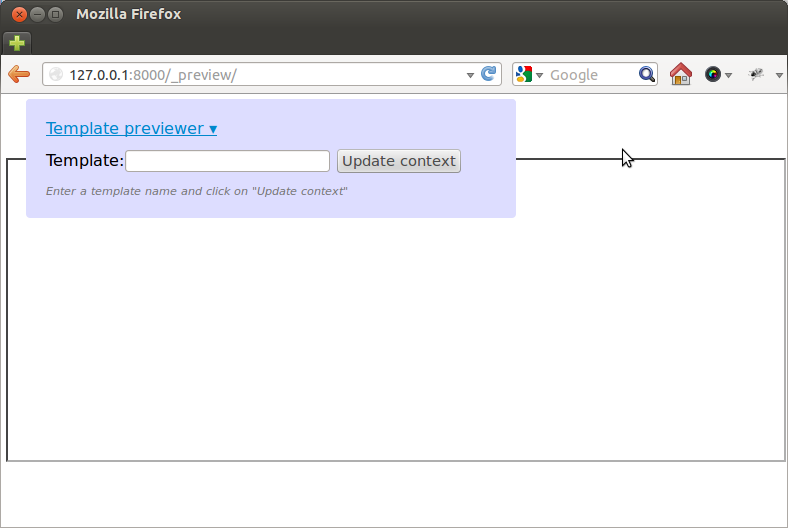\n\nThe lower box is an html `iframe` where the preview will be shown. The template\npreviewer UI can be folded/unfolded by clicking on its title.\n\nThere you can type a template name in the text box, and click on \n\"Update context\". The template name should be written as a path reachable to\nyour template loader (i.e., any valid first argument to\n`django.template.loader.get_template`). If the template is reachable and can\nbe successfully loaded, the previewer UI will add entry boxes labeled with the\nnames of template variables required in the template.\n\nFor example, assuming we have the following template calles `sample.html`:\n\n```html\n{{ title }}
\n\n{% for item in foo.bar %}\n - {{ item.last_name }}, {{ item.first_name }}
\n{% endfor %}\n\n```\n\nYou'll get something like:\n\n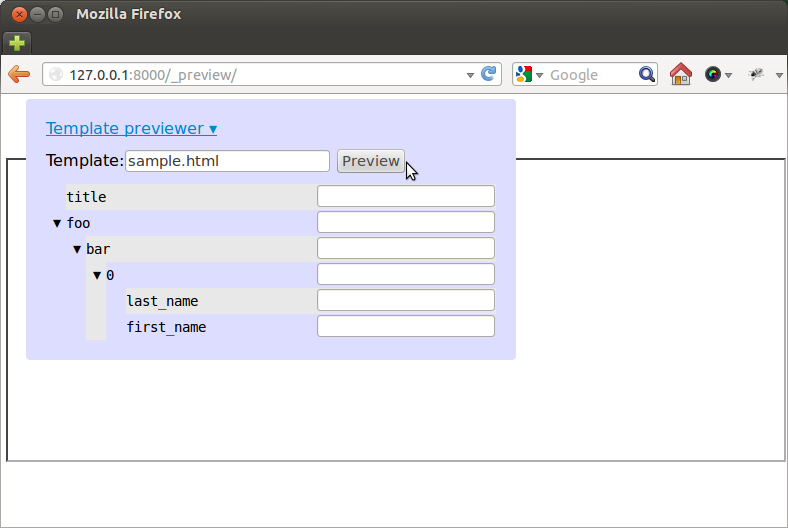\n\nThere you can fill up some values, and click on Preview, getting the following:\n\n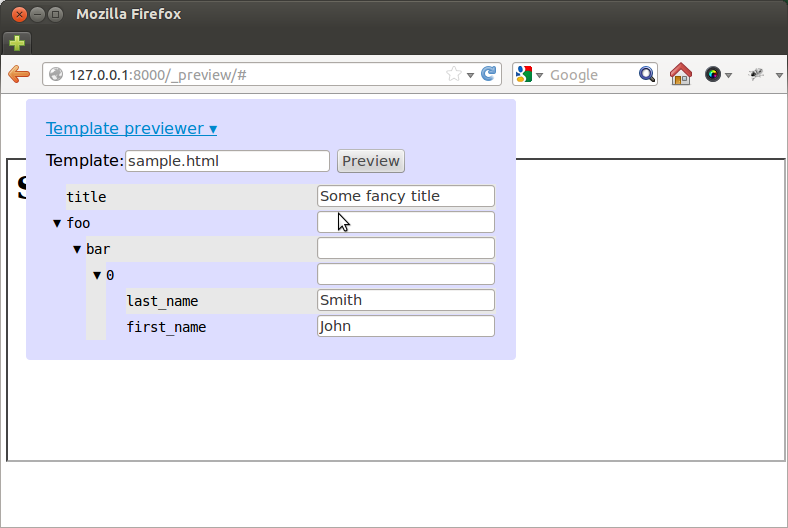\n\nor, hiding the previewer UI:\n\n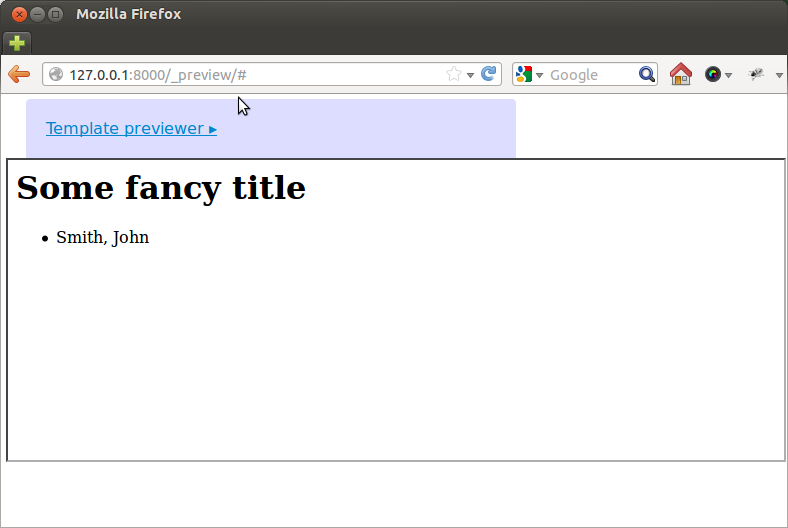\n\nThat's essentially all there is to it. You can keep editing the context and \nrefreshing the preview. If you are using the development server, updating the\ntemplate file and clicking preview again should refresh too (allowing for a \nquick edit+preview cycle once you have a nice sample context ready)\n\nLicensing\n=========\n\nThis package was written by Daniel F. Moisset at\nMachinalis, and is \u00a9 Machinalis, licensed under the BSD (see LICENSE for\ndetails).\n\nJavascript files included in the `template_previewer/static/js` directory (but\nnot its subdirectories) are third party libraries, copyright their respective\nowners. Check the files for licensing details.",
"description_content_type": null,
"docs_url": null,
"download_url": "UNKNOWN",
"downloads": {
"last_day": -1,
"last_month": -1,
"last_week": -1
},
"home_page": "https://github.com/machinalis/django-template-previewer",
"keywords": null,
"license": "UNKNOWN",
"maintainer": null,
"maintainer_email": null,
"name": "django-template-previewer",
"package_url": "https://pypi.org/project/django-template-previewer/",
"platform": "UNKNOWN",
"project_url": "https://pypi.org/project/django-template-previewer/",
"project_urls": {
"Download": "UNKNOWN",
"Homepage": "https://github.com/machinalis/django-template-previewer"
},
"release_url": "https://pypi.org/project/django-template-previewer/0.1.3/",
"requires_dist": null,
"requires_python": null,
"summary": "A Django app to allow developers preview templates",
"version": "0.1.3"
},
"last_serial": 744824,
"releases": {
"0.1": [
{
"comment_text": "",
"digests": {
"md5": "1c010e8c2ac1a5fe161c7a6bb42b9b93",
"sha256": "e9ad42acd2f4424b7bacd2e5ca900f4401c992d66ff1096a77fbce93cf50905e"
},
"downloads": -1,
"filename": "django-template-previewer-0.1.tar.gz",
"has_sig": false,
"md5_digest": "1c010e8c2ac1a5fe161c7a6bb42b9b93",
"packagetype": "sdist",
"python_version": "source",
"requires_python": null,
"size": 173373,
"upload_time": "2012-09-12T19:31:08",
"url": "https://files.pythonhosted.org/packages/15/8c/ec0da2eb1fff5cf87577e4b1ed2a8de8ebf1fad49863bcf724bfd9a4f8e6/django-template-previewer-0.1.tar.gz"
}
],
"0.1.1": [
{
"comment_text": "",
"digests": {
"md5": "e8fd0cb7181c0b840b07d75aa669da9d",
"sha256": "d42f1bbe9d26293a85839b2e925b660e0f9a4648067532717e1377b30f97bb13"
},
"downloads": -1,
"filename": "django-template-previewer-0.1.1.tar.gz",
"has_sig": false,
"md5_digest": "e8fd0cb7181c0b840b07d75aa669da9d",
"packagetype": "sdist",
"python_version": "source",
"requires_python": null,
"size": 175121,
"upload_time": "2012-09-12T20:02:00",
"url": "https://files.pythonhosted.org/packages/ae/0d/0314b14697ad0ccfa1e4e7216c8f1c795e12e5f5151f7edf7908a9237585/django-template-previewer-0.1.1.tar.gz"
}
],
"0.1.2": [
{
"comment_text": "",
"digests": {
"md5": "a2982d7b0c14f17a715803f066a2cfb8",
"sha256": "9b6bc1dfa7e6327d87c6695d0725b102de34ce29410510bcc722e0ee849d2b9e"
},
"downloads": -1,
"filename": "django-template-previewer-0.1.2.tar.gz",
"has_sig": false,
"md5_digest": "a2982d7b0c14f17a715803f066a2cfb8",
"packagetype": "sdist",
"python_version": "source",
"requires_python": null,
"size": 175132,
"upload_time": "2012-09-12T20:54:14",
"url": "https://files.pythonhosted.org/packages/34/14/b82eac3018e45f9d4245ea63e2420febe0096fb3f3700c31e8c296348c19/django-template-previewer-0.1.2.tar.gz"
}
],
"0.1.3": [
{
"comment_text": "",
"digests": {
"md5": "6f97b8c21d17f41674cee9c4668df06a",
"sha256": "42ea7ca45510c47ebe7d75a565bcfc92b0a25b8b4a21875a22a8f4ea1bdcd6c1"
},
"downloads": -1,
"filename": "django-template-previewer-0.1.3.tar.gz",
"has_sig": false,
"md5_digest": "6f97b8c21d17f41674cee9c4668df06a",
"packagetype": "sdist",
"python_version": "source",
"requires_python": null,
"size": 175208,
"upload_time": "2012-09-12T21:28:56",
"url": "https://files.pythonhosted.org/packages/64/63/f74b51ab0f7e5ede8ae50f0e486898bcea1461cc8dfa961d8b889f201e62/django-template-previewer-0.1.3.tar.gz"
}
]
},
"urls": [
{
"comment_text": "",
"digests": {
"md5": "6f97b8c21d17f41674cee9c4668df06a",
"sha256": "42ea7ca45510c47ebe7d75a565bcfc92b0a25b8b4a21875a22a8f4ea1bdcd6c1"
},
"downloads": -1,
"filename": "django-template-previewer-0.1.3.tar.gz",
"has_sig": false,
"md5_digest": "6f97b8c21d17f41674cee9c4668df06a",
"packagetype": "sdist",
"python_version": "source",
"requires_python": null,
"size": 175208,
"upload_time": "2012-09-12T21:28:56",
"url": "https://files.pythonhosted.org/packages/64/63/f74b51ab0f7e5ede8ae50f0e486898bcea1461cc8dfa961d8b889f201e62/django-template-previewer-0.1.3.tar.gz"
}
]
}