{
"info": {
"author": "APIMatic SDK Generator",
"author_email": "support@apimatic.io",
"bugtrack_url": null,
"classifiers": [],
"description": "# Getting started\n\nAccount information api information.\n\n## How to Build\n\n\nYou must have Python ```2 >=2.7.9``` or Python ```3 >=3.4``` installed on your system to install and run this SDK. This SDK package depends on other Python packages like nose, jsonpickle etc. \nThese dependencies are defined in the ```requirements.txt``` file that comes with the SDK.\nTo resolve these dependencies, you can use the PIP Dependency manager. Install it by following steps at [https://pip.pypa.io/en/stable/installing/](https://pip.pypa.io/en/stable/installing/).\n\nPython and PIP executables should be defined in your PATH. Open command prompt and type ```pip --version```.\nThis should display the version of the PIP Dependency Manager installed if your installation was successful and the paths are properly defined.\n\n* Using command line, navigate to the directory containing the generated files (including ```requirements.txt```) for the SDK.\n* Run the command ```pip install -r requirements.txt```. This should install all the required dependencies.\n\n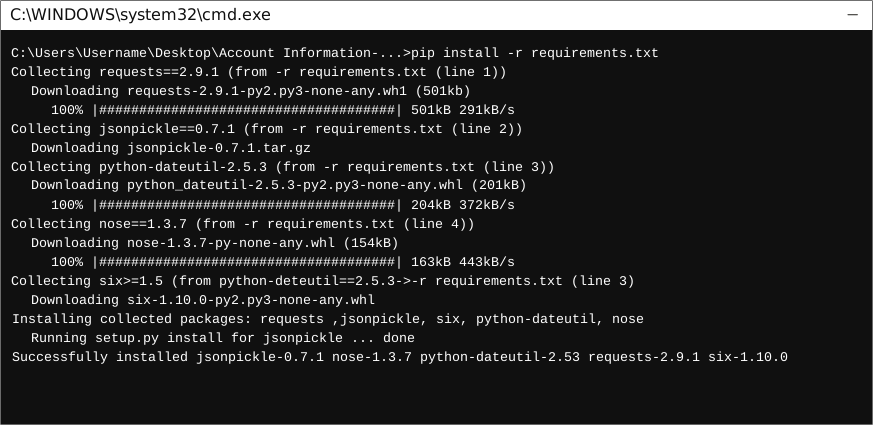\n\n\n## How to Use\n\nThe following section explains how to use the Accountinformation SDK package in a new project.\n\n### 1. Open Project in an IDE\n\nOpen up a Python IDE like PyCharm. The basic workflow presented here is also applicable if you prefer using a different editor or IDE.\n\n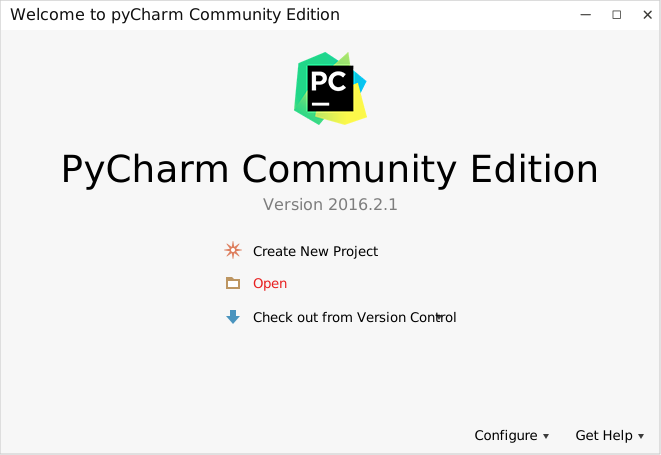\n\nClick on ```Open``` in PyCharm to browse to your generated SDK directory and then click ```OK```.\n\n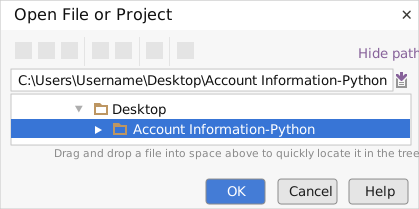 \n\nThe project files will be displayed in the side bar as follows:\n\n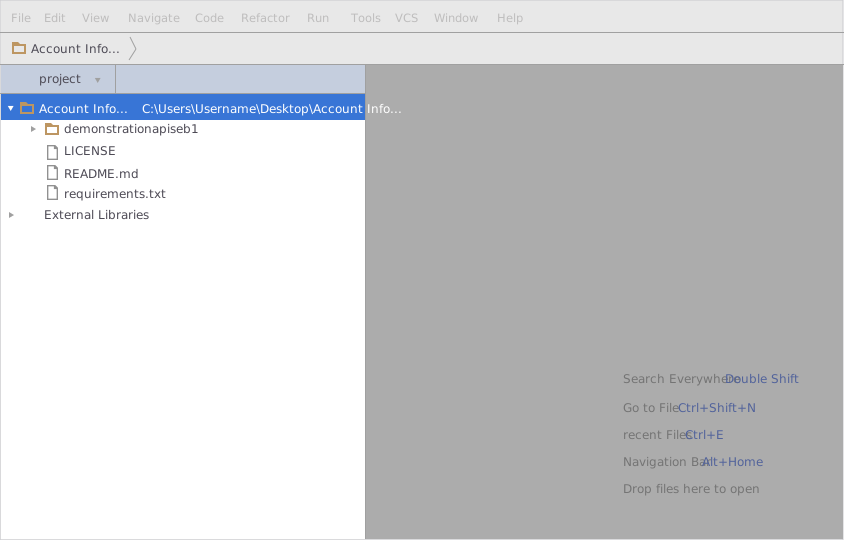 \n\n### 2. Add a new Test Project\n\nCreate a new directory by right clicking on the solution name as shown below:\n\n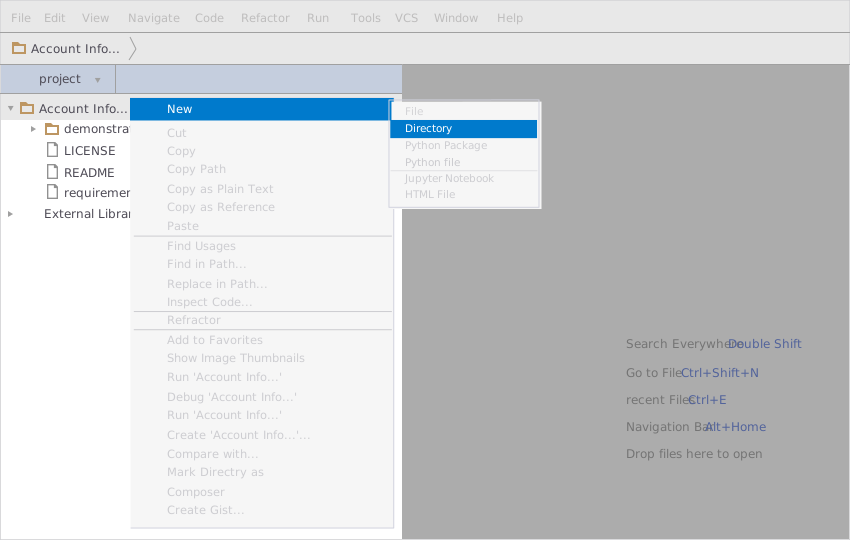\n\nName the directory as \"test\"\n\n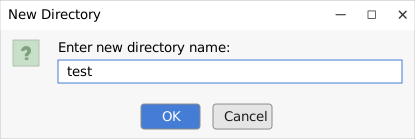\n \nAdd a python file to this project with the name \"testsdk\"\n\n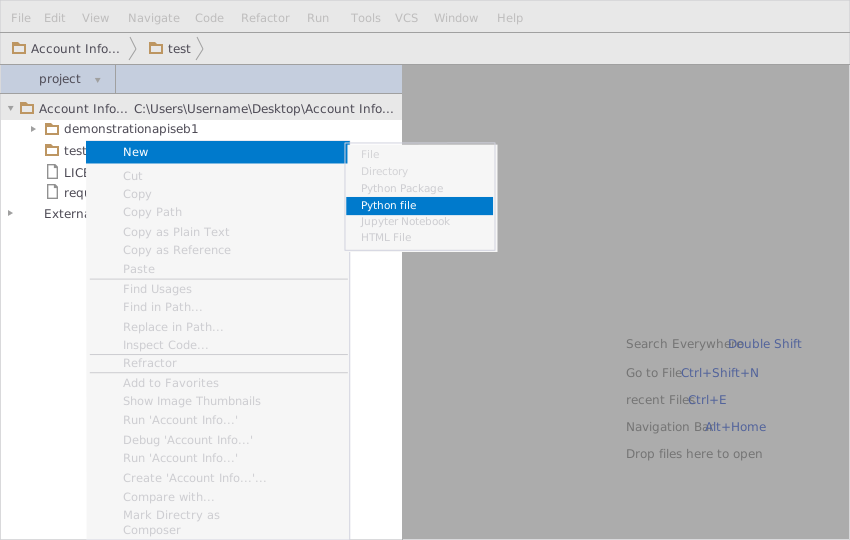\n\nName it \"testsdk\"\n\n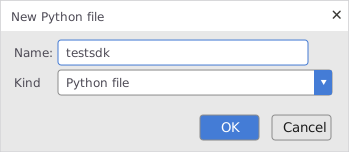\n\nIn your python file you will be required to import the generated python library using the following code lines\n\n```Python\nfrom demonstrationapiseb1.demonstration_ap_iseb_1_client import DemonstrationAPIseb1Client\n```\n\n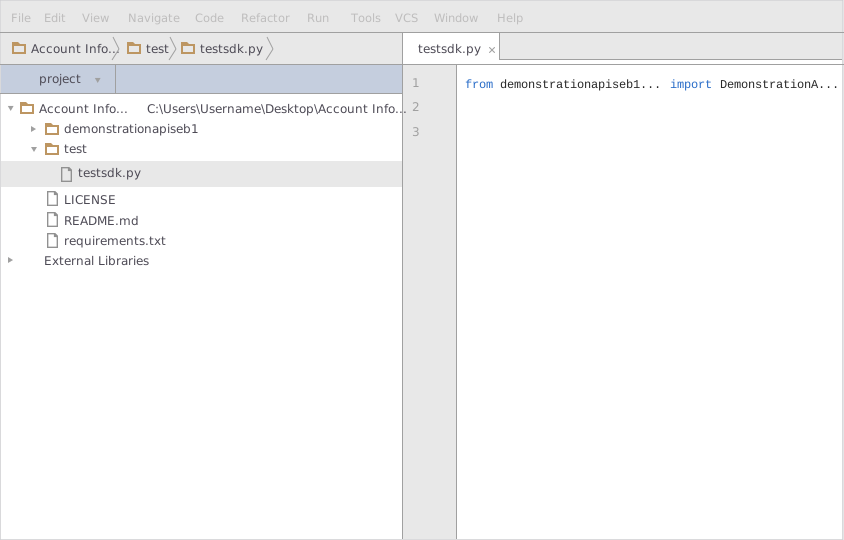\n\nAfter this you can write code to instantiate an API client object, get a controller object and make API calls. Sample code is given in the subsequent sections.\n\n### 3. Run the Test Project\n\nTo run the file within your test project, right click on your Python file inside your Test project and click on ```Run```\n\n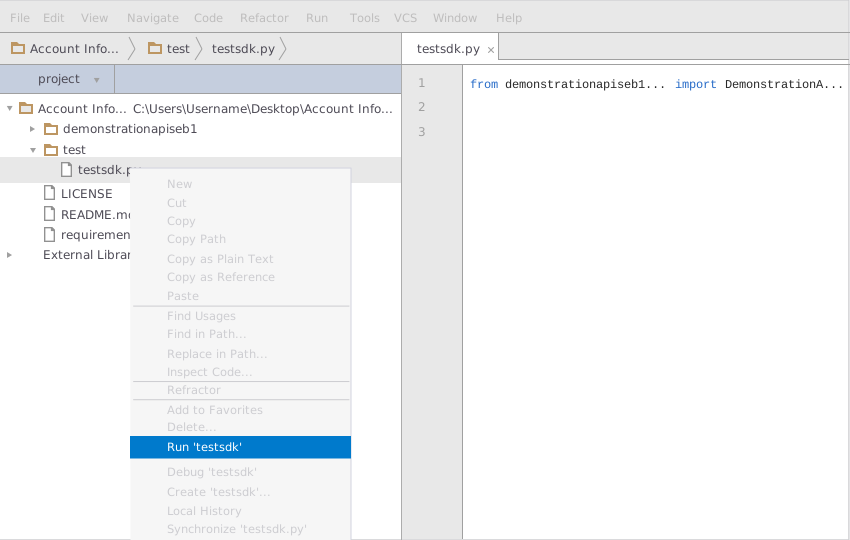\n\n\n## How to Test\n\nYou can test the generated SDK and the server with automatically generated test\ncases. unittest is used as the testing framework and nose is used as the test\nrunner. You can run the tests as follows:\n\n 1. From terminal/cmd navigate to the root directory of the SDK.\n 2. Invoke ```pip install -r test-requirements.txt```\n 3. Invoke ```nosetests```\n\n## Initialization\n\n### \n\nAPI client can be initialized as following.\n\n```python\n\nclient = DemonstrationAPIseb1Client()\n```\n\n\n\n# Class Reference\n\n## List of Controllers\n\n* [AccountsController](#accounts_controller)\n\n##  AccountsController\n\n### Get controller instance\n\nAn instance of the ``` AccountsController ``` class can be accessed from the API Client.\n\n```python\n accounts_controller = client.accounts\n```\n\n###  get_returns_a_list_of_transactions_for_one_specific_account_unfiltered_transaction_lists_are_paginated_when_filtering_by_date_results_are_never_paginated\n\n> Returns a list of transactions for one specific account. You can search on account with or without a date period. The response contains transaction ids that can be used to retrieve transaction details.\n\n```python\ndef get_returns_a_list_of_transactions_for_one_specific_account_unfiltered_transaction_lists_are_paginated_when_filtering_by_date_results_are_never_paginated(self,\n accept)\n```\n\n#### Parameters\n\n| Parameter | Tags | Description |\n|-----------|------|-------------|\n| accept | ``` Required ``` | TODO: Add a parameter description |\n\n\n\n#### Example Usage\n\n```python\naccept = 'application/json'\n\naccounts_controller.get_returns_a_list_of_transactions_for_one_specific_account_unfiltered_transaction_lists_are_paginated_when_filtering_by_date_results_are_never_paginated(accept)\n\n```\n\n\n###  get_returns_transaction_details_on_a_specific_transaction\n\n> Depending on transaction type, different fields will be returned. Some types of transaction detail does not have any further details than shown in the original transactions list.\n\n```python\ndef get_returns_transaction_details_on_a_specific_transaction(self,\n accept)\n```\n\n#### Parameters\n\n| Parameter | Tags | Description |\n|-----------|------|-------------|\n| accept | ``` Required ``` | TODO: Add a parameter description |\n\n\n\n#### Example Usage\n\n```python\naccept = 'application/json'\n\naccounts_controller.get_returns_transaction_details_on_a_specific_transaction(accept)\n\n```\n\n\n###  get_returns_a_list_of_a_user_s_accounts\n\n> Listed accounts are those where the user is account holder and where the account type is PSD2 supported.\n\n```python\ndef get_returns_a_list_of_a_user_s_accounts(self,\n with_balance,\n accept,\n x_request_id,\n psu_ip_address,\n psu_ip_port,\n psu_user_agent,\n psu_geo_location,\n psu_accept,\n psu_accept_charset,\n psu_accept_encoding,\n psu_accept_language,\n psu_http_method,\n psu_device_id)\n```\n\n#### Parameters\n\n| Parameter | Tags | Description |\n|-----------|------|-------------|\n| withBalance | ``` Required ``` | TODO: Add a parameter description |\n| accept | ``` Required ``` | TODO: Add a parameter description |\n| xRequestID | ``` Required ``` | TODO: Add a parameter description |\n| pSUIPAddress | ``` Required ``` | TODO: Add a parameter description |\n| pSUIPPort | ``` Required ``` | TODO: Add a parameter description |\n| pSUUserAgent | ``` Required ``` | TODO: Add a parameter description |\n| pSUGeoLocation | ``` Required ``` | TODO: Add a parameter description |\n| pSUAccept | ``` Required ``` | TODO: Add a parameter description |\n| pSUAcceptCharset | ``` Required ``` | TODO: Add a parameter description |\n| pSUAcceptEncoding | ``` Required ``` | TODO: Add a parameter description |\n| pSUAcceptLanguage | ``` Required ``` | TODO: Add a parameter description |\n| pSUHttpMethod | ``` Required ``` | TODO: Add a parameter description |\n| pSUDeviceID | ``` Required ``` | TODO: Add a parameter description |\n\n\n\n#### Example Usage\n\n```python\nwith_balance = '{{withBalance}}'\naccept = 'application/json'\nx_request_id = '{{X-Request-ID}}'\npsu_ip_address = '{{PSU-IP-Address}}'\npsu_ip_port = '{{PSU-IP-Port}}'\npsu_user_agent = '{{PSU-User-Agent}}'\npsu_geo_location = '{{PSU-Geo-Location}}'\npsu_accept = '{{PSU-Accept}}'\npsu_accept_charset = '{{PSU-Accept-Charset}}'\npsu_accept_encoding = '{{PSU-Accept-Encoding}}'\npsu_accept_language = '{{PSU-Accept-Language}}'\npsu_http_method = '{{PSU-Http-Method}}'\npsu_device_id = '{{PSU-Device-ID}}'\n\naccounts_controller.get_returns_a_list_of_a_user_s_accounts(with_balance, accept, x_request_id, psu_ip_address, psu_ip_port, psu_user_agent, psu_geo_location, psu_accept, psu_accept_charset, psu_accept_encoding, psu_accept_language, psu_http_method, psu_device_id)\n\n```\n\n\n###  get_returns_account_information_potentially_including_balances_for_one_specific_account\n\n> Returns account information, with or without balances for one specific account. The accountId is found using the account list endpoint.\n\n```python\ndef get_returns_account_information_potentially_including_balances_for_one_specific_account(self,\n with_balance,\n account_id,\n accept,\n x_request_id,\n psu_ip_address,\n psu_ip_port,\n psu_user_agent,\n psu_geo_location,\n psu_accept,\n psu_accept_charset,\n psu_accept_encoding,\n psu_accept_language,\n psu_http_method,\n psu_device_id)\n```\n\n#### Parameters\n\n| Parameter | Tags | Description |\n|-----------|------|-------------|\n| withBalance | ``` Required ``` | TODO: Add a parameter description |\n| accountId | ``` Required ``` | TODO: Add a parameter description |\n| accept | ``` Required ``` | TODO: Add a parameter description |\n| xRequestID | ``` Required ``` | TODO: Add a parameter description |\n| pSUIPAddress | ``` Required ``` | TODO: Add a parameter description |\n| pSUIPPort | ``` Required ``` | TODO: Add a parameter description |\n| pSUUserAgent | ``` Required ``` | TODO: Add a parameter description |\n| pSUGeoLocation | ``` Required ``` | TODO: Add a parameter description |\n| pSUAccept | ``` Required ``` | TODO: Add a parameter description |\n| pSUAcceptCharset | ``` Required ``` | TODO: Add a parameter description |\n| pSUAcceptEncoding | ``` Required ``` | TODO: Add a parameter description |\n| pSUAcceptLanguage | ``` Required ``` | TODO: Add a parameter description |\n| pSUHttpMethod | ``` Required ``` | TODO: Add a parameter description |\n| pSUDeviceID | ``` Required ``` | TODO: Add a parameter description |\n\n\n\n#### Example Usage\n\n```python\nwith_balance = '{{withBalance}}'\naccount_id = '{{accountId}}'\naccept = 'application/json'\nx_request_id = '{{X-Request-ID}}'\npsu_ip_address = '{{PSU-IP-Address}}'\npsu_ip_port = '{{PSU-IP-Port}}'\npsu_user_agent = '{{PSU-User-Agent}}'\npsu_geo_location = '{{PSU-Geo-Location}}'\npsu_accept = '{{PSU-Accept}}'\npsu_accept_charset = '{{PSU-Accept-Charset}}'\npsu_accept_encoding = '{{PSU-Accept-Encoding}}'\npsu_accept_language = '{{PSU-Accept-Language}}'\npsu_http_method = '{{PSU-Http-Method}}'\npsu_device_id = '{{PSU-Device-ID}}'\n\naccounts_controller.get_returns_account_information_potentially_including_balances_for_one_specific_account(with_balance, account_id, accept, x_request_id, psu_ip_address, psu_ip_port, psu_user_agent, psu_geo_location, psu_accept, psu_accept_charset, psu_accept_encoding, psu_accept_language, psu_http_method, psu_device_id)\n\n```\n\n\n[Back to List of Controllers](#list_of_controllers)\n\n\n\n",
"description_content_type": "",
"docs_url": null,
"download_url": "",
"downloads": {
"last_day": -1,
"last_month": -1,
"last_week": -1
},
"home_page": "https://apimatic.io",
"keywords": "",
"license": "",
"maintainer": "",
"maintainer_email": "",
"name": "demonstrationAPIseb1",
"package_url": "https://pypi.org/project/demonstrationAPIseb1/",
"platform": "",
"project_url": "https://pypi.org/project/demonstrationAPIseb1/",
"project_urls": {
"Homepage": "https://apimatic.io"
},
"release_url": "https://pypi.org/project/demonstrationAPIseb1/1.0/",
"requires_dist": null,
"requires_python": "",
"summary": "Account information api information.",
"version": "1.0"
},
"last_serial": 4380916,
"releases": {
"1.0": [
{
"comment_text": "",
"digests": {
"md5": "8f7024b6f62e2aa05ec792fe373a2667",
"sha256": "78139c14cc6e93bfd747d5c111ab49e286799cdbafc7bba3ed1baced26368e1a"
},
"downloads": -1,
"filename": "demonstrationAPIseb1-1.0.tar.gz",
"has_sig": false,
"md5_digest": "8f7024b6f62e2aa05ec792fe373a2667",
"packagetype": "sdist",
"python_version": "source",
"requires_python": null,
"size": 18620,
"upload_time": "2018-10-16T10:37:37",
"url": "https://files.pythonhosted.org/packages/95/3f/51afb724d163b35fc08619d8fc16cef42553c8b0328068a0350600b3f421/demonstrationAPIseb1-1.0.tar.gz"
}
]
},
"urls": [
{
"comment_text": "",
"digests": {
"md5": "8f7024b6f62e2aa05ec792fe373a2667",
"sha256": "78139c14cc6e93bfd747d5c111ab49e286799cdbafc7bba3ed1baced26368e1a"
},
"downloads": -1,
"filename": "demonstrationAPIseb1-1.0.tar.gz",
"has_sig": false,
"md5_digest": "8f7024b6f62e2aa05ec792fe373a2667",
"packagetype": "sdist",
"python_version": "source",
"requires_python": null,
"size": 18620,
"upload_time": "2018-10-16T10:37:37",
"url": "https://files.pythonhosted.org/packages/95/3f/51afb724d163b35fc08619d8fc16cef42553c8b0328068a0350600b3f421/demonstrationAPIseb1-1.0.tar.gz"
}
]
}