{
"info": {
"author": "Fernando Bevilacqua",
"author_email": "dovyski@gmail.com",
"bugtrack_url": null,
"classifiers": [
"Development Status :: 5 - Production/Stable",
"Intended Audience :: Developers",
"License :: OSI Approved :: MIT License",
"Natural Language :: English",
"Operating System :: OS Independent",
"Programming Language :: Python :: 2",
"Programming Language :: Python :: 2.7",
"Programming Language :: Python :: 3",
"Programming Language :: Python :: 3.4",
"Programming Language :: Python :: 3.5",
"Programming Language :: Python :: 3.6",
"Topic :: Software Development :: User Interfaces"
],
"description": "# cvui\n\nA (very) simple UI lib built on top of OpenCV drawing primitives. Other UI libs, such as [imgui](https://github.com/ocornut/imgui), require a graphical backend (e.g. OpenGL) to work, so if you want to use imgui in a OpenCV app, you must make it OpenGL enabled, for instance. It is not the case with cvui, which uses *only* OpenCV drawing primitives to do all the rendering (no OpenGL or Qt required).\n\n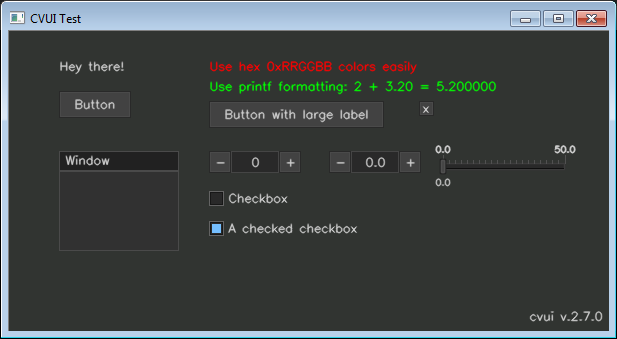\n\n## Features\n\n- Lightweight and simple to use user interface;\n- Header-only with no external dependencies (except OpenCV);\n- Based on OpenCV drawing primitives only (OpenGL or Qt are not required);\n- Friendly and C-like API (no classes/objects, etc);\n- Easily render components without worrying about their position (using rows/columns);\n- Simple (yet powerful) mouse API;\n- Modest number of UI components (11 in total);\n- Available in C++ and Python (pure implementation, no bindings).\n\n## Usage\n\nUse of cvui revolves around calling `cvui.init()` to initialize the lib, rendering cvui components to a `np.ndarray` (that you handle yourself) and finally showing that `np.ndarray` on the screen using `cvui.imshow()`, which is cvui's version of `cv2.imshow()`. Alternatively you can use `cv2.imshow()` to show things, but in such case you must call `cvui.update()` yourself before calling `cv.imshow()`.\n\nBelow is an example:\n\n```python\nimport numpy as np\nimport cv2\nimport cvui\n\nWINDOW_NAME = 'CVUI Test'\n\n# Initialize cvui and create/open a OpenCV window.\ncvui.init(WINDOW_NAME)\n# Create a frame to render components to.\nframe = np.zeros((200, 400, 3), np.uint8)\n\nwhile True:\n # Clear the frame.\n frame[:] = (49, 52, 49)\n # Render a message in the frame at position (10, 15)\n cvui.text(frame, 10, 15, 'Hello world!')\n # Show frame in a window.\n cvui.imshow(WINDOW1_NAME, frame)\n\n if cv2.waitKey(20) == 27:\n break\n```\n\nThe following sections explain in detail each one of the steps required to use cvui.\n\n### 1. Import and initialize cvui\n\nBefore using cvui, you need to call `cvui.init()` to initialize it. The easiest way is to initialize cvui and tell it to create any OpenCV window that will be used, e.g.:\n\n```python\nimport numpy as np\nimport cv2\nimport cvui\n\nWINDOW_NAME = 'CVUI Test'\n\n# Tell cvui to init and create a window\ncvui.init(WINDOW_NAME)\n\nwhile True:\n # your app logic here\n if cv2.waitKey(20) == 27:\n break\n```\n\n**Tip:** if you need to use cvui with multiple windows, or you want more control over the process of creating windows, check the Multiple OpenCV windows page and the multiple-windows and multiple-windows-complex examples.\n\n### 2. Rendering and using cvui components\n\nAll cvui components are rendered to a `np.ndarray`. Below is an example showing how to render a `'Hello world'` message on a `np.ndarray` named `frame`:\n\n```python\nimport numpy as np\nimport cv2\nimport cvui\n\nWINDOW_NAME = 'CVUI Test'\n\ncvui.init(WINDOW_NAME)\n\n# Create a frame\nframe = np.zeros((200, 400, 3), np.uint8)\n\nwhile True:\n # clear the frame\n frame[:] = (49, 52, 49)\n\n # render a message in the frame at position (10, 15)\n cvui.text(frame, 10, 15, 'Hello world!')\n\n if cv2.waitKey(20) == 27:\n break\n```\n\nSome cvui components, i.e. counter, trackbar and checkbox., use an external variable that they need to modify to control their internal state. Since there are no pointers to built-in types in Python, cvui components that need to change an external variable must receive such variable as an array/list with a single element.\n\nBelow is an example of a checkbox whose state is stored in the variable `checkboxState`:\n\n```python\nimport numpy as np\nimport cv2\nimport cvui\n\nWINDOW_NAME = 'CVUI Test'\ncvui.init(WINDOW_NAME)\nframe = np.zeros((200, 400, 3), np.uint8)\n\n# use an array/list because this variable will be changed by cvui\ncheckboxState = [False]\n\nwhile True:\n frame[:] = (49, 52, 49)\n\n # Render the checkbox. Notice that checkboxState is used AS IS,\n # e.g. simply \"checkboxState\" instead of \"checkboxState[0]\".\n # Only internally that cvui will use checkboxState[0].\n cvui.checkbox(frame, 10, 15, 'My checkbox', checkboxState)\n\n # Check the state of the checkbox. Here you need to remember to\n # use the first position of the array/list because that's the\n # one being used by all cvui components that perform changes\n # to external variables.\n if checkboxState[0] == True:\n print('Checkbox is checked')\n\n if cv2.waitKey(20) == 27:\n break\n```\n\n**Tip:** see the online documentation to learn more about all available cvui components.\n\n### 3. Show (window) content\n\nAfter rendering your components, show the final result using `cvui.imshow()`, which is cvui's improved version of OpenCV's `cv2.imshow()`:\n\n```python\nimport numpy as np\nimport cv2\nimport cvui\n\nWINDOW_NAME = 'CVUI Test'\n\ncvui.init(WINDOW_NAME)\nframe = np.zeros((200, 400, 3), np.uint8)\n\nwhile True:\n frame[:] = (49, 52, 49)\n cvui.text(frame, 10, 15, 'Hello world!')\n\n # Show window content\n cvui.imshow(WINDOW1_NAME, frame)\n\n if cv2.waitKey(20) == 27:\n break\n```\n\nWhen you use `cvui.imshow()` instead of `cv2.imshow()`, cvui will not only show the content, but update its internal structures to ensure all UI interactions work.\n\nIf you want to use `cv2.imshow()`, you must call `cvui.update()` before `cv2.imshow()` and after you are finished invoking cvui components, so cvui can perform its internal processing to handle mouse interactions. E.g.\n\n```python\nimport numpy as np\nimport cv2\nimport cvui\n\nWINDOW_NAME = 'CVUI Test'\n\ncvui.init(WINDOW_NAME)\nframe = np.zeros((200, 400, 3), np.uint8)\n\nwhile True:\n frame[:] = (49, 52, 49)\n cvui.text(frame, 10, 15, 'Hello world!')\n\n # Update cvui internal stuff\n cvui.update()\n\n # Show window content\n cv2.imshow(WINDOW1_NAME, frame)\n\n if cv2.waitKey(20) == 27:\n break\n```\n\n\n",
"description_content_type": "text/markdown",
"docs_url": null,
"download_url": "",
"downloads": {
"last_day": -1,
"last_month": -1,
"last_week": -1
},
"home_page": "https://github.com/dovyski/cvui",
"keywords": "",
"license": "MIT",
"maintainer": "",
"maintainer_email": "",
"name": "cvui",
"package_url": "https://pypi.org/project/cvui/",
"platform": "",
"project_url": "https://pypi.org/project/cvui/",
"project_urls": {
"Homepage": "https://github.com/dovyski/cvui"
},
"release_url": "https://pypi.org/project/cvui/2.7/",
"requires_dist": null,
"requires_python": "",
"summary": "A (very) simple UI lib built on top of OpenCV drawing primitives",
"version": "2.7"
},
"last_serial": 4350833,
"releases": {
"2.7": [
{
"comment_text": "",
"digests": {
"md5": "9e224242030062a613d6fe9be2c35a52",
"sha256": "6064be24794e4a244ea5cfc467b27b930aacf3985a2041417eba3fed133f6f6f"
},
"downloads": -1,
"filename": "cvui-2.7-py3-none-any.whl",
"has_sig": false,
"md5_digest": "9e224242030062a613d6fe9be2c35a52",
"packagetype": "bdist_wheel",
"python_version": "py3",
"requires_python": null,
"size": 22597,
"upload_time": "2018-10-08T06:29:43",
"url": "https://files.pythonhosted.org/packages/0e/44/63ba8fb1f6b0a537f04b3085ca75371a810b3aee9b269f72e9aa3ddf61d1/cvui-2.7-py3-none-any.whl"
}
],
"2.7b1": [
{
"comment_text": "",
"digests": {
"md5": "1eba93dd7e5bb1fdd5728fcc9cd4e878",
"sha256": "e19c640b22caeb985e972e7333bd5c3f0b06b3975e99888ea74bfc3118c97cca"
},
"downloads": -1,
"filename": "cvui-2.7b1-py3-none-any.whl",
"has_sig": false,
"md5_digest": "1eba93dd7e5bb1fdd5728fcc9cd4e878",
"packagetype": "bdist_wheel",
"python_version": "py3",
"requires_python": null,
"size": 21789,
"upload_time": "2018-06-28T09:11:25",
"url": "https://files.pythonhosted.org/packages/38/8d/5277a0391340e2b0d724a9c3cea0350b96e32c98f1fa4ca09ac900f616ff/cvui-2.7b1-py3-none-any.whl"
},
{
"comment_text": "",
"digests": {
"md5": "3977158676d2239d97a291627f9144a9",
"sha256": "10a236de2d48a6b0abfba3d54c232657b1783d6655b9225bdd7d6cac56300348"
},
"downloads": -1,
"filename": "cvui-2.7b1.tar.gz",
"has_sig": false,
"md5_digest": "3977158676d2239d97a291627f9144a9",
"packagetype": "sdist",
"python_version": "source",
"requires_python": null,
"size": 21784,
"upload_time": "2018-06-28T09:11:27",
"url": "https://files.pythonhosted.org/packages/a7/e5/c6e485aa2bb7fb0d4db587b91bf3b1c854d8bddb239958d2edd1e6ec17b0/cvui-2.7b1.tar.gz"
}
]
},
"urls": [
{
"comment_text": "",
"digests": {
"md5": "9e224242030062a613d6fe9be2c35a52",
"sha256": "6064be24794e4a244ea5cfc467b27b930aacf3985a2041417eba3fed133f6f6f"
},
"downloads": -1,
"filename": "cvui-2.7-py3-none-any.whl",
"has_sig": false,
"md5_digest": "9e224242030062a613d6fe9be2c35a52",
"packagetype": "bdist_wheel",
"python_version": "py3",
"requires_python": null,
"size": 22597,
"upload_time": "2018-10-08T06:29:43",
"url": "https://files.pythonhosted.org/packages/0e/44/63ba8fb1f6b0a537f04b3085ca75371a810b3aee9b269f72e9aa3ddf61d1/cvui-2.7-py3-none-any.whl"
}
]
}