{ "info": { "author": "Prasoon Batham", "author_email": "prasoonbatham@gmail.com", "bugtrack_url": null, "classifiers": [], "description": "

\"Cool

\n

Codeforces cli for lazy nerds who don't want to leave their cozy terminals.

\n\n[![License](https://img.shields.io/badge/license-MIT-blue.svg)](https://opensource.org/licenses/MIT)\n![Python](https://img.shields.io/badge/python-v3.6+-blue.svg)\n\n\n\n## Installation\n\n```bash\npip install cfs\n```\n

OR

\n\n```bash\ngit clone https://github.com/prasoonbatham11/cfcli.git\npython3 setup.py install\n```\n\n## Usage\n\n

Use -h or --help to see usage.

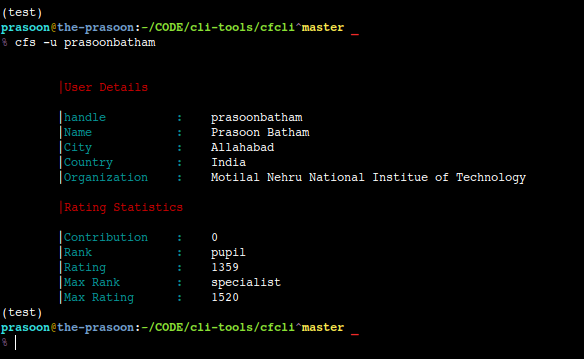
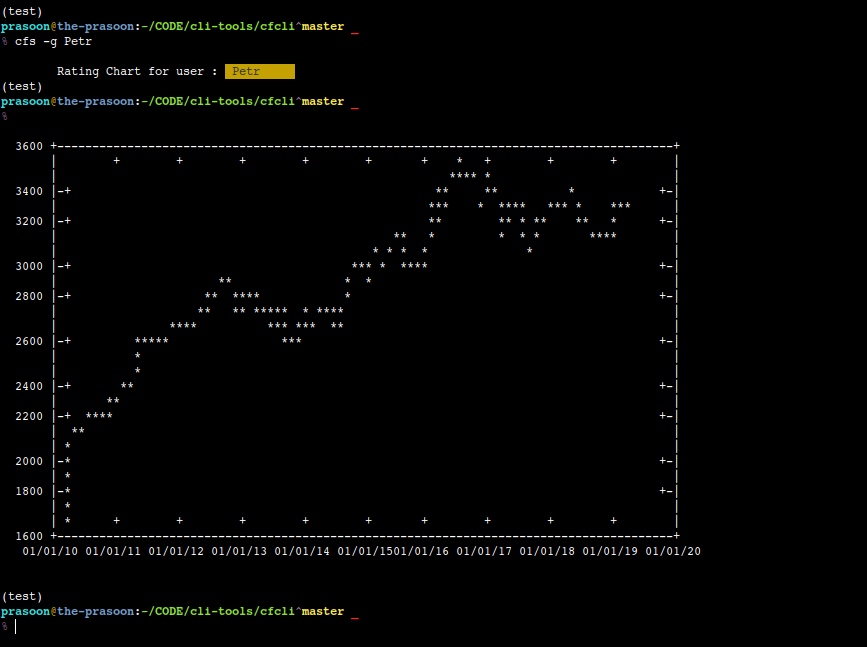
\n\n ```bash\ncfs -h\n```\n\n### View User Details\n\n```bash\n# Shows basic details of the user specified\ncfs -u prasoonbatham\n```\n\n![](https://raw.githubusercontent.com/prasoonbatham11/cfcli/master/images/show_user.png)\n\n### View Rating Graph of User\n\n```bash\n# Shows Rating change graph of user\ncfs -g prasoonbatham\n```\n\n
Rating Graph of user is displayed as a gnuplot.

\n\n![](https://raw.githubusercontent.com/prasoonbatham11/cfcli/master/images/user_graph.png)\n\n### View Contest Details\n\n
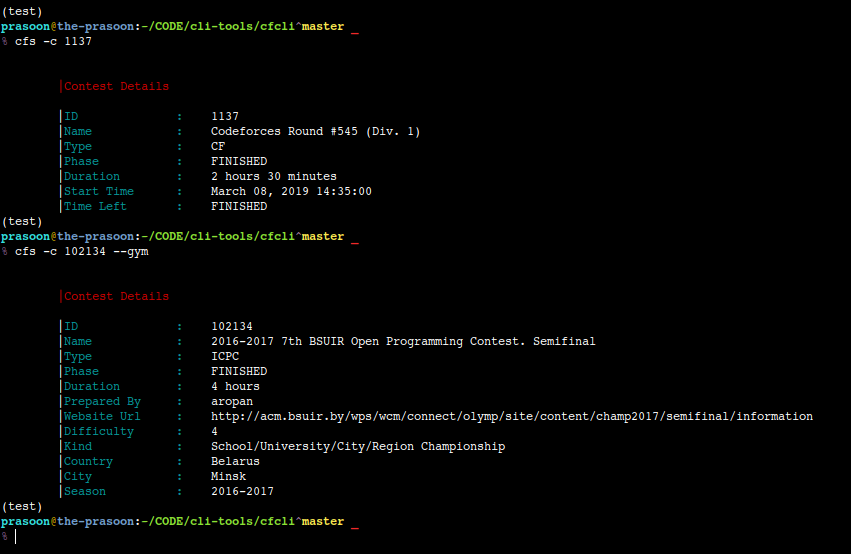
Contest ID can be found in the url of contest such as: /contest/1137/.

\n\n```bash\n# Shows details of contest specified by contest id\ncfs -c 1137\n\n# To view Contests from gym\ncfs -c 102134 --gym\n```\n\n![](https://raw.githubusercontent.com/prasoonbatham11/cfcli/master/images/contest.png)\n\n### Interact With Problemset Subcommand Interface\n\n
These commands retrieve the specified problemset (by tag or whole) and open a python cmd sub-terminal where various other actions can be performed.

\n\n```bash\n# Loads all the problems\ncfs -p\n\n# Specify a problemset tag\ncfs -p --tag dp\n```\n\n

The sub-interface has the following commands:

\n\n\n

Say the following is the output for 8 problems

\n\n```bash\ncf> list 8\n0: Circus\n1: Sushi for Two\n2: Matches Are Not a Child's Play \n3: Train Car Selection\n4: Cooperative Game\n5: Museums Tour\n6: Camp Schedule\n7: Skyscrapers\ncf> list 8\n8: Spanning Tree with One Fixed Degree\n9: Spanning Tree with Maximum Degree\n10: K Balanced Teams\n11: Zero Quantity Maximization\n12: Balanced Team\n13: Preparation for International Women's Day\n14: Middle of the Contest\n15: Greedy Subsequences\ncf> \n```\n\n

To reset the pointer back to 0 we use reset command.

\n\n

Similar to list, listc is used to list problems of a particular contest.

\n\n\n```bash\ncf> listc 1133\n8: Spanning Tree with One Fixed Degree\n9: Spanning Tree with Maximum Degree\n10: K Balanced Teams\n11: Zero Quantity Maximization\n12: Balanced Team\n13: Preparation for International Women's Day\n14: Middle of the Contest\n```\n\n

In codeforces every problem has an index ('A', 'B', etc.). To view the problems by index use listi. To reset the pointer, again use reset command.

\n\n```bash\ncf> listi B\n0: Circus\n6: Camp Schedule\n13: Preparation for International Women's Day\n20: Discounts\n27: Draw!\n30: Two Cakes\n35: Wrong Answer\n39: Mike and Children\n45: Once in a casino\n53: Tanya and Candies\n```\n\n

listn and prob are used to view problem details by name and serial number respectively

\n\n```bash\ncf> listn Sushi for Two\n |Problem Details\n\n |Name : Sushi for Two\n |Contest ID : 1138 \n |Index : A \n |Points : 500.0 \n |Rating : 900 \n |Solved By : 3940 \ncf> prob 0\n |Problem Details\n\n |Name : Circus \n |Contest ID : 1138 \n |Index : B \n |Points : 1000.0 \n |Rating : 1700 \n |Solved By : 1147 \n```\n\n

To view any problem statement use stat command. This opens a paged output where you can see problem statement.

\n\n```bash\ncf> stat 1133A\n```\n\n### View A Blog Entry Specified By Blog ID\n\n

Blog ID can be found in the url of blog such as: /blog/entry/14565/.

\n\n```bash\n# View blog specified by blog id\ncfs -b 14565\n```\n\n

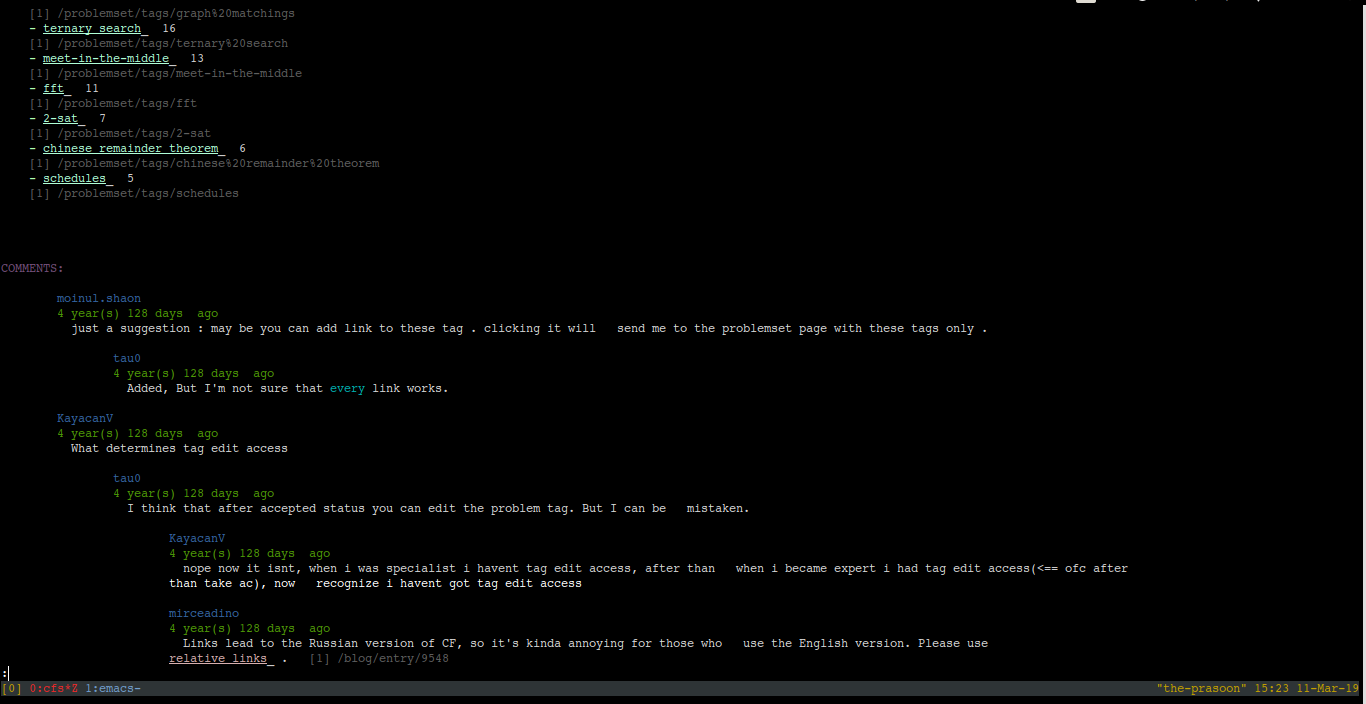
The blog is displayed in a paged output with a proper comment thread. The comment thread is hierarchical, i.e., a reply to a comment is separated by one tab space from its parent comment.

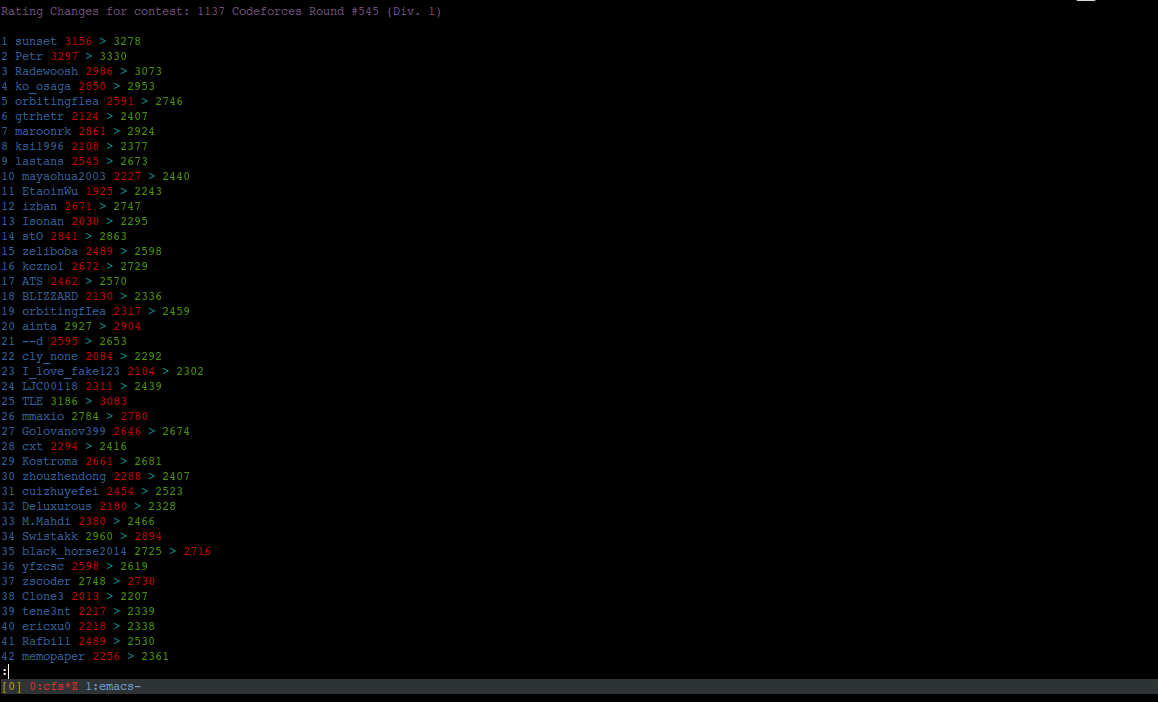
\n\n![](https://raw.githubusercontent.com/prasoonbatham11/cfcli/master/images/blog.png)\n\n### View Rating Change For Users In A Contest\n\n```bash\n# View blog specified by blog id\ncfs -rc 1137\n\n# Specify a particular handle\ncfs -rc 1137 --handle Petr\n```\n\n![](https://raw.githubusercontent.com/prasoonbatham11/cfcli/master/images/rating_change.png)\n\n### Get Blog Entries Of A User\n\n```bash\n# Get all blog entries of Petr\ncfs -bu Petr\n```\n\n
The subcommand interface is implemented using cmd python package and has the following commands.

\n\n\n

Say we get the following output by running list 5 for user Petr:

\n\n```bash\ncf> list 5\n0: 65854 An oracle week\n1: 65574 A WTF week\n2: 65328 A snack week\n3: 65152 A tourist week\n4: 64991 A mumbling week\n```\n

Running list 5 again will return the next 5 entries.Now an internal pointer idx points to entry 10. To reset it we run reset.

\n\n```bash\ncf> list 5\n5: 64854 A Galois week\n6: 64669 An anti-library week\n7: 64501 A Dilworth week\n8: 64349 A Radewoosh week\n9: 64346 And the best problem of 2018 is...\ncf> reset\ncf> list 5\n0: 65854 An oracle week\n1: 65574 A WTF week\n2: 65328 A snack week\n3: 65152 A tourist week\n4: 64991 A mumbling week\ncf> \n```\n

To view the entry A galois week we can either run:

\n\n```bash\ncf> viewi 5 \n```\n\n

OR

\n\n```bash\ncf> vidx 64854 \n```\n\n### Get Submissions For A Specified User\n\n

To display all the submissions of the user use:

\n\n```bash\ncfs -us prasoonbatham\n```\n\n

You can also specify fr and count arguments to see count number of submissions from a particular index fr.

\n \n ```bash\n# Display 10 submissions from 5th index\ncfs -us prasoonbatham --fr 5 --count 10\n```\n \n

The default values for fr and count are 1 and 10 respectively. If either one of these are specified the other one takes default value.

\n\n

For instance, if we want to retrieve 10 submissions from 5th index we can write.

\n\n ```bash\n# Here count takes the default value 10\ncfs -us prasoonbatham --fr 5\n```\n\n

Similarly,

\n\n ```bash\n# Display 20 submissions from 1st index\ncfs -us prasoonbatham --count 20\n```\n\n![](https://raw.githubusercontent.com/prasoonbatham11/cfcli/master/images/submissions_user.png)\n\n### View Contest Submissions\n\n ```bash\n# Display contest submissions specified by contest id\ncfs -cs 1137\n```\n\n
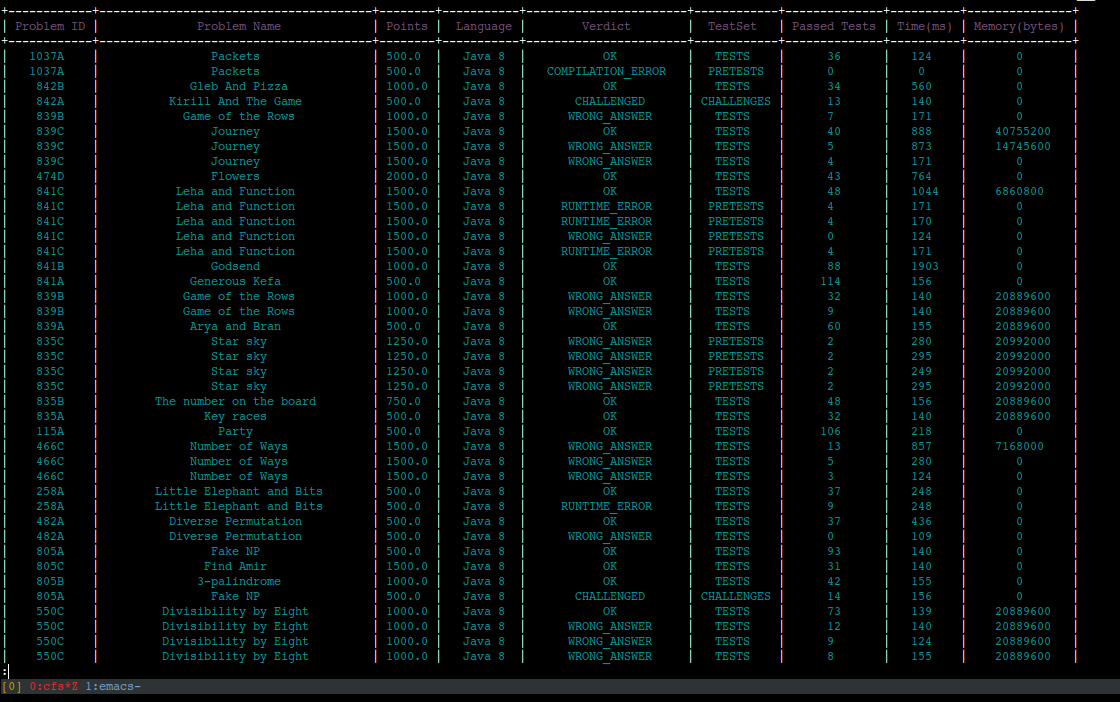
Here too you can specify fr and count arguments to see submissions. And it works similar to user submissions.

\n\n ```bash\n# Display 100 submissions from index 50\ncfs -cs 1137 --fr 50 --count 100\n```\n\n

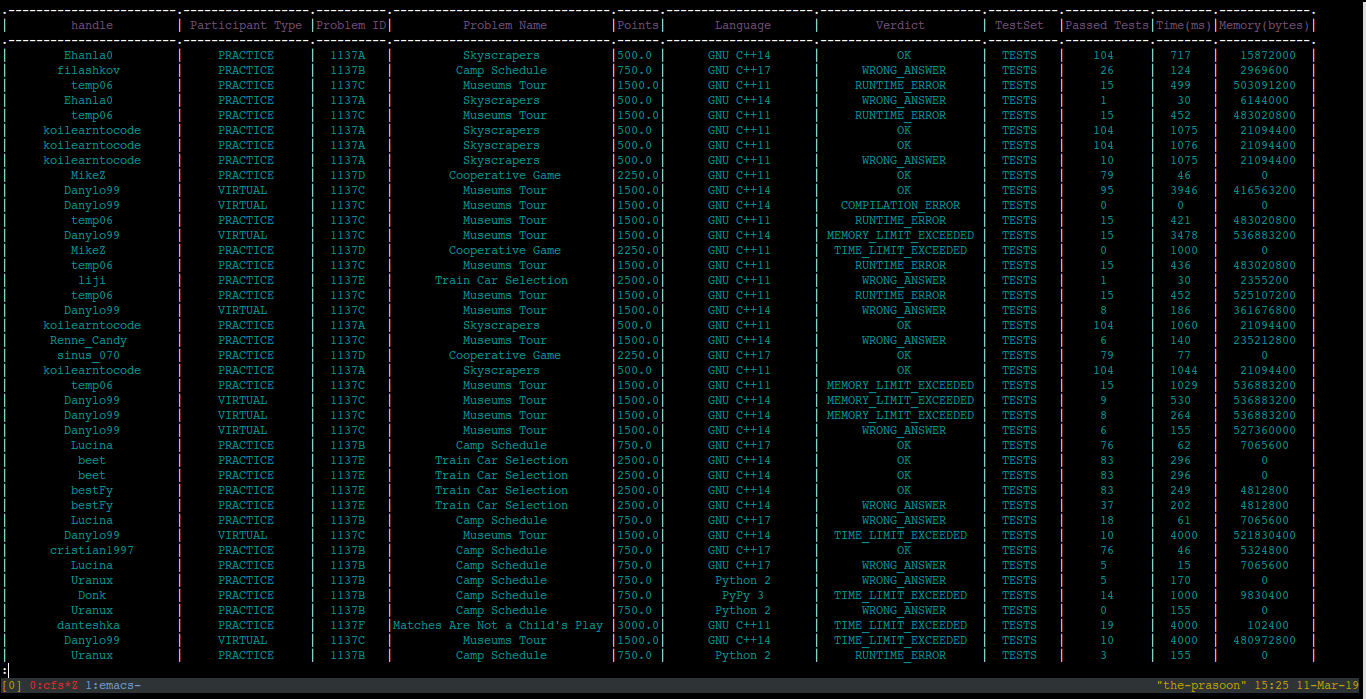
Another optional parameter to specify here is: handle which retrieves submissions only by the user specified.

\n\n ```bash\n# Display 10 submissions for user Petr from index 3 in contest 556\ncfs -cs 556 --fr 3 --count 10 --handle Petr\n```\n\n![](https://raw.githubusercontent.com/prasoonbatham11/cfcli/master/images/submissions_contest.png)\n\n### Compare Two Users\n\n ```bash\ncfs --compare prasoonbatham Petr\n```\n\n![](https://raw.githubusercontent.com/prasoonbatham11/cfcli/master/images/compare.png)\n\n
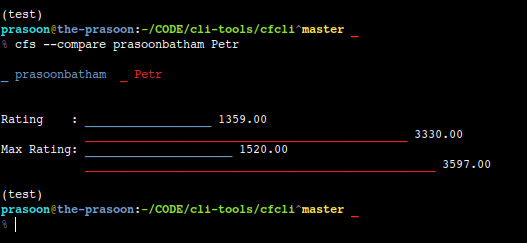
Seriously who am I comparing myself to!

\n\n## TODO\n\n- [ ] Add Command for submitting a solution.\n- [ ] Improve rendering of problem statement.\n- [ ] Add proxy support.\n- [ ] Add command to recommend problems\n\n## Contribute\n\n", "description_content_type": "text/markdown", "docs_url": null, "download_url": "", "downloads": { "last_day": -1, "last_month": -1, "last_week": -1 }, "home_page": "https://github.com/prasoonbatham11/cfcli", "keywords": "Codeforces,cli,command line,terminal", "license": "MIT", "maintainer": "", "maintainer_email": "", "name": "cfs", "package_url": "https://pypi.org/project/cfs/", "platform": "", "project_url": "https://pypi.org/project/cfs/", "project_urls": { "Homepage": "https://github.com/prasoonbatham11/cfcli" }, "release_url": "https://pypi.org/project/cfs/1.0.5/", "requires_dist": null, "requires_python": ">=3.6", "summary": "Codeforces cli for lazy nerds who don't want to leave their cozy terminals.", "version": "1.0.5" }, "last_serial": 5505896, "releases": { "1.0.0": [ { "comment_text": "", "digests": { "md5": "2e3e4910bf8d2d32803fb7693ae9511d", "sha256": "08aa80c5ae7e7c7b6f02f96d6d0fbe97029778356bf10b65f1f806926fe11d0a" }, "downloads": -1, "filename": "cfs-1.0.0.tar.gz", "has_sig": false, "md5_digest": "2e3e4910bf8d2d32803fb7693ae9511d", "packagetype": "sdist", "python_version": "source", "requires_python": ">=3.6", "size": 668827, "upload_time": "2019-03-11T10:06:37", "url": "https://files.pythonhosted.org/packages/26/5a/858f293d1e5b4baa30024a5c644f0a0d35f51d349ef39f096150228fb664/cfs-1.0.0.tar.gz" } ], "1.0.1": [ { "comment_text": "", "digests": { "md5": "eeb08dceb188916a94cf1092bd6085a9", "sha256": "34cc121d7d650bb713637709dd64ecddb34f8601b509a25229a81689d500f123" }, "downloads": -1, "filename": "cfs-1.0.1.tar.gz", "has_sig": false, "md5_digest": "eeb08dceb188916a94cf1092bd6085a9", "packagetype": "sdist", "python_version": "source", "requires_python": ">=3.6", "size": 668862, "upload_time": "2019-03-11T10:30:50", "url": "https://files.pythonhosted.org/packages/d5/f4/bbe1b3f72a03c6e2ad5d7b11b23d3f4d5d873f9bf9df446455dae84a239f/cfs-1.0.1.tar.gz" } ], "1.0.2": [ { "comment_text": "", "digests": { "md5": "5ed6ad00ed8631885633ec4086045b9e", "sha256": "8385b8d1cbb039f67a89f6864f5ef0a636a33e5166792fef3d26cd9f5eb8463d" }, "downloads": -1, "filename": "cfs-1.0.2.tar.gz", "has_sig": false, "md5_digest": "5ed6ad00ed8631885633ec4086045b9e", "packagetype": "sdist", "python_version": "source", "requires_python": ">=3.6", "size": 668920, "upload_time": "2019-03-11T10:52:14", "url": "https://files.pythonhosted.org/packages/19/b6/41494dab659757f925a0de86dd9a5a852cd62787e32045df871d0ba684d7/cfs-1.0.2.tar.gz" } ], "1.0.3": [ { "comment_text": "", "digests": { "md5": "e1769c234698184209caff2cb4a54c78", "sha256": "eb2a6eeb0db6b78cf739d35b70884c5e26bc127526f935d11f881448efb3baff" }, "downloads": -1, "filename": "cfs-1.0.3.tar.gz", "has_sig": false, "md5_digest": "e1769c234698184209caff2cb4a54c78", "packagetype": "sdist", "python_version": "source", "requires_python": ">=3.6", "size": 668942, "upload_time": "2019-03-12T17:10:26", "url": "https://files.pythonhosted.org/packages/53/e1/94ebb2084b5a0d9963145469996ded202195648657774ee8dda88bc6cd56/cfs-1.0.3.tar.gz" } ], "1.0.4": [ { "comment_text": "", "digests": { "md5": "c6eafb1d521dc31c90502ffcd1a2e5e1", "sha256": "a225464ec0263680c2ff1d339477f07e1548b3bc81888744c391cee90e3a398c" }, "downloads": -1, "filename": "cfs-1.0.4-py3.7.egg", "has_sig": false, "md5_digest": "c6eafb1d521dc31c90502ffcd1a2e5e1", "packagetype": "bdist_egg", "python_version": "3.7", "requires_python": ">=3.6", "size": 35067, "upload_time": "2019-07-09T09:40:52", "url": "https://files.pythonhosted.org/packages/99/41/762a7b093ba2ead56c63f5b4b3b4513b0692ac7cc4b119f8ae8d32545ad8/cfs-1.0.4-py3.7.egg" }, { "comment_text": "", "digests": { "md5": "270d8229780ac15a4fe44f299a8505fb", "sha256": "6c6fe39d6a3a175f93f0f351a97ec1b23c5bc679dbce5016e225f26057a20cca" }, "downloads": -1, "filename": "cfs-1.0.4.tar.gz", "has_sig": false, "md5_digest": "270d8229780ac15a4fe44f299a8505fb", "packagetype": "sdist", "python_version": "source", "requires_python": ">=3.6", "size": 669001, "upload_time": "2019-03-15T03:31:51", "url": "https://files.pythonhosted.org/packages/ab/5c/67625920610d98815c2b4835cf6d4e8b68e46f27755ee5e60c50c7e6184a/cfs-1.0.4.tar.gz" } ], "1.0.5": [ { "comment_text": "", "digests": { "md5": "915496059eb3830a809e47170e7c0020", "sha256": "2ab74ca3556d5a1885b43ca0b7076f8cb58fe24afe4b307867c7743d901c7234" }, "downloads": -1, "filename": "cfs-1.0.5-py3.7.egg", "has_sig": false, "md5_digest": "915496059eb3830a809e47170e7c0020", "packagetype": "bdist_egg", "python_version": "3.7", "requires_python": ">=3.6", "size": 35067, "upload_time": "2019-07-09T09:40:54", "url": "https://files.pythonhosted.org/packages/58/39/c101533df078edf0232074d04bccfbeb0f3fa7a68376aaf75c75145aadd3/cfs-1.0.5-py3.7.egg" } ] }, "urls": [ { "comment_text": "", "digests": { "md5": "915496059eb3830a809e47170e7c0020", "sha256": "2ab74ca3556d5a1885b43ca0b7076f8cb58fe24afe4b307867c7743d901c7234" }, "downloads": -1, "filename": "cfs-1.0.5-py3.7.egg", "has_sig": false, "md5_digest": "915496059eb3830a809e47170e7c0020", "packagetype": "bdist_egg", "python_version": "3.7", "requires_python": ">=3.6", "size": 35067, "upload_time": "2019-07-09T09:40:54", "url": "https://files.pythonhosted.org/packages/58/39/c101533df078edf0232074d04bccfbeb0f3fa7a68376aaf75c75145aadd3/cfs-1.0.5-py3.7.egg" } ] }